cancel
Showing results for 
Search instead for 
Did you mean: 

Level up your Power BI skills this month - build one visual each week and tell better stories with data! Get started

Reply
Anonymous
Not applicable

Remove unwanted rows

Hi,


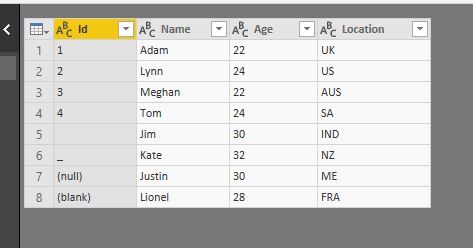
I have created a sample data in which column Id has values like underscore (_), (null), (blank) etc. (refer rows 5 to 8 in attached file).


I understand there is an option "Remove Empty" which removes blank rows. In this case, row no. 5 will be removed. To remove the other unwanted rows, I will have to replace each of those values with a blank row and then use above option.


But when I select the column Id and navigate to Remove Rows -> Remove Blank Rows, none of the rows are removed.

How does the Remove Blank Rows option work?


Please explain using this same example and sample data. 


Unwanetd Values - Power Query.JPG


Thanks,

Vishy

2 ACCEPTED SOLUTIONS
Baskar
Resident Rockstar
Resident Rockstar

@Anonymous


Add those two lines in your Power Query. 


Remove Non Numerics.PNG

Text1 = Table.SelectRows( Text, each [ID] = Text.Select([ID],{"a".."z","A".."Z","0".."9"} ) ),
#"Filtered Rows" = Table.SelectRows(Text1, each [ID] <> "")


After.PNGBefore.PNG

View solution in original post

Greg_Deckler
Community Champion
Community Champion

You should be able to click on the drop down arrow of a colum and remove values that you do not want (uncheck) and those rows should get filtered out.


Follow on LinkedIn
@ me in replies or I'll lose your thread!!!
Instead of a Kudo, please vote for this idea
Become an expert!: Enterprise DNA
External Tools: MSHGQM
YouTube Channel!: Microsoft Hates Greg
Latest book!:
DAX For Humans

DAX is easy, CALCULATE makes DAX hard...

View solution in original post

2 REPLIES 2
Greg_Deckler
Community Champion
Community Champion

You should be able to click on the drop down arrow of a colum and remove values that you do not want (uncheck) and those rows should get filtered out.


Follow on LinkedIn
@ me in replies or I'll lose your thread!!!
Instead of a Kudo, please vote for this idea
Become an expert!: Enterprise DNA
External Tools: MSHGQM
YouTube Channel!: Microsoft Hates Greg
Latest book!:
DAX For Humans

DAX is easy, CALCULATE makes DAX hard...
Baskar
Resident Rockstar
Resident Rockstar

@Anonymous


Add those two lines in your Power Query. 


Remove Non Numerics.PNG

Text1 = Table.SelectRows( Text, each [ID] = Text.Select([ID],{"a".."z","A".."Z","0".."9"} ) ),
#"Filtered Rows" = Table.SelectRows(Text1, each [ID] <> "")


After.PNGBefore.PNG

Helpful resources

Announcements
April Power BI Update Carousel

Power BI Monthly Update - April 2026

Check out the April 2026 Power BI update to learn about new features.

Fabric SQL PBI Data Days

Data Days 2026 coming soon!

Sign up to receive a private message when registration opens and key events begin.

New to Fabric survey Carousel

New to Fabric Survey

If you have recently started exploring Fabric, we'd love to hear how it's going. Your feedback can help with product improvements.

Power BI DataViz World Championships carousel

Power BI DataViz World Championships - June 2026

A new Power BI DataViz World Championship is coming this June! Don't miss out on submitting your entry.