Join us at FabCon Atlanta from March 16 - 20, 2026, for the ultimate Fabric, Power BI, AI and SQL community-led event. Save $200 with code FABCOMM.
Register now!The Power BI Data Visualization World Championships is back! Get ahead of the game and start preparing now! Learn more
Hi,
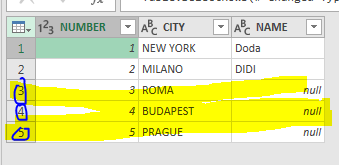
If I want to remove rows (3,4,5) - all the rows automatically that have no value (null) in specific column (name)
How can I do it?
The reason that I don't want that my excel workbook will bring data that I will not use and will calculate it when file will be refreshed
Solved! Go to Solution.
If you filter it in Power Query, the query will be optimized to exclude those rows and not import them.
Use the drop down in Name and just filter out the null's by unchecking it.
Cross posted: https://social.technet.microsoft.com/Forums/en-US/2d68a4e4-f4d6-4280-b7d1-5630703008c2/remove-rows-i...
If I filter the data like you said
I still don't want that my excel workbook will bring data that I will not use and will calculate it when file will be refreshed
If you filter it in Power Query, the query will be optimized to exclude those rows and not import them.
The Power BI Data Visualization World Championships is back! Get ahead of the game and start preparing now!
| User | Count |
|---|---|
| 145 | |
| 125 | |
| 107 | |
| 79 | |
| 54 |