This is best Fabric, Power BI, SQL and AI community event. How do we know? The last event sold out! Save €200 with code FABCMTY200.
Register nowA new Data Days event is coming soon! This time we’re going bigger than ever. Fabric, Power BI, SQL, AI and more. Don't miss out.
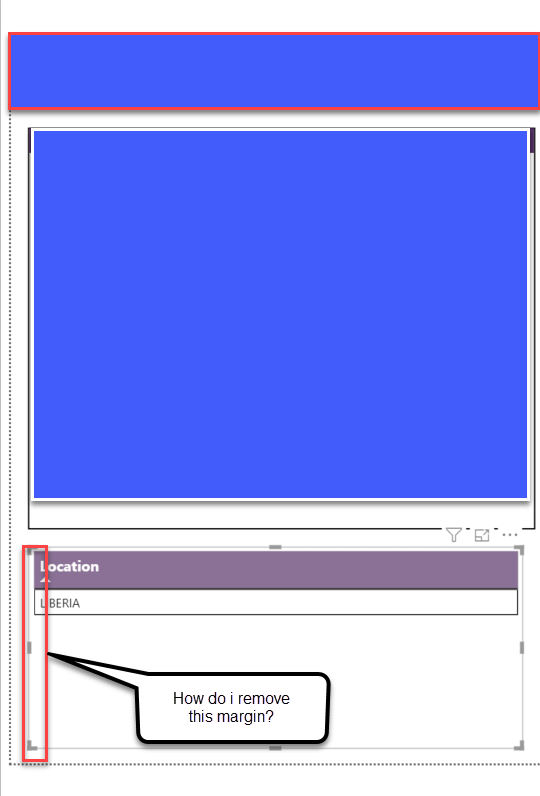
Hi all - i have a simple table visual but am unable to figure out how to do a simple thing after much searching. On a table visual, there are some pre-set margins between the table and the actual edge of the table "object". I want to remove those so that the borders of the table ARE actually the ends of the table itself.
With the issue of having these small margins, i am unable to align my table with another pie chart element above it. Is there any way to do this in Power BI? Maybe it is a setting somewhere basic that i have not seen.
Have attached a screenshot here to explain the issue. Please let me know if you know a solution for this.
Solved! Go to Solution.
@Anonymous ,
I'm afraid currently there's no such option which can let us change the margin of a table visual. I would suggest you create an idea here to help power bi improve.
Regards,
Jimmy Tao
Hi,
The simplest solution is: Go to format visualization, general, properties, and padding. make the padding '0px' and you are good.
@Anonymous ,
I'm afraid currently there's no such option which can let us change the margin of a table visual. I would suggest you create an idea here to help power bi improve.
Regards,
Jimmy Tao
Sign up to receive a private message when registration opens and key events begin.
If you have recently started exploring Fabric, we'd love to hear how it's going. Your feedback can help with product improvements.
| User | Count |
|---|---|
| 32 | |
| 26 | |
| 23 | |
| 20 | |
| 15 |
| User | Count |
|---|---|
| 64 | |
| 41 | |
| 28 | |
| 22 | |
| 22 |