cancel
Showing results for 
Search instead for 
Did you mean: 

We've captured the moments from FabCon & SQLCon that everyone is talking about, and we are bringing them to the community, live and on-demand. Starts on April 14th. Register now

Reply
romovaro
Responsive Resident
Responsive Resident

Remove duplicates rows

Hello


I have a question regarding duplicates rows.


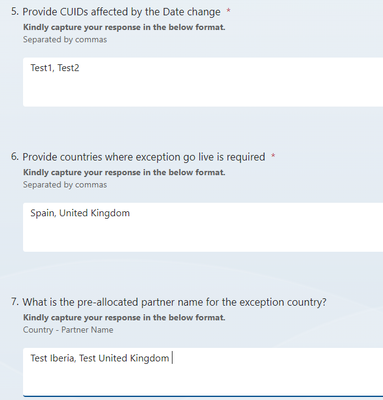
I created a Microsoft Form that goes to a Sharepoint list. Some of the answers (3) can have different answers separated by commas.


romovaro_1-1689771767578.png


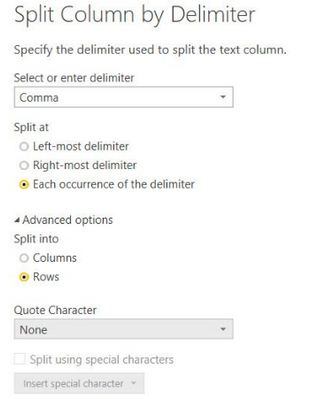
Once in powerBI, I use the query editor to split the answers using comma as the delimiter.

romovaro_2-1689771793480.png


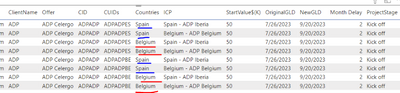
the problem is that by doing this 3 times, I end up with triplicate rows. (one row extra for each split)

Any idea how to keep only one row and remove the other duplicates?


romovaro_0-1689771570074.png


thanks


@jgeddes 

2 ACCEPTED SOLUTIONS
MFelix
Super User
Super User

Hi @romovaro ,


If you want to show the several answers separated you will always get duplicated or triplicated rows, in this case believe that the best option is to have a dimension table for your main data for the form with Id, date and so and then create a fact table with your answers that have duplicates, triplicates and so on.


Then making use of the relational model you can have all your calculations done.


Regards

Miguel Félix


Did I answer your question? Mark my post as a solution!

Proud to be a Super User!

Check out my blog: Power BI em Português


View solution in original post

romovaro
Responsive Resident
Responsive Resident

Hi MFelix Thanks for your suggestion. At the end I found a solution in Power Query to split Multiple columns into Rows ALL at once by creating custom columns using the Text.Split formula + creating Table.From Columns and Expand.)

View solution in original post

2 REPLIES 2
MFelix
Super User
Super User

Hi @romovaro ,


If you want to show the several answers separated you will always get duplicated or triplicated rows, in this case believe that the best option is to have a dimension table for your main data for the form with Id, date and so and then create a fact table with your answers that have duplicates, triplicates and so on.


Then making use of the relational model you can have all your calculations done.


Regards

Miguel Félix


Did I answer your question? Mark my post as a solution!

Proud to be a Super User!

Check out my blog: Power BI em Português


romovaro
Responsive Resident
Responsive Resident

Hi MFelix Thanks for your suggestion. At the end I found a solution in Power Query to split Multiple columns into Rows ALL at once by creating custom columns using the Text.Split formula + creating Table.From Columns and Expand.)

Helpful resources

Announcements
New to Fabric survey Carousel

New to Fabric Survey

If you have recently started exploring Fabric, we'd love to hear how it's going. Your feedback can help with product improvements.

Power BI DataViz World Championships carousel

Power BI DataViz World Championships - June 2026

A new Power BI DataViz World Championship is coming this June! Don't miss out on submitting your entry.

Join our Fabric User Panel

Join our Fabric User Panel

Share feedback directly with Fabric product managers, participate in targeted research studies and influence the Fabric roadmap.

March Power BI Update Carousel

Power BI Community Update - March 2026

Check out the March 2026 Power BI update to learn about new features.