
Don't miss your chance to take the Fabric Data Engineer (DP-600) exam for FREE! Find out how by attending the DP-600 session on April 23rd (pacific time), live or on-demand.
Learn moreJoin the FabCon + SQLCon recap series. Up next: Power BI, Real-Time Intelligence, IQ and AI, and Data Factory take center stage. All sessions are available on-demand after the live show. Register now
Hi,
My question is quite simple I guess:
Revenus by month for 2 products (Product A ans product B) starting from 2015 till 2018. However, there is no data (= Blank) for 2016 and 2017 (not zero 0 BUT blanks).
I'm trying to create a measure that will summarize revenues by product for each year but will show on a chart ONLY the years or month that I have data for while ignoring all the others.
So basically I want to show on a chart only 2015 and 2018 without doing any cherry pick using the visual level filter functionality.
I was trying all kinds of functions in my measure "IF BLANK / ISBLANK / NOT ISBLANK" etc. with no much success. it keeps showing 2015, 2016, 2017 and 2018 where 2016 and 2017 are showing blank.
Thasnk!
NH
Solved! Go to Solution.
Hi @NirH_at_BITeam,
Yes. As we can only drag column field to the Axis bucket of the chart visual, we need to modify table to filter out Axis values which has blank data.
Best Regards,
Qiuyun Yu
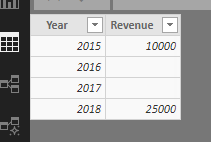
Assume the sample raw data like below:
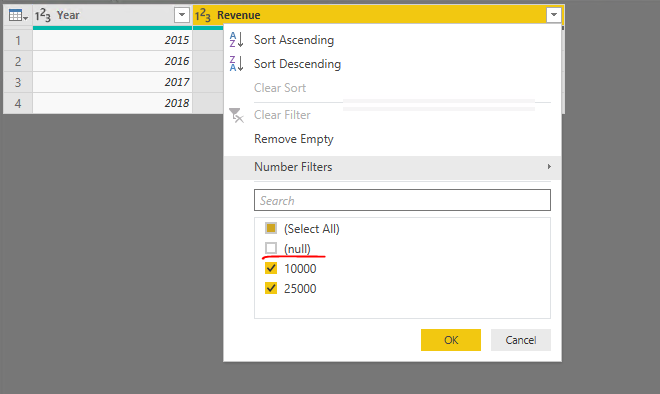
We can go to Query Editor and remove the blanks for the table:
Or we can create a new table via DAX then use this table data in a chart visual:
Best Regards,
Qiuyun Yu
Thanks and you were right my data does look like your table.
So basically there is no simple DAX to resolve this either to handle it in the source/load system (Power Query), or creating the table... is that correct?
NH
Hi @NirH_at_BITeam,
Yes. As we can only drag column field to the Axis bucket of the chart visual, we need to modify table to filter out Axis values which has blank data.
Best Regards,
Qiuyun Yu
Check out the April 2026 Power BI update to learn about new features.
If you have recently started exploring Fabric, we'd love to hear how it's going. Your feedback can help with product improvements.
A new Power BI DataViz World Championship is coming this June! Don't miss out on submitting your entry.
| User | Count |
|---|---|
| 48 | |
| 40 | |
| 37 | |
| 20 | |
| 16 |
| User | Count |
|---|---|
| 69 | |
| 67 | |
| 32 | |
| 27 | |
| 26 |