Don't miss your chance to take exam DP-600 or DP-700 on us!
Request nowLearn from the best! Meet the four finalists headed to the FINALS of the Power BI Dataviz World Championships! Register now
Hey,
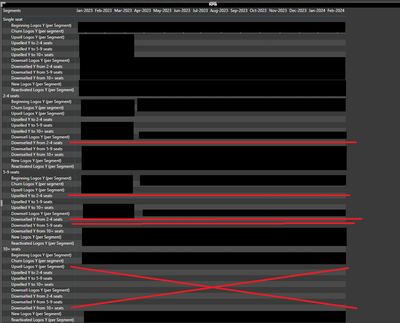
I have the following table:
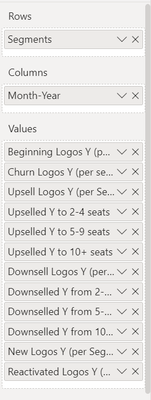
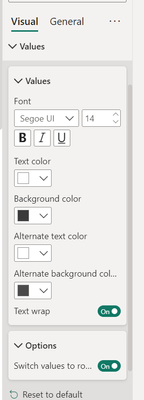
Where "Single seat", "2-4 seats", "5-9 seats" and "10+ seats" is a Segment column added in Rows, the month-year added as a Column and all the others are Measures values, which are switched to be visualized in rows instead of columns.
My question is the following - how can I remove the rows with no values? For example:
Measure Upselled Y (per Segment) to 5-9 seats we need to keep under Single Seat Segment and 2-4 Seats Segment, but remove from 5-9 Seats Segment and 10+ Seats Segments sections.
Thanks!
Solved! Go to Solution.
Hi @ninast_
After testing, it cannot remove the blank value, because when you close the 'swotch value to rows', you will find that The [Upselled Y (per Segment) to 5-9 seats] measure has no value in the '5-9' and '10+' groups, but it has a value in other groups, and they are in the same column, so they can't be removed.
If you want to remove the blank value, you need to consider to create a new table called MeasureType then put them to the row under the segment in the matrix
e.g
2.Create a measure
Measure_type =
SWITCH (
SELECTEDVALUE ( 'MeasureType'[MeasureID] ),
1, [Beginning Logos Y],
2, [Churn Logos Y],
3, [Upsell Logos Y]
)
3.Crete a new measure
Final_measure =
SUMX ( VALUES ( 'MeasureType'[MeasureNames] ), [Measure_type] )
Then put the final_measure to the value field of the matrix visual.
Best Regards!
Yolo Zhu
If this post helps, then please consider Accept it as the solution to help the other members find it more quickly.
Hi @ninast_
After testing, it cannot remove the blank value, because when you close the 'swotch value to rows', you will find that The [Upselled Y (per Segment) to 5-9 seats] measure has no value in the '5-9' and '10+' groups, but it has a value in other groups, and they are in the same column, so they can't be removed.
If you want to remove the blank value, you need to consider to create a new table called MeasureType then put them to the row under the segment in the matrix
e.g
2.Create a measure
Measure_type =
SWITCH (
SELECTEDVALUE ( 'MeasureType'[MeasureID] ),
1, [Beginning Logos Y],
2, [Churn Logos Y],
3, [Upsell Logos Y]
)
3.Crete a new measure
Final_measure =
SUMX ( VALUES ( 'MeasureType'[MeasureNames] ), [Measure_type] )
Then put the final_measure to the value field of the matrix visual.
Best Regards!
Yolo Zhu
If this post helps, then please consider Accept it as the solution to help the other members find it more quickly.
Thanks! It worked even without the final measure 🙂
Share feedback directly with Fabric product managers, participate in targeted research studies and influence the Fabric roadmap.
Check out the February 2026 Power BI update to learn about new features.
| User | Count |
|---|---|
| 54 | |
| 47 | |
| 39 | |
| 16 | |
| 15 |
| User | Count |
|---|---|
| 83 | |
| 70 | |
| 38 | |
| 28 | |
| 27 |