cancel
Showing results for 
Search instead for 
Did you mean: 

A new Data Days event is coming soon! This time we’re going bigger than ever. Fabric, Power BI, SQL, AI and more. Don't miss out.

Reply
stack23
Advocate II
Advocate II

Remove Summation on Power BI SQL Server Column

How do I remove a summation property for a Power BI SQL table? I have a Customer Transaction Table. For some reason PowerBI is trying to Measure Sum the CustomerTransactionId primary key row. I do not want this added. Please see picture below.
I just want to display all rows in a table.


CREATE TABLE [dbo].[CustomerTransaction]
(
[Customertransactionid] [int] IDENTITY(1,1) primary key NOT NULL,
[Customerid] [int] NULL,
[Quantitybought] [int] NULL,
)


[1]: https://i.stack.imgur.com/qg0A1.png

1 ACCEPTED SOLUTION
TomMartens
Super User
Super User

Hey,


if you can change the default aggregation function used for numeric columns, this will work either in connections to SQL Server tables in "direct query" or "import" mode.


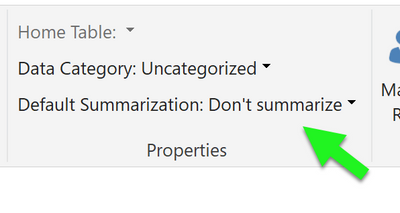
Mark the column and in the Modeling menu you can change the "Default summerization" for the column to: Don't summarize

image.png

Please be aware that is a limit of 1 MIllion rows that can be returned by a query utilizing a connection in "Direct query" mode.

Maybe you might consider to change the summerization to "Count".


Regards,

Tom


Did I answer your question? Mark my post as a solution, this will help others!

Proud to be a Super User!
I accept Kudos 😉
Hamburg, Germany

View solution in original post

2 REPLIES 2
TomMartens
Super User
Super User

Hey,


if you can change the default aggregation function used for numeric columns, this will work either in connections to SQL Server tables in "direct query" or "import" mode.


Mark the column and in the Modeling menu you can change the "Default summerization" for the column to: Don't summarize

image.png

Please be aware that is a limit of 1 MIllion rows that can be returned by a query utilizing a connection in "Direct query" mode.

Maybe you might consider to change the summerization to "Count".


Regards,

Tom


Did I answer your question? Mark my post as a solution, this will help others!

Proud to be a Super User!
I accept Kudos 😉
Hamburg, Germany
Greg_Deckler
Community Champion
Community Champion

In the Values area, click the drop down next to the column in question. Choose "Do not summarize". Or you can change th default aggregation method in the model.


Follow on LinkedIn
@ me in replies or I'll lose your thread!!!
Instead of a Kudo, please vote for this idea
Become an expert!: Enterprise DNA
External Tools: MSHGQM
YouTube Channel!: Microsoft Hates Greg
Latest book!:
DAX For Humans

DAX is easy, CALCULATE makes DAX hard...

Helpful resources

Announcements
May Power BI Update Carousel

Power BI Monthly Update - May 2026

Check out the May 2026 Power BI update to learn about new features.

Fabric SQL PBI Data Days

Data Days 2026 coming soon!

Sign up to receive a private message when registration opens and key events begin.

New to Fabric survey Carousel

New to Fabric Survey

If you have recently started exploring Fabric, we'd love to hear how it's going. Your feedback can help with product improvements.

Power BI DataViz World Championships carousel

Power BI DataViz World Championships - June 2026

A new Power BI DataViz World Championship is coming this June! Don't miss out on submitting your entry.