Join us at FabCon Atlanta from March 16 - 20, 2026, for the ultimate Fabric, Power BI, AI and SQL community-led event. Save $200 with code FABCOMM.
Register now!The Power BI Data Visualization World Championships is back! It's time to submit your entry. Live now!
Hi, I have bar charts that have scroll bars down the right hand side.... Is there a way to remove these so that the graph shows all the data?
Some other charts I have don't have the scroll bars, but I can't see why the difference.
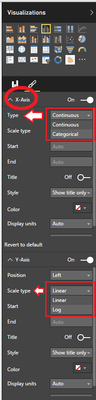
I searched for the answer and saw something about changing the axis type from categorical to continuous, but I don't have those choices in my axis options - it only allows the scale type to be log of linear.
Thanks,
Hi @TMQ,
are you searching this?
It's strange that this option in the X-Axis isn't visible. What type of datas do you have in this axis?
#I'M Not An Expert#
One way is to eliminate (i.e., turn off) the axis.
The Power BI Data Visualization World Championships is back! It's time to submit your entry.
Check out the January 2026 Power BI update to learn about new features.
| User | Count |
|---|---|
| 61 | |
| 49 | |
| 30 | |
| 25 | |
| 23 |
| User | Count |
|---|---|
| 129 | |
| 105 | |
| 56 | |
| 39 | |
| 32 |