cancel
Showing results for 
Search instead for 
Did you mean: 

July 7 - July 17 | Round 2 of the Power BI Dataviz World Championships. Don't miss your chance! Learn more

Reply
swwong1
Helper III
Helper III

Remove Null Values by Moving Values

Hi All,


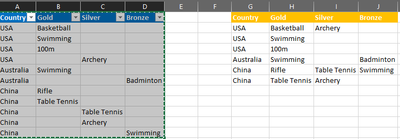
Below in blue is the existing structure I have (after doing certain transformations). I would like to move the values 'upwards' if the above rows are null values (please refer to table on the right). 


I have seen a similar solution on this forum but the number of rows isn't fixed here - one country can have 10 rows, another only 5 rows. There is a similar solution on Stackflow but I am not sure where to input/how to use it on PowerQuery within PBI.


For easier reference, I have provided a sample in Excel.


https://www.dropbox.com/s/cj4ekr0xjbvcjlp/OlympicsData.xlsx?dl=0 


Many thanks!


swwong1_0-1627472893483.png


1 ACCEPTED SOLUTION
Anonymous
Not applicable

Hi @swwong1 ,

The solution in above thread can't get your desired result base on my testing. Please copy and paste the below applied codes in your Advanced Editor and check whether it can be used as a workaround... You can find the details in the attachment.

let
    Source = Table.FromRows(Json.Document(Binary.Decompress(Binary.FromText("i45WCg12VNJRckoszk4tSUrMyQFyQChWByYVXJ6Zm5uZl44hYWhgkIshCESORckZqUWVMHHH0uKSosSczETsZiFLQ5BTYgpQTUl+HljeOSMzDyQXlJmWk4qkDyYekpiUk6oQkpqXl1mMRRqLCjRpNOciySA7ODYWAA==", BinaryEncoding.Base64), Compression.Deflate)), let _t = ((type nullable text) meta [Serialized.Text = true]) in type table [Country = _t, Gold = _t, Silver = _t, Bronze = _t]),
    #"Changed Type" = Table.TransformColumnTypes(Source,{{"Country", type text}, {"Gold", type text}, {"Silver", type text}, {"Bronze", type text}}),
    #"Unpivoted Only Selected Columns" = Table.Unpivot(#"Changed Type", {"Gold", "Silver", "Bronze"}, "Attribute", "Value"),
    #"Filtered Rows" = Table.SelectRows(#"Unpivoted Only Selected Columns", each ([Value] <> "")),
    #"Grouped Rows" = Table.Group(#"Filtered Rows", {"Country","Attribute"}, {{"Value", each Text.Combine([Value],"; "), type text}}),
    #"Pivoted Column" = Table.Pivot(#"Grouped Rows", List.Distinct(#"Grouped Rows"[Attribute]), "Attribute", "Value")
in
    #"Pivoted Column"
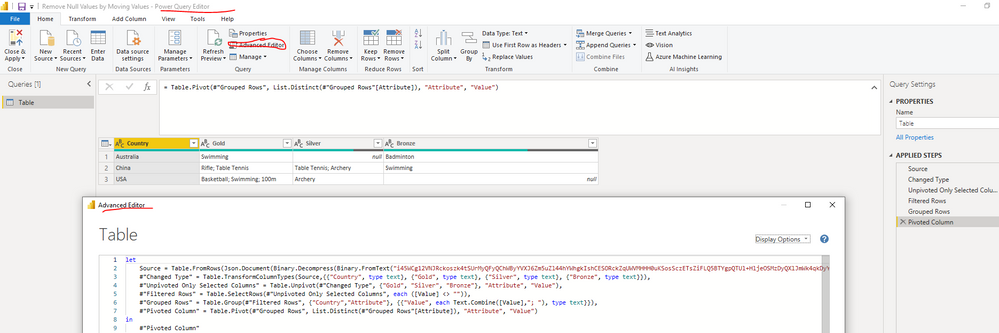
yingyinr_0-1628063113156.png


Best Regards

View solution in original post

3 REPLIES 3
amitchandak
Super User
Super User

@swwong1 . this should be best correct at source.

Let us check if this can done in M.


@ImkeF , can you help with this.

Share with Power BI Enthusiasts: Full Power BI Video (20 Hours) YouTube
Microsoft Fabric Series 60+ Videos YouTube
Microsoft Fabric Hindi End to End YouTube

@amitchandak, many thanks for looking into it.


The below is the StackOverflow link which provides the solution I require but I am not sure where to put this code in PQ/PBI.


https://stackoverflow.com/questions/64802547/move-up-values-when-null-power-query

Anonymous
Not applicable

Hi @swwong1 ,

The solution in above thread can't get your desired result base on my testing. Please copy and paste the below applied codes in your Advanced Editor and check whether it can be used as a workaround... You can find the details in the attachment.

let
    Source = Table.FromRows(Json.Document(Binary.Decompress(Binary.FromText("i45WCg12VNJRckoszk4tSUrMyQFyQChWByYVXJ6Zm5uZl44hYWhgkIshCESORckZqUWVMHHH0uKSosSczETsZiFLQ5BTYgpQTUl+HljeOSMzDyQXlJmWk4qkDyYekpiUk6oQkpqXl1mMRRqLCjRpNOciySA7ODYWAA==", BinaryEncoding.Base64), Compression.Deflate)), let _t = ((type nullable text) meta [Serialized.Text = true]) in type table [Country = _t, Gold = _t, Silver = _t, Bronze = _t]),
    #"Changed Type" = Table.TransformColumnTypes(Source,{{"Country", type text}, {"Gold", type text}, {"Silver", type text}, {"Bronze", type text}}),
    #"Unpivoted Only Selected Columns" = Table.Unpivot(#"Changed Type", {"Gold", "Silver", "Bronze"}, "Attribute", "Value"),
    #"Filtered Rows" = Table.SelectRows(#"Unpivoted Only Selected Columns", each ([Value] <> "")),
    #"Grouped Rows" = Table.Group(#"Filtered Rows", {"Country","Attribute"}, {{"Value", each Text.Combine([Value],"; "), type text}}),
    #"Pivoted Column" = Table.Pivot(#"Grouped Rows", List.Distinct(#"Grouped Rows"[Attribute]), "Attribute", "Value")
in
    #"Pivoted Column"

yingyinr_0-1628063113156.png


Best Regards

Helpful resources

Announcements
FabCon and SQLCon Barcelona 2026

FabCon & SQLCon – Barcelona 2026

Join us in Barcelona for FabCon and SQLCon, the Fabric, Power BI, SQL, and AI community event. Save €200 with code FABCMTY200.

60 days of Data Days Carousel

Data Days 2026

Join Data Days 2026: 60 days of free live/on-demand sessions, challenges, study groups, and certification opportunities.

Power BI DataViz World Championships carousel

Power BI DataViz World Championships - June 2026

A new Power BI DataViz World Championship is coming this June! Don't miss out on submitting your entry.

Top Solution Authors