Don't miss your chance to take the Fabric Data Engineer (DP-600) exam for FREE! Find out how by attending the DP-600 session on April 23rd (pacific time), live or on-demand.
Learn moreNext up in the FabCon + SQLCon recap series: The roadmap for Microsoft SQL and Maximizing Developer experiences in Fabric. All sessions are available on-demand after the live show. Register now
Hi All,
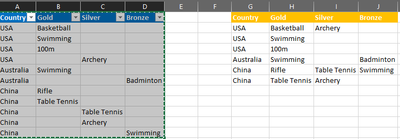
Below in blue is the existing structure I have (after doing certain transformations). I would like to move the values 'upwards' if the above rows are null values (please refer to table on the right).
I have seen a similar solution on this forum but the number of rows isn't fixed here - one country can have 10 rows, another only 5 rows. There is a similar solution on Stackflow but I am not sure where to input/how to use it on PowerQuery within PBI.
For easier reference, I have provided a sample in Excel.
https://www.dropbox.com/s/cj4ekr0xjbvcjlp/OlympicsData.xlsx?dl=0
Many thanks!
Solved! Go to Solution.
Hi @swwong1 ,
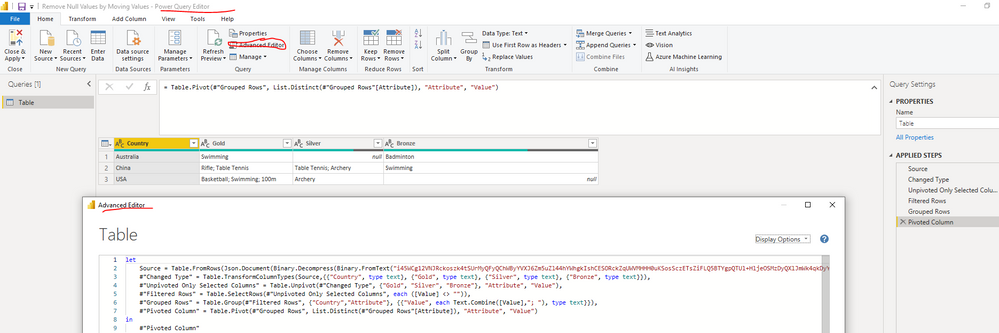
The solution in above thread can't get your desired result base on my testing. Please copy and paste the below applied codes in your Advanced Editor and check whether it can be used as a workaround... You can find the details in the attachment.
let
Source = Table.FromRows(Json.Document(Binary.Decompress(Binary.FromText("i45WCg12VNJRckoszk4tSUrMyQFyQChWByYVXJ6Zm5uZl44hYWhgkIshCESORckZqUWVMHHH0uKSosSczETsZiFLQ5BTYgpQTUl+HljeOSMzDyQXlJmWk4qkDyYekpiUk6oQkpqXl1mMRRqLCjRpNOciySA7ODYWAA==", BinaryEncoding.Base64), Compression.Deflate)), let _t = ((type nullable text) meta [Serialized.Text = true]) in type table [Country = _t, Gold = _t, Silver = _t, Bronze = _t]),
#"Changed Type" = Table.TransformColumnTypes(Source,{{"Country", type text}, {"Gold", type text}, {"Silver", type text}, {"Bronze", type text}}),
#"Unpivoted Only Selected Columns" = Table.Unpivot(#"Changed Type", {"Gold", "Silver", "Bronze"}, "Attribute", "Value"),
#"Filtered Rows" = Table.SelectRows(#"Unpivoted Only Selected Columns", each ([Value] <> "")),
#"Grouped Rows" = Table.Group(#"Filtered Rows", {"Country","Attribute"}, {{"Value", each Text.Combine([Value],"; "), type text}}),
#"Pivoted Column" = Table.Pivot(#"Grouped Rows", List.Distinct(#"Grouped Rows"[Attribute]), "Attribute", "Value")
in
#"Pivoted Column"
Best Regards
@amitchandak, many thanks for looking into it.
The below is the StackOverflow link which provides the solution I require but I am not sure where to put this code in PQ/PBI.
https://stackoverflow.com/questions/64802547/move-up-values-when-null-power-query
Hi @swwong1 ,
The solution in above thread can't get your desired result base on my testing. Please copy and paste the below applied codes in your Advanced Editor and check whether it can be used as a workaround... You can find the details in the attachment.
let
Source = Table.FromRows(Json.Document(Binary.Decompress(Binary.FromText("i45WCg12VNJRckoszk4tSUrMyQFyQChWByYVXJ6Zm5uZl44hYWhgkIshCESORckZqUWVMHHH0uKSosSczETsZiFLQ5BTYgpQTUl+HljeOSMzDyQXlJmWk4qkDyYekpiUk6oQkpqXl1mMRRqLCjRpNOciySA7ODYWAA==", BinaryEncoding.Base64), Compression.Deflate)), let _t = ((type nullable text) meta [Serialized.Text = true]) in type table [Country = _t, Gold = _t, Silver = _t, Bronze = _t]),
#"Changed Type" = Table.TransformColumnTypes(Source,{{"Country", type text}, {"Gold", type text}, {"Silver", type text}, {"Bronze", type text}}),
#"Unpivoted Only Selected Columns" = Table.Unpivot(#"Changed Type", {"Gold", "Silver", "Bronze"}, "Attribute", "Value"),
#"Filtered Rows" = Table.SelectRows(#"Unpivoted Only Selected Columns", each ([Value] <> "")),
#"Grouped Rows" = Table.Group(#"Filtered Rows", {"Country","Attribute"}, {{"Value", each Text.Combine([Value],"; "), type text}}),
#"Pivoted Column" = Table.Pivot(#"Grouped Rows", List.Distinct(#"Grouped Rows"[Attribute]), "Attribute", "Value")
in
#"Pivoted Column"
Best Regards
If you have recently started exploring Fabric, we'd love to hear how it's going. Your feedback can help with product improvements.
A new Power BI DataViz World Championship is coming this June! Don't miss out on submitting your entry.
Share feedback directly with Fabric product managers, participate in targeted research studies and influence the Fabric roadmap.
| User | Count |
|---|---|
| 48 | |
| 43 | |
| 39 | |
| 19 | |
| 17 |
| User | Count |
|---|---|
| 68 | |
| 63 | |
| 31 | |
| 30 | |
| 23 |