Learn from the best! Meet the four finalists headed to the FINALS of the Power BI Dataviz World Championships! Register now
Hello!
I'm making a 100% stacked column chart. which is like this:
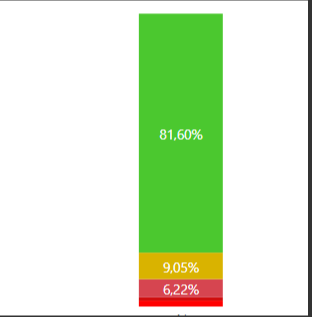
where the value field is given by the store count and legends are the state of the stores. Example: 81.6% do room count with stock, 9.05% count rooms with average stock, and so on. This chart serves me because it takes as the total all the room count that I have and performs the percentage of each of them. the problem arises when I use a filter and want to see only the low rooms:
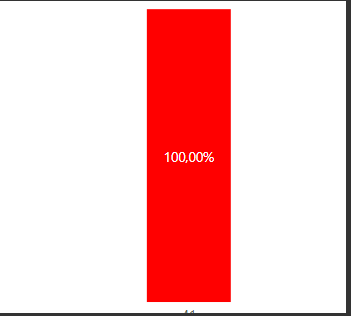
it's this way, it takes about 100% just the filtered rooms. I need you to show how much the low rooms weigh, but with respect to the total. (should appear there about 5%)
I tried doing this
Valor = DIVIDE(COUNTA(Base[Store Name]), CALCULATE(COUNTA(Base[Store Nbr]), ALL(Base)))
but the chart doesn't pull the right percentages
please help
@CLCastroEn ,Can you share sample data and sample output in table format? Or a sample pbix after removing sensitive data.
the first column is the store count, the second column is the % of the count (which is precisely what I need the chart not to remove from the filter), and the last column "Value" is the percentage that throws away the measure that I create :
Hi @CLCastroEn ,
How did you calcute the column2 to count stores? Bascially it should show the same result, please see the picture below and check my sample file.
Seems need more details about this issue for further discussion or you can consider sharing a sample file.
Best Regards,
Yingjie Li
If this post helps then please consider Accept it as the solution to help the other members find it more quickly.
| User | Count |
|---|---|
| 58 | |
| 45 | |
| 31 | |
| 17 | |
| 16 |
| User | Count |
|---|---|
| 73 | |
| 63 | |
| 44 | |
| 23 | |
| 22 |