cancel
Showing results for 
Search instead for 
Did you mean: 

The Power BI Data Visualization World Championships is back! Get ahead of the game and start preparing now! Learn more

Reply
Chitemerere
Responsive Resident
Responsive Resident

Remove Filters from DAX Measure

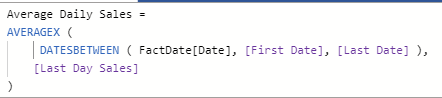
I have the following DAX measure:

RemoveFilters.PNG


The above measure is being inserted into a tool tip to give a constant value for the average daily sales between stated date periods and should be non-responsive to a date filter.  How can one make the above measure constant./removefilters so that it is not responsive to changes in dates?


Best regards,

Chris

1 ACCEPTED SOLUTION

Many thanks, i had to put the ALL filter in the calculation of the First Date and Last Date as follows:

First Date = Calculate(min(FactDate[Date]), ALL(FactDate[Date]))
Best regards,
Chris

View solution in original post

2 REPLIES 2
mahoneypat
Microsoft Employee
Microsoft Employee

You could replace [First Date] and [Last Date] with hard-coded dates like DATE(2020,1,1).  Or you could replace with

CALCULATE([First Date], ALL('Date'))


Regards,

Pat


Did I answer your question? Mark my post as a solution! Kudos are also appreciated!

To learn more about Power BI, follow me on Twitter or subscribe on YouTube.


@mahoneypa HoosierBI on YouTube


Many thanks, i had to put the ALL filter in the calculation of the First Date and Last Date as follows:

First Date = Calculate(min(FactDate[Date]), ALL(FactDate[Date]))
Best regards,
Chris

Helpful resources

Announcements
Power BI DataViz World Championships

Power BI Dataviz World Championships

The Power BI Data Visualization World Championships is back! Get ahead of the game and start preparing now!

December 2025 Power BI Update Carousel

Power BI Monthly Update - December 2025

Check out the December 2025 Power BI Holiday Recap!

FabCon Atlanta 2026 carousel

FabCon Atlanta 2026

Join us at FabCon Atlanta, March 16-20, for the ultimate Fabric, Power BI, AI and SQL community-led event. Save $200 with code FABCOMM.