cancel
Showing results for 
Search instead for 
Did you mean: 

We've captured the moments from FabCon & SQLCon that everyone is talking about, and we are bringing them to the community, live and on-demand. Starts on April 14th. Register now

Reply
Anonymous
Not applicable

Remove Duplicates - Row count

I know how to remove the duplicate rows in the Query Editor. Is there a way to know how many duplcates were present?


For example, in excel when we remove duplicates, it tells us "This many duplicate rows" right? Is there a way to know that number in power bi when we execute the remove duplicate step?


Thanks for your help!

1 ACCEPTED SOLUTION

You can check all rows in power query. The top 1000 is only if the result has more than 1000. If you run "Keep duplicates" first then you can add a custom step like this to check it

= Table.RowCount(#"Keep duplicates")

Hope this helps


If this post helps, then please consider Accept it as the solution to help the other members find it more quickly.

Happy to help!

LaDataWeb Blog

View solution in original post

5 REPLIES 5
Anonymous
Not applicable

Hi @Anonymous ,


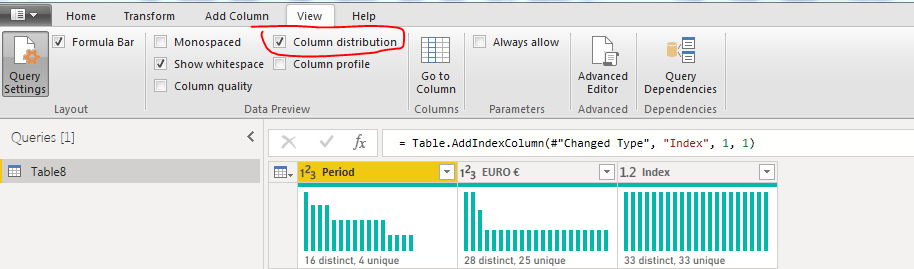
I dont know if you know htis, there is also a wonderful features in power bi, which gives the count of Distinct in a row..

Edit queries--> View-> Column distribution.


This gives the distinct count in each row.

Capture23.PNG


Thanks,

Tejaswi

PANDAmonium
Resolver IV
Resolver IV

I usually just load the data in then create a measure on count - distinct count.

Measure = COUNT('Table'[Column1]) - DISTINCTCOUNT('Table'[Column1])
Or to see the count of duplicates using multiple columns, concatenate them and create the same measure.
 
I figure since query editor is based on the top 1000, if you're using a large dataset it won't give you an accurate count in power query past the top 1000. But I would like if my assumptions are correct, what other people do, and if there's an easier way as well.

You can check all rows in power query. The top 1000 is only if the result has more than 1000. If you run "Keep duplicates" first then you can add a custom step like this to check it

= Table.RowCount(#"Keep duplicates")

Hope this helps


If this post helps, then please consider Accept it as the solution to help the other members find it more quickly.

Happy to help!

LaDataWeb Blog

ibarrau
Super User
Super User

Hi, yes you can. First select the columns you want to check for duplicates. Then keep duplicates:
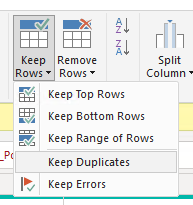
keep duplicateskeep duplicates

Then you can group by and count if there are a lot of rows.

After you are sure of what the data is showing you can remove duplicates if you are sure.


Another way is to create a DAX table or connnect with DAX Studio and write a query like this:

EVALUATE
FILTER (
    ADDCOLUMNS (
        SUMMARIZE ( muestradatos, muestradatos[Afiliado] ),
        "CantDuplicados", CALCULATE ( COUNTROWS ( muestradatos ) )
    ),
    [CantDuplicados] > 1
)

Column1 should be the field you want to check for duplicates. You can add more columns or check for all. The result of that query should be which columns have duplicates and a count of them.


Hope this helps,

If this post helps, then please consider Accept it as the solution to help the other members find it more quickly.


If this post helps, then please consider Accept it as the solution to help the other members find it more quickly.

Happy to help!

LaDataWeb Blog

Anonymous
Not applicable

You can do a GROUPBY in power query and add columns for count and distinct count.

Helpful resources

Announcements
New to Fabric survey Carousel

New to Fabric Survey

If you have recently started exploring Fabric, we'd love to hear how it's going. Your feedback can help with product improvements.

Power BI DataViz World Championships carousel

Power BI DataViz World Championships - June 2026

A new Power BI DataViz World Championship is coming this June! Don't miss out on submitting your entry.

Join our Fabric User Panel

Join our Fabric User Panel

Share feedback directly with Fabric product managers, participate in targeted research studies and influence the Fabric roadmap.

March Power BI Update Carousel

Power BI Community Update - March 2026

Check out the March 2026 Power BI update to learn about new features.