Join us at FabCon Atlanta from March 16 - 20, 2026, for the ultimate Fabric, Power BI, AI and SQL community-led event. Save $200 with code FABCOMM.
Register now!The Power BI Data Visualization World Championships is back! It's time to submit your entry. Live now!
Hi all,
I am facing an issue where I need to remove rows in one model object based on a shared GUID listed in a column in another model object.
In this case, I have a list of successful leases that are linked to quotes for leases via this GUID. I need to remove the successful quotes from the quote model (or, at least, add a successful/unsuccessful column into that model) so that I can look at how our company is performing in certain markets. Otherwise I have a model that lumps all the successful/unsuccessful quotes together without disctinction and another model that is just the successful quotes, but no way to look at unsuccessful quotes by themselves.
In any advice?
Solved! Go to Solution.
Hi @Anonymous
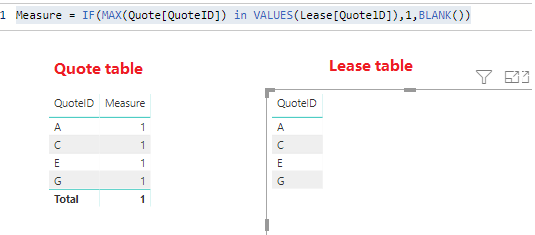
You may create a measure like below and use it in visual level filter.
Measure = IF(MAX(Quote[QuoteID]) in VALUES(Lease[QuotelD]),1,BLANK())
Regards,
Hi @Anonymous
It seems you may try to use LOOKUPVALUE like this post to get the successful quotes.Then if the column is blank,it is unsuccessful.If you need further help,please share a simplified data sample and expected output.
Regards,
That didn't work, I am getting an error message reading "a table of multiple values was supplied where a single value was expected."
Here's an example
Lease Table
QuoteID
A
C
E
G
Quote Table
QuoteID
A
B
C
D
E
F
G
I need some way to either remove or mark ID's A, C, E, and G in the Quote Table.
Hi @Anonymous
You may create a measure like below and use it in visual level filter.
Measure = IF(MAX(Quote[QuoteID]) in VALUES(Lease[QuotelD]),1,BLANK())
Regards,
The Power BI Data Visualization World Championships is back! It's time to submit your entry.
Check out the January 2026 Power BI update to learn about new features.
| User | Count |
|---|---|
| 70 | |
| 55 | |
| 38 | |
| 28 | |
| 22 |
| User | Count |
|---|---|
| 133 | |
| 121 | |
| 54 | |
| 37 | |
| 31 |