FabCon is coming to Atlanta
Join us at FabCon Atlanta from March 16 - 20, 2026, for the ultimate Fabric, Power BI, AI and SQL community-led event. Save $200 with code FABCOMM.
Register now!- Power BI forums
- Get Help with Power BI
- Desktop
- Service
- Report Server
- Power Query
- Mobile Apps
- Developer
- DAX Commands and Tips
- Custom Visuals Development Discussion
- Health and Life Sciences
- Power BI Spanish forums
- Translated Spanish Desktop
- Training and Consulting
- Instructor Led Training
- Dashboard in a Day for Women, by Women
- Galleries
- Data Stories Gallery
- Themes Gallery
- Contests Gallery
- QuickViz Gallery
- Quick Measures Gallery
- Visual Calculations Gallery
- Notebook Gallery
- Translytical Task Flow Gallery
- TMDL Gallery
- R Script Showcase
- Webinars and Video Gallery
- Ideas
- Custom Visuals Ideas (read-only)
- Issues
- Issues
- Events
- Upcoming Events
The Power BI Data Visualization World Championships is back! Get ahead of the game and start preparing now! Learn more
- Power BI forums
- Forums
- Get Help with Power BI
- Desktop
- Remaining value count
- Subscribe to RSS Feed
- Mark Topic as New
- Mark Topic as Read
- Float this Topic for Current User
- Bookmark
- Subscribe
- Printer Friendly Page


- Mark as New
- Bookmark
- Subscribe
- Mute
- Subscribe to RSS Feed
- Permalink
- Report Inappropriate Content
Remaining value count
Hi all-
I have contract values for the same contracts. The contract value shows the same value over and over as it is the same contract for each invoice. I need to create a column that takes the invoice amount minus the contract amount but that will put the nex value in the next row. Baiscally, I want to show the paid off amount getting smaller and smaller as each invoice is paid to the contact, eveutally beign 0$.
| Contract ID | Contract amount | Invoice amount | Invoice amount remaining | What I want to show(remaining) |
| 1 | 100 | 25 | 75 | 75 |
| 1 | 100 | 25 | 75 | 50 |
| 1 | 100 | 25 | 75 | 25 |
| 1 | 100 | 25 | 75 | 0 |
Solved! Go to Solution.
- Mark as New
- Bookmark
- Subscribe
- Mute
- Subscribe to RSS Feed
- Permalink
- Report Inappropriate Content
Hi @edavis248 ,
Do you mean that when this column "What I want to show (remaining)" is negative, it also outputs 0? If yes, we can create a column.
What I want to show(remaining) =
var a= CALCULATE(SUM('BGE_INVOICES'[Contract amount]),FILTER('BGE_INVOICES','BGE_INVOICES'[Index]=1))
var b=SUMX(FILTER('BGE_INVOICES','BGE_INVOICES'[Contract ID]=EARLIER('BGE_INVOICES'[Contract ID])&&'BGE_INVOICES'[Index]<=EARLIER('BGE_INVOICES'[Index])),'BGE_INVOICES'[Invoice amount])
return
IF((a-b)>=0,(a-b),0)
I don't think I'm very clear about your new needs, my suggestion is that you mark the answer to the current post as a solution and recreate the post to describe the other needs in detail, thank you for your time.
Best Regards,
Neeko Tang
If this post helps, then please consider Accept it as the solution to help the other members find it more quickly.

- Mark as New
- Bookmark
- Subscribe
- Mute
- Subscribe to RSS Feed
- Permalink
- Report Inappropriate Content
Hi @edavis248 ,
According to your description, here are my steps you can follow as a solution.
(1) My test data is the same as yours.
(2)Click "Transform Data" to enter the Power Query editor and add an index column.
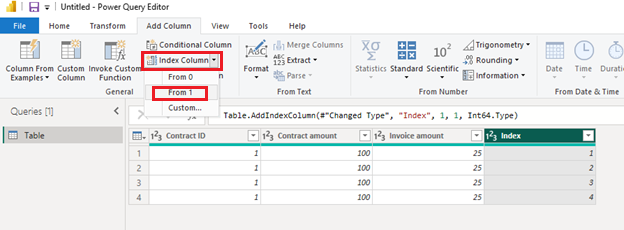
(3) We can create a calculated column.
What I want to show(remaining) =
var a= CALCULATE(SUM('Table'[Contract amount]),FILTER('Table','Table'[Index]=1))
var b=SUMX(FILTER('Table','Table'[Contract ID]=EARLIER('Table'[Contract ID])&&'Table'[Index]<=EARLIER('Table'[Index])),'Table'[Invoice amount])
return
a-b
(4) Then the result is as follows.
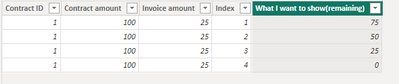
Best Regards,
Neeko Tang
If this post helps, then please consider Accept it as the solution to help the other members find it more quickly.
- Mark as New
- Bookmark
- Subscribe
- Mute
- Subscribe to RSS Feed
- Permalink
- Report Inappropriate Content
Thanks Neeko I think this is what I need. However is there a reason my EARLIER function wont pull in the column?

- Mark as New
- Bookmark
- Subscribe
- Mute
- Subscribe to RSS Feed
- Permalink
- Report Inappropriate Content
Hi @edavis248 ,
Do you mean that when this column "What I want to show (remaining)" is negative, it also outputs 0? If yes, we can create a column.
What I want to show(remaining) =
var a= CALCULATE(SUM('BGE_INVOICES'[Contract amount]),FILTER('BGE_INVOICES','BGE_INVOICES'[Index]=1))
var b=SUMX(FILTER('BGE_INVOICES','BGE_INVOICES'[Contract ID]=EARLIER('BGE_INVOICES'[Contract ID])&&'BGE_INVOICES'[Index]<=EARLIER('BGE_INVOICES'[Index])),'BGE_INVOICES'[Invoice amount])
return
IF((a-b)>=0,(a-b),0)
I don't think I'm very clear about your new needs, my suggestion is that you mark the answer to the current post as a solution and recreate the post to describe the other needs in detail, thank you for your time.
Best Regards,
Neeko Tang
If this post helps, then please consider Accept it as the solution to help the other members find it more quickly.
- Mark as New
- Bookmark
- Subscribe
- Mute
- Subscribe to RSS Feed
- Permalink
- Report Inappropriate Content
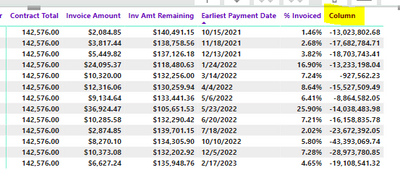
I actually added at a column not the measure so it worked technically. But it is showing some mass negative values. I have quiet a bit more contracts than my example. I am getting this result:
Appreciate any help I can work to get a workign file without sentitive info.
In the below I would expect the "Column" to show wha tthe inv amt remaining column does but trickle down to $0. currently I have the contract total - invoice amount of each invoice but was that value for 10/15/2021 to start the next line then $140,491 - 3,817(invoice amount) then the next line would be $136,674. Appreciate any help, I have been working on this for weeks.
- Mark as New
- Bookmark
- Subscribe
- Mute
- Subscribe to RSS Feed
- Permalink
- Report Inappropriate Content
Hi @edavis248 ,
Please click "New Column" in the "Modeling" pane and copy the following dax.
What I want to show(remaining) =
var a= CALCULATE(SUM('BGE_INVOICES'[Contract amount]),FILTER('BGE_INVOICES','BGE_INVOICES'[Index]=1))
var b=SUMX(FILTER('BGE_INVOICES','BGE_INVOICES'[Contract ID]=EARLIER('BGE_INVOICES'[Contract ID])&&'BGE_INVOICES'[Index]<=EARLIER('BGE_INVOICES'[Index])),'BGE_INVOICES'[Invoice amount])
return
a-b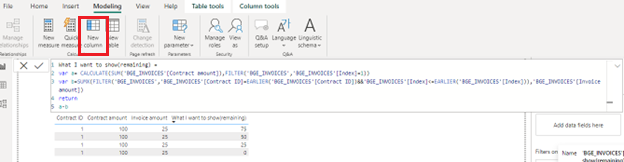
Best Regards,
Neeko Tang
If this post helps, then please consider Accept it as the solution to help the other members find it more quickly.
- Mark as New
- Bookmark
- Subscribe
- Mute
- Subscribe to RSS Feed
- Permalink
- Report Inappropriate Content
I actually added at a column not the measure so it worked technically. But it is showing some mass negative values. I have quiet a bit more contracts than my example. I am getting this result:
Appreciate any help I can work to get a workign file without sentitive info.
In the below I would expect the "Column" to show wha tthe inv amt remaining column does but trickle down to $0. currently I have the contract total - invoice amount of each invoice but was that value for 10/15/2021 to start the next line then $140,491 - 3,817(invoice amount) then the next line would be $136,674. Appreciate any help, I have been working on this for weeks.

Helpful resources

Power BI Dataviz World Championships
The Power BI Data Visualization World Championships is back! Get ahead of the game and start preparing now!

Power BI Monthly Update - December 2025
Check out the December 2025 Power BI Holiday Recap!

FabCon Atlanta 2026
Join us at FabCon Atlanta, March 16-20, for the ultimate Fabric, Power BI, AI and SQL community-led event. Save $200 with code FABCOMM.


| User | Count |
|---|---|
| 151 | |
| 130 | |
| 109 | |
| 79 | |
| 54 |


