Join us at FabCon Atlanta from March 16 - 20, 2026, for the ultimate Fabric, Power BI, AI and SQL community-led event. Save $200 with code FABCOMM.
Register now!The Power BI Data Visualization World Championships is back! Get ahead of the game and start preparing now! Learn more
Hello,
On a report I am using a relative date slicer such that the user can selected, for example, the last 3 months of data. Instead, I would like to do the last 3 months of data since the last game date for the current player because different players are playing at different period of time making the current filter tricky.
Is there a way to do that in Power BI?
Thank you
Solved! Go to Solution.
I was able to solve this topic using the PowerBI Preselected slicer visual. Thank you
Please provide sample data (with sensitive information removed) that covers your issue or question completely, in a usable format (not as a screenshot). Leave out anything not related to the issue.
If you are unsure how to do that please refer to https://community.fabric.microsoft.com/t5/Community-Blog/How-to-provide-sample-data-in-the-Power-BI-...
Please show the expected outcome based on the sample data you provided.
If you want to get answers faster please refer to https://community.fabric.microsoft.com/t5/Desktop/How-to-Get-Your-Question-Answered-Quickly/m-p/1447...
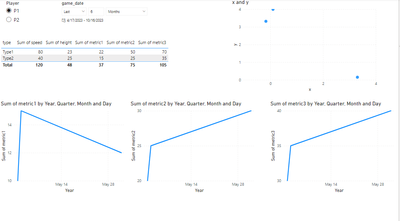
Here is some data and a screenshot of a fake report so it might help to understand the situation.
My report page is on the player level so one player must be selected. I then have a date slicer and this is is the one I would like to work on. It is currently set on "Last 6 months" but my issue is that if a player has not played in the last 6 months the report will look empty. This is why I would like the slicer to be the last 6 months since the player last game (most recent game_date).
I was able to apply some kind of filtering following these ideas: https://www.victorrocca.com/solution-last-activity-date/ and https://community.fabric.microsoft.com/t5/Desktop/Required-custom-date-Slicer-Last-7-days-last-15-da...
However these solutions seems to only work on a visual level (I have to add the filter to each graph independently) and I was not able to apply it to visuals not on the game_date granularity (eg. the table or the "x and y" chart).
I hope it helps and thank you for your help!
| Player | game_date | x | y | type | speed | height | metric1 | metric2 | metric3 |
| P1 | 5/1/2023 | -0.17 | 3.32 | Type1 | 30 | 20 | 10 | 20 | 30 |
| P1 | 5/2/2023 | 3.3 | 0.15 | Type2 | 40 | 25 | 15 | 25 | 35 |
| P1 | 6/1/2023 | 0.1 | 4 | Type1 | 50 | 3 | 12 | 30 | 40 |
| P2 | 6/2/2023 | 0.2 | 3 | Type3 | 30 | 35 | 15 | 35 | 30 |
| P2 | 1/1/2023 | 0.4 | 1 | Type2 | 70 | 30 | 20 | 25 | 40 |
| P2 | 2/28/2023 | 0.2 | 3 | Type4 | 90 | 20 | 30 | 30 | 40 |
I was able to solve this topic using the PowerBI Preselected slicer visual. Thank you
The Power BI Data Visualization World Championships is back! Get ahead of the game and start preparing now!
| User | Count |
|---|---|
| 37 | |
| 37 | |
| 33 | |
| 32 | |
| 29 |
| User | Count |
|---|---|
| 130 | |
| 88 | |
| 82 | |
| 68 | |
| 64 |