cancel
Showing results for 
Search instead for 
Did you mean: 

Next up in the FabCon + SQLCon recap series: The roadmap for Microsoft SQL and Maximizing Developer experiences in Fabric. All sessions are available on-demand after the live show. Register now

Reply
Kmcdonald
Helper III
Helper III

Relative Date - Using Now/Today Function

Hi,

Does anyone know a way to filter a relative date using a now function or column?


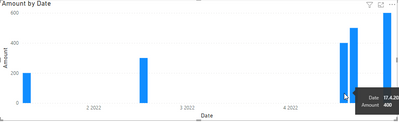
I have got some DAX that counts rows, based on a Calendarauto function. The issue is that is counts for dates past today and looks pretty bad on my line graph (see below).

I have been experimenting with the Now and Today function but can't get it to show only values on or before that date.

Seeing if anyone has a solution on this 🙂

Kmcdonald_0-1650103145949.png


1 ACCEPTED SOLUTION
Ashish_Mathur
Super User
Super User

Hi,

Try this measure

=if(min(calendar[date])>today(),blank(),[your measure])

To the X-axis of your graph, please drag Date from the Calendar Table.


Regards,
Ashish Mathur
http://www.ashishmathur.com
https://www.linkedin.com/in/excelenthusiasts/

View solution in original post

4 REPLIES 4
Ashish_Mathur
Super User
Super User

Hi,

Try this measure

=if(min(calendar[date])>today(),blank(),[your measure])

To the X-axis of your graph, please drag Date from the Calendar Table.


Regards,
Ashish Mathur
http://www.ashishmathur.com
https://www.linkedin.com/in/excelenthusiasts/
Kmcdonald
Helper III
Helper III

This will only bring today's data though, I still want to see back at least 3 months before today.

Hi, @Kmcdonald , here's the specific idea I mentioned before:

See my visual with dates that are after Today:

vojtechsima_0-1650184502442.png

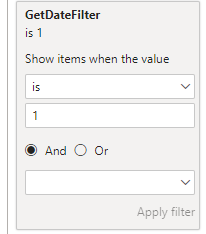
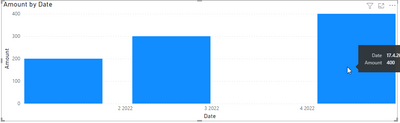
Now, write this measure, put it to the Filter Pane accordingly and you will get dates before today(including today, you can adjust that).

GetDateFilter = 

IF(MAX('Date'[Date])> TODAY(), 0, 1)

vojtechsima_1-1650184537048.png

vojtechsima_2-1650184552468.png


Any kudos or recognition appreciated. To learn more on the topic, check out my blog and follow me on LinkedIn.
vojtechsima
Super User
Super User

Hi, @Kmcdonald 
The easiest solution is to write a calculated column or measure that will check the current day and return 1 or 0 (or whatever) for days before today. Then you go to the Filter pane and put the column or measure to filter that visual and you select that you want to display only data that have the result 1.


Any kudos or recognition appreciated. To learn more on the topic, check out my blog and follow me on LinkedIn.

Helpful resources

Announcements
New to Fabric survey Carousel

New to Fabric Survey

If you have recently started exploring Fabric, we'd love to hear how it's going. Your feedback can help with product improvements.

Power BI DataViz World Championships carousel

Power BI DataViz World Championships - June 2026

A new Power BI DataViz World Championship is coming this June! Don't miss out on submitting your entry.

Join our Fabric User Panel

Join our Fabric User Panel

Share feedback directly with Fabric product managers, participate in targeted research studies and influence the Fabric roadmap.

March Power BI Update Carousel

Power BI Community Update - March 2026

Check out the March 2026 Power BI update to learn about new features.