Learn from the best! Meet the four finalists headed to the FINALS of the Power BI Dataviz World Championships! Register now
Hello,
I am interested in creating the following report level filter.
StartDate>=[AsOfDate]-3 And StartDate<=[AsOfDate]+30
StartDate is a table on its own and AsOfDate is a column in the dataset that the report pulls from. AsOfDate should be a single day (yesterday). How would I go about this?
Solved! Go to Solution.
Hi @bruppert
First, we should know a measures can't be added into "Report level filter" field.
Also, the slicer or filter pane don't support this kind of relative date filter.
So i provide such workarounds.
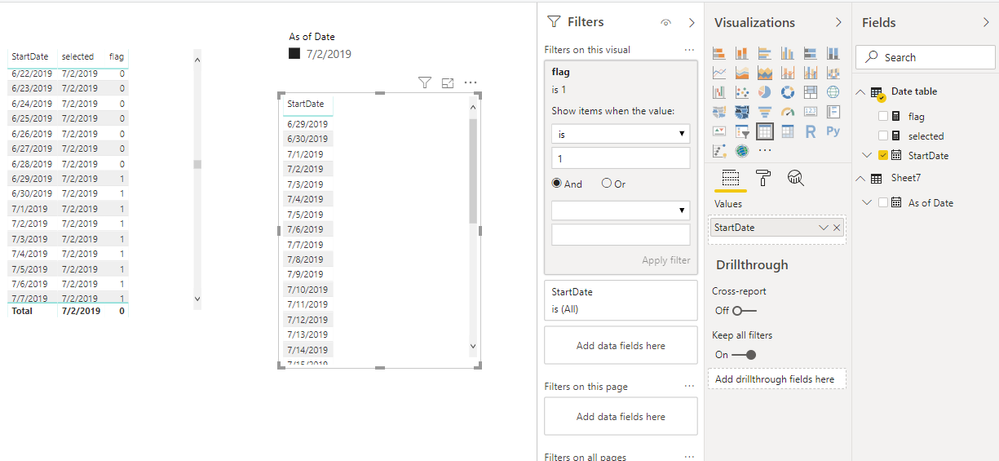
Add [As of date] in the slicer,
Create measures
selected = SELECTEDVALUE(Sheet7[As of Date])
flag =
IF (
MAX ( 'Date table'[StartDate] ) >= [selected] - 3
&& MAX ( 'Date table'[StartDate] ) <= [selected] + 30,
1,
0
)
Best Regards
Maggie
Community Support Team _ Maggie Li
If this post helps, then please consider Accept it as the solution to help the other members find it more quickly.
Hi @bruppert
You want to use [StartDate] to filter [AsOfDate], right?
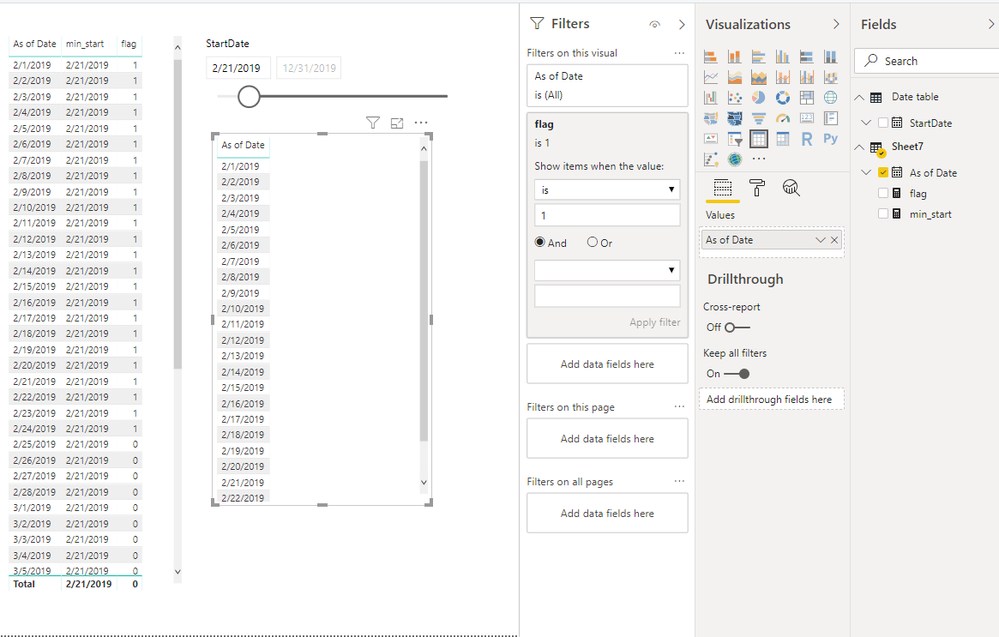
for example, a table visual with [AsOfDate] column, change [StartDate], then the table visual with [AsOfDate] will change accordingly.
If so, i find a workaround.
Create measures
min_start = MIN('Date table'[StartDate])
flag = IF([min_start]>=MAX(Sheet7[As of Date])-3&&[min_start]<=MAX(Sheet7[As of Date])+30,1,0)
But it can only be aded to a visual level filter.
Best Regards
Maggie
Community Support Team _ Maggie Li
If this post helps, then please consider Accept it as the solution to help the other members find it more quickly.
Hi Maggie,
Thanks for the response. I am actually interested in filtering [StartDate] based on [AsOfDate].
Both of these columns are in the data set that my report shares a live connection with. In my report, I have created a table that includes the [StartDate] column but not [AsOfDate]. What I want is a filter to only include rows that have [StartDate] after MAX([AsOfDate]) - 3 AND before MAX([AsOfDate]) + 30.
Thanks!
Hi @bruppert
First, we should know a measures can't be added into "Report level filter" field.
Also, the slicer or filter pane don't support this kind of relative date filter.
So i provide such workarounds.
Add [As of date] in the slicer,
Create measures
selected = SELECTEDVALUE(Sheet7[As of Date])
flag =
IF (
MAX ( 'Date table'[StartDate] ) >= [selected] - 3
&& MAX ( 'Date table'[StartDate] ) <= [selected] + 30,
1,
0
)
Best Regards
Maggie
Community Support Team _ Maggie Li
If this post helps, then please consider Accept it as the solution to help the other members find it more quickly.
| User | Count |
|---|---|
| 57 | |
| 43 | |
| 32 | |
| 16 | |
| 13 |
| User | Count |
|---|---|
| 84 | |
| 70 | |
| 38 | |
| 27 | |
| 24 |