Join us at FabCon Atlanta from March 16 - 20, 2026, for the ultimate Fabric, Power BI, AI and SQL community-led event. Save $200 with code FABCOMM.
Register now!The Power BI Data Visualization World Championships is back! Get ahead of the game and start preparing now! Learn more
Hello,
I have an existing column that is an ID for my customers. I am trying to make it to where my customer ID can be interchangable with the actual name of my customer. I tried to make a relationship between the two in my query, but it didn't work. I simply want to replace my Customer ID with the actual name of my customer. Any help would be appreciated.... thanks
Solved! Go to Solution.
Hi @Anonymous ,
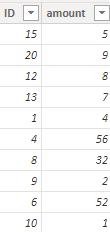
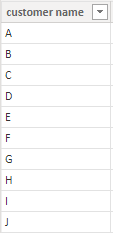
I created some data:
Table1:
Table2:
Here are the steps you can follow:
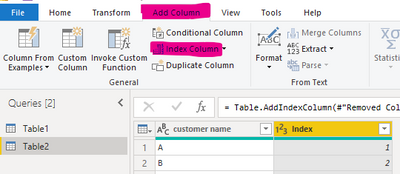
You can add Index to both tables in power query.
This way you have a relationship between your two tables.
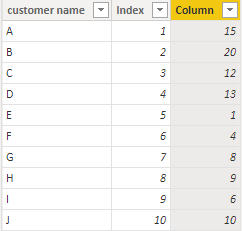
You can then create computed columns:
Column =
CALCULATE(SUM('Table1'[ID]),FILTER(ALL(Table1),'Table1'[Index]='Table2'[Index]))
Or create measure.
Measure =
CALCULATE(MAX('Table2'[customer name]),FILTER(ALL(Table2),'Table2'[Index]=MAX('Table1'[Index])))
Please click here for the pbix file
Best Regards,
Liu Yang
If this post helps, then please consider Accept it as the solution to help the other members find it more quickly
Hi @Anonymous ,
I created some data:
Table1:
Table2:
Here are the steps you can follow:
You can add Index to both tables in power query.
This way you have a relationship between your two tables.
You can then create computed columns:
Column =
CALCULATE(SUM('Table1'[ID]),FILTER(ALL(Table1),'Table1'[Index]='Table2'[Index]))
Or create measure.
Measure =
CALCULATE(MAX('Table2'[customer name]),FILTER(ALL(Table2),'Table2'[Index]=MAX('Table1'[Index])))
Please click here for the pbix file
Best Regards,
Liu Yang
If this post helps, then please consider Accept it as the solution to help the other members find it more quickly
The Power BI Data Visualization World Championships is back! Get ahead of the game and start preparing now!
| User | Count |
|---|---|
| 39 | |
| 37 | |
| 33 | |
| 32 | |
| 29 |
| User | Count |
|---|---|
| 133 | |
| 88 | |
| 85 | |
| 68 | |
| 64 |