cancel
Showing results for 
Search instead for 
Did you mean: 

Learn from the best! Meet the four finalists headed to the FINALS of the Power BI Dataviz World Championships! Register now

Reply
PBIDevNoob
Helper I
Helper I

Relationships and Reference Measure vs Direct Formula

Hi! 


I'm trying to understand why my relationships doesn't seem to be working correctly and the difference between calling a measure from another measure and directly applying the formula in a measure. 


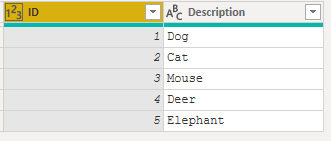
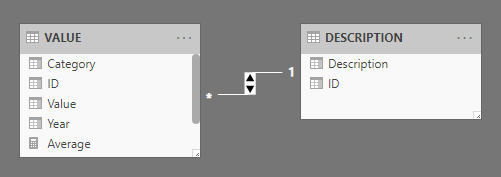
I have 2 tables with a one-to-many relationship. The first table just describes the ID, the second table has columns for ID, Year, Category, and Value. 


I added 3 measures for average. 

  1. Average = AVERAGE('VALUE'[Value])
  2. Average by ID Direct = AVERAGEX( VALUES('VALUE'[ID]), AVERAGE('VALUE'[Value]))
  3. Average by Measure = AVERAGEX( VALUES('VALUE'[ID]), [Average]))

I then created a table/matrix with 'Values'[ID], 'Description'[Description], 'Values'[Category], with measures 2 and 3, and slicers for Category and Year.


For some reason, when I select from the Year and Category slicers, the measure "Average by Measure" I get a table where the description returns 2 rows for 1 ID:
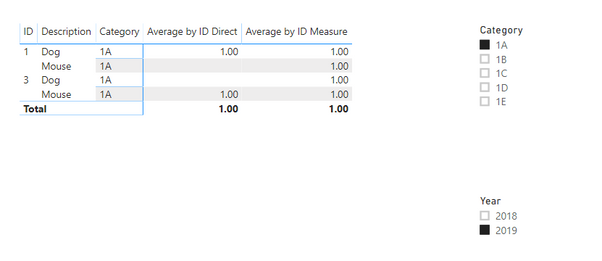
ResultResult


So I have questions regarding this.

  1. Why did Measure 2 and 3 return different values when in essence they should be the same?
  2. Why doesn't the relationship work even though I've set the direction to filter both. 

Note:

I realize that I can fix this by adding the relatedtable to measure 3, but I want to understand why. I also know that I can just use the ID from the Description table, but again, I want to understand why.


I've attached my sample in Google Drive: GDrive PBIX File 
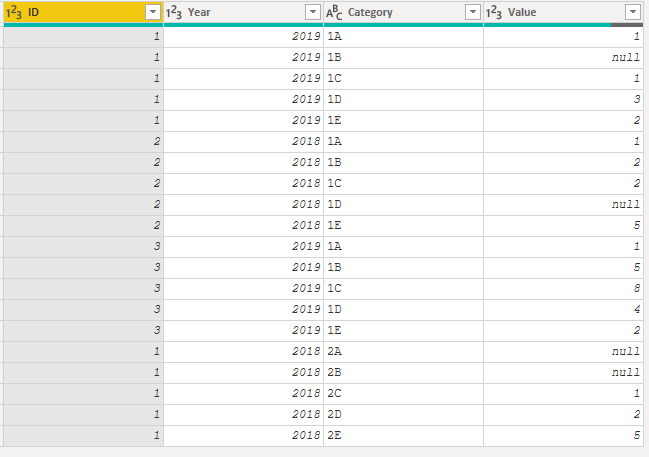
 

Values TableValues TableDescription TableDescription Table

RelationshipRelationship


1 ACCEPTED SOLUTION

@PBIDevNoob 


Every measure has an implicit CALCULATE that you can’t see, so measures always trigger context transition from within a row context. Besides, you may try performance analyzer in Power BI Desktop to check query.


Community Support Team _ Sam Zha
If this post helps, then please consider Accept it as the solution to help the other members find it more quickly.

View solution in original post

5 REPLIES 5
Greg_Deckler
Community Champion
Community Champion

Try using DISTINCT instead of VALUES. VALUES and VALUE aren't the greatest functions in the world and tend to be overused. They tend to mask data modeling issues.


Follow on LinkedIn
@ me in replies or I'll lose your thread!!!
Instead of a Kudo, please vote for this idea
Become an expert!: Enterprise DNA
External Tools: MSHGQM
YouTube Channel!: Microsoft Hates Greg
Latest book!:
DAX For Humans

DAX is easy, CALCULATE makes DAX hard...

Thanks, but it pretty much returns the same thing. I'm also more concerned with knowing why the relationship isn't working correctly and why the using a measure in a measure returns a different value than using the same formula directly. 


@PBIDevNoob 


Every measure has an implicit CALCULATE that you can’t see, so measures always trigger context transition from within a row context. Besides, you may try performance analyzer in Power BI Desktop to check query.


Community Support Team _ Sam Zha
If this post helps, then please consider Accept it as the solution to help the other members find it more quickly.
amitchandak
Super User
Super User

I think the problem , because of blank values. Please find the attached file.


Share with Power BI Enthusiasts: Full Power BI Video (20 Hours) YouTube
Microsoft Fabric Series 60+ Videos YouTube
Microsoft Fabric Hindi End to End YouTube

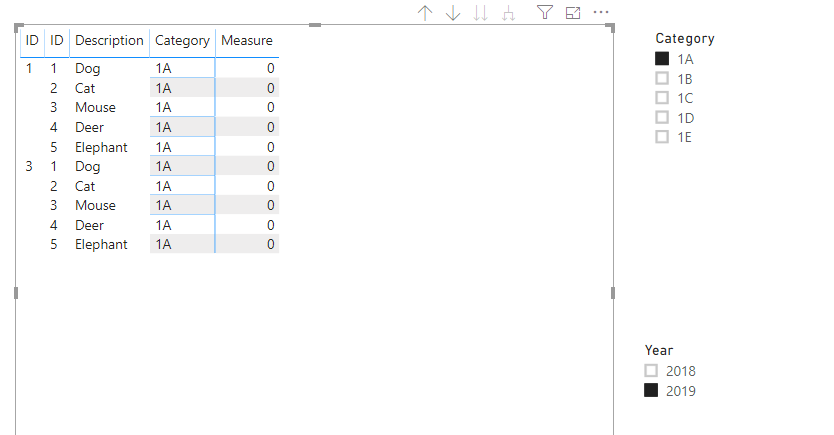
Can you tell me why? Also, if I create "Measure = 1" it returns something like a cartesian join for the IDs between the tables. Why does this happen even though I have a bi-directional filter on the tables. This doesn't make sense to me, and it feels like I'm not understanding a basic concept of relationships and measures. 


image.png


Helpful resources

Announcements
New to Fabric survey Carousel

New to Fabric Survey

If you have recently started exploring Fabric, we'd love to hear how it's going. Your feedback can help with product improvements.

Power BI DataViz World Championships carousel

Power BI DataViz World Championships - June 2026

A new Power BI DataViz World Championship is coming this June! Don't miss out on submitting your entry.

Join our Fabric User Panel

Join our Fabric User Panel

Share feedback directly with Fabric product managers, participate in targeted research studies and influence the Fabric roadmap.

March Power BI Update Carousel

Power BI Community Update - March 2026

Check out the March 2026 Power BI update to learn about new features.