cancel
Showing results for 
Search instead for 
Did you mean: 

Learn from the best! Meet the four finalists headed to the FINALS of the Power BI Dataviz World Championships! Register now

Reply
Anonymous
Not applicable

Relationships and Power Query

Hello,

I have a table that contains all my Sales order. The columns are pretty much what you can expect to see in a Sales table:


ID | Date | Product | Quantity | Revenue | Location Key


Then I have another table, called LocationDim. This contains all the information from my stores around the globe:

Location Key | Country | City | Store Name


Is there any way I can see the column "Country" from the LocationDim on the Sales table? 

Asking this because I'd like to create a column that works basically like: "Product_Date_Country". But as Country is in the LocationDim table, I don't seem to be able to do it.


Thank you!

1 ACCEPTED SOLUTION
v-henryk-mstf
Community Support
Community Support

Hi @Anonymous ,


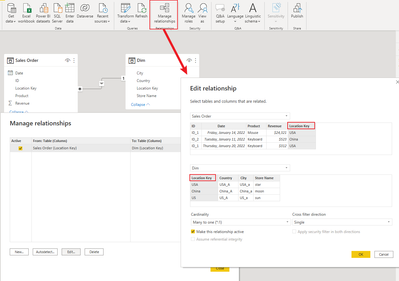
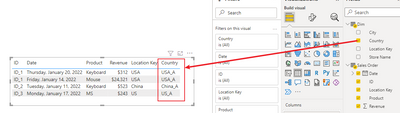
The best way to create a relationship is to select edit relationship in the powerbi desktop and then create a one-to-many relationship between the uniquely identified location key in the dim table and the location key in the sales order table.

vhenrykmstf_0-1666602422127.png

vhenrykmstf_1-1666602474635.png


If the problem is still not resolved, please provide detailed error information and let me know immediately. Looking forward to your reply.


Best Regards,
Henry


If this post helps, then please consider Accept it as the solution to help the other members find it more quickly.

View solution in original post

2 REPLIES 2
v-henryk-mstf
Community Support
Community Support

Hi @Anonymous ,


The best way to create a relationship is to select edit relationship in the powerbi desktop and then create a one-to-many relationship between the uniquely identified location key in the dim table and the location key in the sales order table.

vhenrykmstf_0-1666602422127.png

vhenrykmstf_1-1666602474635.png


If the problem is still not resolved, please provide detailed error information and let me know immediately. Looking forward to your reply.


Best Regards,
Henry


If this post helps, then please consider Accept it as the solution to help the other members find it more quickly.

JorgePinho
Solution Sage
Solution Sage

Hello @Anonymous . It is possible!


In Power Query Editor go to the Sales table and use "Merge Queries" and connect to the Dimension table by the Location Key column. 


This will bring the columns from the Dimension Table to the Sales table. Then you can select the one you want to keep (Country).

Helpful resources

Announcements
Join our Fabric User Panel

Join our Fabric User Panel

Share feedback directly with Fabric product managers, participate in targeted research studies and influence the Fabric roadmap.

February Power BI Update Carousel

Power BI Monthly Update - February 2026

Check out the February 2026 Power BI update to learn about new features.

FabCon Atlanta 2026 carousel

FabCon Atlanta 2026

Join us at FabCon Atlanta, March 16-20, for the ultimate Fabric, Power BI, AI and SQL community-led event. Save $200 with code FABCOMM.