We've captured the moments from FabCon & SQLCon that everyone is talking about, and we are bringing them to the community, live and on-demand. Starts on April 14th. Register now
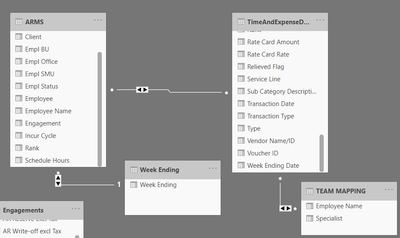
I am trying to get the acutal hours charged vs budgeted hours for specific dates say example - for 28th week ending for an employee it should be 40 budget hours and 40 hours actual hours charged as on 28th weekending.. i have the following dataset - Arms(Budgeted hours) , Time and expense Report (Actual hours charged) and weekending(As i need those detais on week ending basis). So when i create a relationship between week ending date with the arms file incurr cycle , i am getting proper visual for the budgeted hours and but if i create relationship between timeandexpense report to week ending it is not coming and i am not able to make the relation ship active. I have a relationship early between arms , time and expense report and team mapping for the employee name so that i can use the specialist without merging them in both dataset. can someone please help me with this relationship issue.
Solved! Go to Solution.
@AjayRangarajan , there too many many to many relationships. You need to have bridge tables
https://www.seerinteractive.com/blog/join-many-many-power-bi/
https://www.sqlbi.com/articles/the-importance-of-star-schemas-in-power-bi/
@AjayRangarajan , there too many many to many relationships. You need to have bridge tables
https://www.seerinteractive.com/blog/join-many-many-power-bi/
https://www.sqlbi.com/articles/the-importance-of-star-schemas-in-power-bi/
Thanks i was able to create relationship based on the link which was given.
you model have too many Cross Filter with both sides
I have some questions
1- Why do you need to join ARMS and Time&Expense Table
2- Why are you not joining Employee table with ARMS and Time&Expense separately
3- Why are you not joining WeekEnding table with ARMS and Time&Expense separately
You model should be
WeekEnding Joins ARMs & Time&Expense with 1-Many single side relationship
Employee Joins ARMs & Time&Expense with 1-Many single side relationship
Proud to be a Super User!
If you have recently started exploring Fabric, we'd love to hear how it's going. Your feedback can help with product improvements.
A new Power BI DataViz World Championship is coming this June! Don't miss out on submitting your entry.
Share feedback directly with Fabric product managers, participate in targeted research studies and influence the Fabric roadmap.
| User | Count |
|---|---|
| 54 | |
| 37 | |
| 32 | |
| 17 | |
| 15 |
| User | Count |
|---|---|
| 66 | |
| 66 | |
| 39 | |
| 34 | |
| 25 |