Join us at FabCon Atlanta from March 16 - 20, 2026, for the ultimate Fabric, Power BI, AI and SQL community-led event. Save $200 with code FABCOMM.
Register now!The Power BI Data Visualization World Championships is back! It's time to submit your entry. Live now!
Hi all!
I've a problem with relationship direction:
Table1: Projects (Filter)
Table 2: ProjectTasks (Primarykey)
Table 3: Actuals - time dedicated by task (Foreign key)
The problem is that are some lines on Actuals that doesn't have ProjectTask associate, but yes Project. Then, when I show "msdyn_quantity" from data, it shows the total time, not by task. That's is OK.
Then, I created a new Measure (himputadas), but it doesn't show the lines from actuals that not have ProjectTask associate. The time difference is my problem.
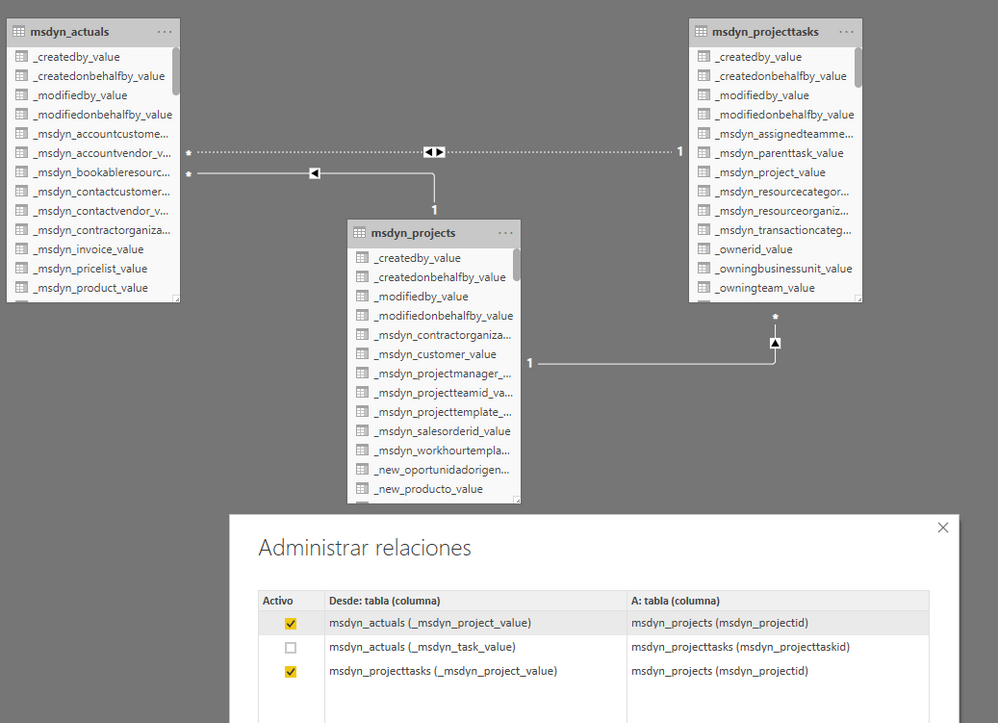
My relations:
My data:
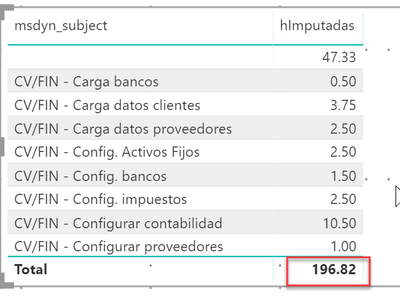
196,82 is correct, but himputaciones need to show 196,82 too, with a line with msdyn_subject in blank for the difference on actuals that don't have projecttask associate.
My measure:
hImputadas = CALCULATE(SUM(msdyn_actuals[msdyn_quantity]);USERELATIONSHIP(msdyn_actuals[_msdyn_task_value];msdyn_projecttasks[msdyn_projecttaskid]))
I tried too with CROSSFILTER and changing relations direction.
I attach PBIX file: PBIX FILE
Thanks in advance!
Solved! Go to Solution.
@jrscaletta update relationship and measure as below
hImputadas = CALCULATE(SUM(msdyn_actuals[msdyn_quantity]), USERELATIONSHIP(msdyn_actuals[_msdyn_project_value], msdyn_projects[msdyn_projectid]), CROSSFILTER(msdyn_actuals[_msdyn_project_value], msdyn_projects[msdyn_projectid], Both ))
here is the output
Subscribe to the @PowerBIHowTo YT channel for an upcoming video on List and Record functions in Power Query!!
Learn Power BI and Fabric - subscribe to our YT channel - Click here: @PowerBIHowTo
If my solution proved useful, I'd be delighted to receive Kudos. When you put effort into asking a question, it's equally thoughtful to acknowledge and give Kudos to the individual who helped you solve the problem. It's a small gesture that shows appreciation and encouragement! ❤
Did I answer your question? Mark my post as a solution. Proud to be a Super User! Appreciate your Kudos 🙂
Feel free to email me with any of your BI needs.
Hi All!!
Table1: Projects (Filter)
Table 2: ProjectTasks (Primarykey)
Table 3: Actuals - time dedicated by task (Foreign key)
The problem is that are some lines on Actuals that doesn't have ProjectTask associate, but yes Project. Then, when I show "msdyn_quantity" from data, it shows the total time, not by task. That's is OK.
Then, I created a new Measure (himputadas), but it doesn't show the lines from actuals that not have ProjectTask associate. The time difference is my problem.
My relations:
My data:
196,82 is correct, but himputaciones need to show 196,82 too, with a line with msdyn_subject in blank.
My measure:
hImputadas = CALCULATE(SUM(msdyn_actuals[msdyn_quantity]);USERELATIONSHIP(msdyn_actuals[_msdyn_task_value];msdyn_projecttasks[msdyn_projecttaskid]))
I tried too with CROSSFILTER and changing relations direction.
I attach PBIX file: PBIX FILE
Thanks in advance!
@jrscaletta update relationship and measure as below
hImputadas = CALCULATE(SUM(msdyn_actuals[msdyn_quantity]), USERELATIONSHIP(msdyn_actuals[_msdyn_project_value], msdyn_projects[msdyn_projectid]), CROSSFILTER(msdyn_actuals[_msdyn_project_value], msdyn_projects[msdyn_projectid], Both ))
here is the output
Subscribe to the @PowerBIHowTo YT channel for an upcoming video on List and Record functions in Power Query!!
Learn Power BI and Fabric - subscribe to our YT channel - Click here: @PowerBIHowTo
If my solution proved useful, I'd be delighted to receive Kudos. When you put effort into asking a question, it's equally thoughtful to acknowledge and give Kudos to the individual who helped you solve the problem. It's a small gesture that shows appreciation and encouragement! ❤
Did I answer your question? Mark my post as a solution. Proud to be a Super User! Appreciate your Kudos 🙂
Feel free to email me with any of your BI needs.
Hi @parry2k, thanks for your help! It works!
But now, I've seen is not showing any line for the "msdyn_subject" that has "hImputadas" in blank. I need to show them too.
It works if I change the direction of the relationship (msdyn_projecttask - msdyn_actuals) from BOTH to ONE WAY, but it brokes other information. I tried to create a new measure like:
hImputadasDetallTarea = CALCULATE(SUM(msdyn_actuals[msdyn_quantity]); CROSSFILTER(msdyn_projecttasks[msdyn_projecttaskid];msdyn_actuals[_msdyn_task_value];OneWay))
But it doesn't work equals that when I changed the relationship direction on the model.
Do you know how can I do that?
Thanks in advance!
I tried too using this measure:
hImputadasDetallTarea = CALCULATE(SUM(msdyn_actuals[msdyn_quantity]); CROSSFILTER(msdyn_actuals[_msdyn_task_value];msdyn_projecttasks[msdyn_projecttaskid];Both); CROSSFILTER(msdyn_projecttasks[_msdyn_project_value];msdyn_projects[msdyn_projectid];Both))
But I think it's necessary use "USERELATIONSHIP" too.
With this measure not work:
- Not appear msdyn_projecttasks info that no has msdyn_actuals[msdyn_quantity] data.
- Not appear msdyn_actuals info that no has msdyn_projecttasks data.
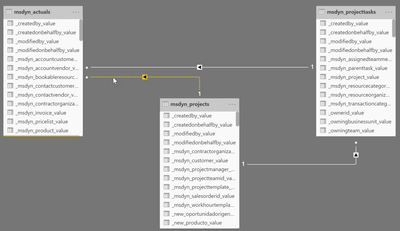
My schema:
With this measure:
hImputadasDetallTarea = CALCULATE(SUM(msdyn_actuals[msdyn_quantity]); CROSSFILTER(msdyn_actuals[_msdyn_task_value];msdyn_projecttasks[msdyn_projecttaskid];Both); CROSSFILTER(msdyn_projecttasks[_msdyn_project_value];msdyn_projects[msdyn_projectid];Both))
With this measure not work:
- Not appear msdyn_projecttasks info that no has msdyn_actuals[msdyn_quantity] data.
- Not appear himputadasDetallTarea info that no has msdyn_projecttasks data.
Photo:

If I use this measure:
hImputadas = CALCULATE(SUM(msdyn_actuals[msdyn_quantity]); USERELATIONSHIP(msdyn_actuals[_msdyn_project_value]; msdyn_projects[msdyn_projectid]); CROSSFILTER(msdyn_actuals[_msdyn_project_value]; msdyn_projects[msdyn_projectid]; Both ))
It shows:
- msdyn_actuals[quantity] that no have msdyn_projecttasks data: CORRECT.
But no shows:
- Not appear msdyn_projecttasks info that no has msdyn_actuals[msdyn_quantity] data.
How can I do?
Thanks in advance.
The Power BI Data Visualization World Championships is back! It's time to submit your entry.
Check out the January 2026 Power BI update to learn about new features.
| User | Count |
|---|---|
| 61 | |
| 47 | |
| 39 | |
| 23 | |
| 23 |
| User | Count |
|---|---|
| 144 | |
| 106 | |
| 63 | |
| 38 | |
| 31 |