Don't miss your chance to take the Fabric Data Engineer (DP-600) exam for FREE! Find out how by attending the DP-600 session on April 23rd (pacific time), live or on-demand.
Learn moreNext up in the FabCon + SQLCon recap series: The roadmap for Microsoft SQL and Maximizing Developer experiences in Fabric. All sessions are available on-demand after the live show. Register now
Hi all,
I've been trying to figure this out for a while now. I am not understanding why the relationship between two tables with a key column only works for certain values.
Please see below:
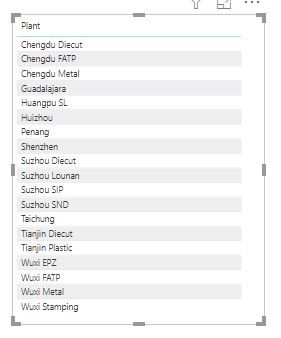
I have 2 tables one call capability and one called plant key. plant key table will contain the unique values of all the plants. capability will have at least 2 columns where plant name is one of them:
This table below is my plant key
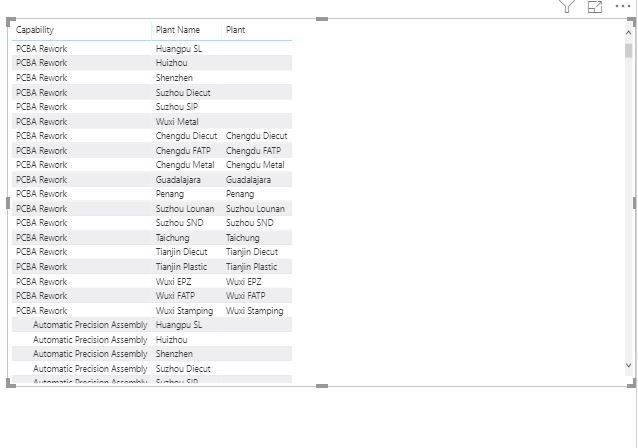
The table below first 2 columns are from the table capability and the last column is from plant key:
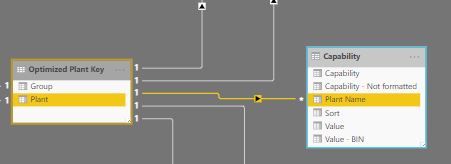
as you can see i have configured it to 1 to many relationship which is correct
so my question is, why is it power bi only selectively relates certain values from my key table to others? it should not be the case in my opinion.
Edit: seems like I needed to trim the columns to remove any whitespaces or non printable characters which seemed to fix most of the problem except one:
Solved! Go to Solution.
Hi,
Have you tried to "TRIM" or "CLEAN" your columns in Power Query ?
Regards,
Robin
Hi,
Have you tried to "TRIM" or "CLEAN" your columns in Power Query ?
Regards,
Robin
Hi @Anonymous ,
Thanks it fixed it
kudos to you
Glad to hear!
Thank you Sir 🙂
If you have recently started exploring Fabric, we'd love to hear how it's going. Your feedback can help with product improvements.
A new Power BI DataViz World Championship is coming this June! Don't miss out on submitting your entry.
| User | Count |
|---|---|
| 46 | |
| 43 | |
| 39 | |
| 20 | |
| 15 |
| User | Count |
|---|---|
| 68 | |
| 68 | |
| 31 | |
| 27 | |
| 24 |