Get certified for free when you join Fabric Data Days 2026 and dive into Fabric, Power BI, SQL, AI, and other essential data skills.
Join nowJuly 7 - July 17 | Round 2 of the Power BI Dataviz World Championships. Don't miss your chance! Learn more
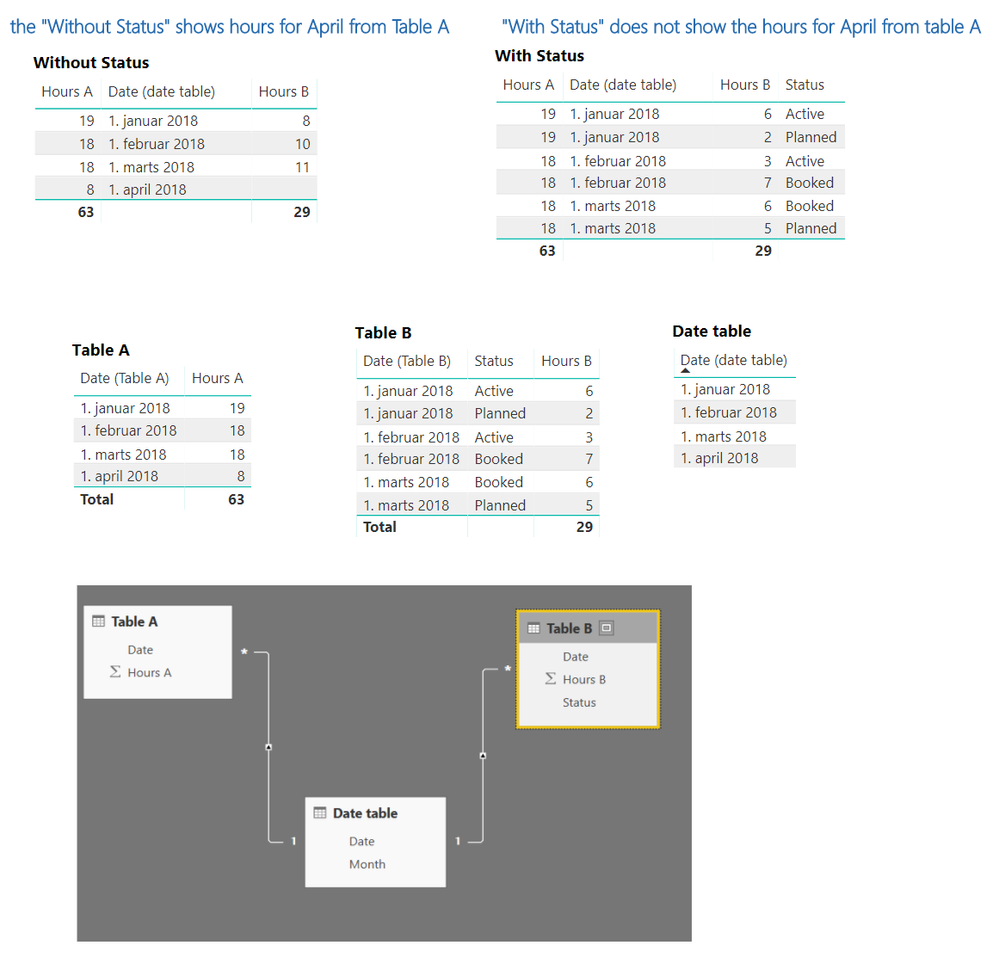
I have 2 tables (Table A and Table B) with a date and Hour column in each plus a Date table.
When I drag date from Date table in Table viz with hour from Table A and Table B it shows hours for April from Table A.
when I drag Status column from Table B in the viz - April disappear as there are no April data in Table B.
How do I get April to appear on the "With status" viz?
Solved! Go to Solution.
hI @Anonymous
try to add these two measures:
Total B Hours = SUM( TableB[Hours B])
Total A Hours =
IF(
NOT( ISINSCOPE( TableB[status] ) ),
SUM( TableA[Hours A] )
)
Did I answer your question correctly? Mark my answer as a solution!
Proud to be a Datanaut!
Instead of having two fact tables (table A and table B), could you have a single fact table (table A B)? I don't have a solution by way of a DAX language. My first approach would be to denormalize the fact tables into one table. Looking at the available columns, you don't look like you have so much granularity that a single table becomes imposible to understand.
the two tables are at a different granularities.. Table A is at the Date granularity whereas Table B is at the Date and Status granularity
Did I answer your question correctly? Mark my answer as a solution!
Proud to be a Datanaut!
hI @Anonymous
try to add these two measures:
Total B Hours = SUM( TableB[Hours B])
Total A Hours =
IF(
NOT( ISINSCOPE( TableB[status] ) ),
SUM( TableA[Hours A] )
)
Did I answer your question correctly? Mark my answer as a solution!
Proud to be a Datanaut!
Join us in Barcelona for FabCon and SQLCon, the Fabric, Power BI, SQL, and AI community event. Save €200 with code FABCMTY200.
If you love stickers, then you will definitely want to check out our community sticker challenge, Barcelona edition!
Check out the July 2026 Power BI update to learn about new features.
| User | Count |
|---|---|
| 30 | |
| 26 | |
| 23 | |
| 23 | |
| 14 |
| User | Count |
|---|---|
| 46 | |
| 33 | |
| 20 | |
| 18 | |
| 16 |