cancel
Showing results for 
Search instead for 
Did you mean: 

The Power BI Data Visualization World Championships is back! Get ahead of the game and start preparing now! Learn more

Reply
tlenzmeier
Helper II
Helper II

Relationship Problems

I have a report I am working on where I cannot get my dates to play nice with one another. The issue has to do with owner invoices and payments. My model has the customer payments PK linked to the owner invoice table. The owner invoice table is linked to my calendar table. I am unable to create an active relationship between the payment date and my calendar table. The result is that while my invoice amounts are correct, the payment amounts are not. If you look at Page 1, you will see the correct payment amounts for CompanyCode 002. I have a vague recollection that a bridge table might be the answer, but I'm not sure. Any help would be greatly appreciated.


https://adolfsonpeterson-my.sharepoint.com/:u:/g/personal/tlenzmeier_a-p_com/ERIlkpfK73BGi6PY29vc96o...

1 ACCEPTED SOLUTION
MFelix
Super User
Super User

Hi @tlenzmeier,


If i'm understanding your question correctly you want to have the calculation of payments based on calendar table, but you already have a date relationship between both tables.


Make an inactive relationship between the tables Calendar and Owner Payments (assuming this is were you have the payment information) then just change your payment measure to:


Payment Amount =
CALCULATE (
    SUM ( 'Owner Payments'[PaymentAmount] );
    LEFT ( 'Owner Payments'[Transaction Code]; 1 ) = "P";
    USERELATIONSHIP ( 'Calendar'[Date]; 'Owner Payments'[Payment Date] )
)

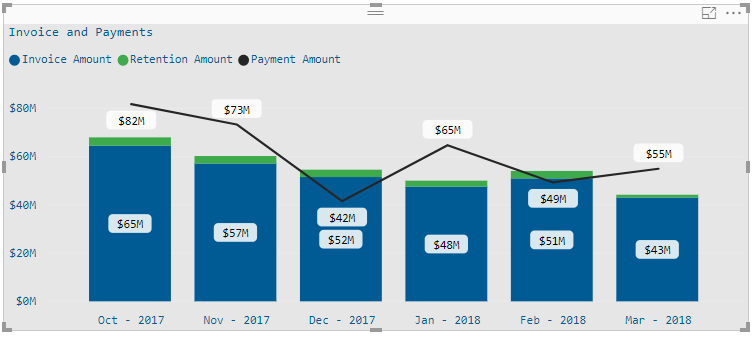
The last part is activating the relationship you created and making the calculations based on context final result below:


AR.png


Attach PBIX file.


Regards,

MFelix


Regards

Miguel Félix


Did I answer your question? Mark my post as a solution!

Proud to be a Super User!

Check out my blog: Power BI em Português


View solution in original post

2 REPLIES 2
MFelix
Super User
Super User

Hi @tlenzmeier,


If i'm understanding your question correctly you want to have the calculation of payments based on calendar table, but you already have a date relationship between both tables.


Make an inactive relationship between the tables Calendar and Owner Payments (assuming this is were you have the payment information) then just change your payment measure to:


Payment Amount =
CALCULATE (
    SUM ( 'Owner Payments'[PaymentAmount] );
    LEFT ( 'Owner Payments'[Transaction Code]; 1 ) = "P";
    USERELATIONSHIP ( 'Calendar'[Date]; 'Owner Payments'[Payment Date] )
)

The last part is activating the relationship you created and making the calculations based on context final result below:


AR.png


Attach PBIX file.


Regards,

MFelix


Regards

Miguel Félix


Did I answer your question? Mark my post as a solution!

Proud to be a Super User!

Check out my blog: Power BI em Português


So simple! Thank you!!

Helpful resources

Announcements
Power BI DataViz World Championships

Power BI Dataviz World Championships

The Power BI Data Visualization World Championships is back! Get ahead of the game and start preparing now!

December 2025 Power BI Update Carousel

Power BI Monthly Update - December 2025

Check out the December 2025 Power BI Holiday Recap!

FabCon Atlanta 2026 carousel

FabCon Atlanta 2026

Join us at FabCon Atlanta, March 16-20, for the ultimate Fabric, Power BI, AI and SQL community-led event. Save $200 with code FABCOMM.