Join us at FabCon Atlanta from March 16 - 20, 2026, for the ultimate Fabric, Power BI, AI and SQL community-led event. Save $200 with code FABCOMM.
Register now!Get Fabric certified for FREE! Don't miss your chance! Learn more
Hello,
I think this is a pretty basic issue but I can't find the solution for it.
I have the following table :
As you can see, we have two dates on the same line.
So with Power Query, what I did was to make to different tables from this main one.
One table is about the date it was bought and the other one about the date of the sale.
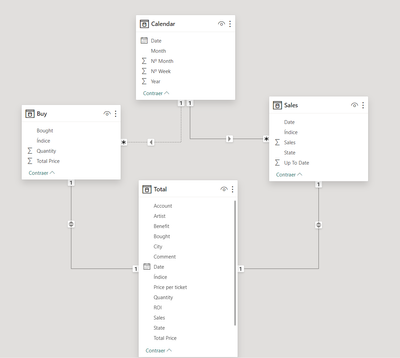
I get the following in PowerBi :
Before making each table, I created an Index column to be able to link my tables between them.
Then I made a calendar table, and that's when I get my problem. I'm not able to get an active relation for one of the table.
I think it's not a PowerBi issue but more the way of dealing with the data.
Thank you in advance for your help.
Solved! Go to Solution.
How did you create the 2nd table in Power Query? Did you duplicate the query or use reference?
Additionally, you can't have two active relationships from a date table to two date columns in the same table. However, you can use inactive relationships. You can need to write your DAX measures to account for them by using CALCULATE and USERELATIONSHIP.
How did you create the 2nd table in Power Query? Did you duplicate the query or use reference?
Additionally, you can't have two active relationships from a date table to two date columns in the same table. However, you can use inactive relationships. You can need to write your DAX measures to account for them by using CALCULATE and USERELATIONSHIP.
I used reference for both tables (Sales and Buy) from the Total table.
1. Yes I was aware of that, that's why I tried to find a solution with making more tables but that's not the correct way to do it, it seems.
2. So my current data model could work, but if I want to make KPIs and stuff with the calendar table, I need to use USERELATIONSHIP ?
If you want to split the table into multiple tables, don't use reference, instead duplicate the query. This will allow you to have an active relationship to both.
Yes, your current model would work, you just need to use USERELATIONSHIP to trigger the inactive relationship. For example, if you wanted your total sales by Purchase Date ( the inactive rel. ), your measure would be Total Sales by Purchase Date = CALCULATE( SUM( [Total Price] ) , USERELATIONSHIP( [Bought] , [Date] ) )
Looking at your data, this looks like vendor ticket sales for events, no? I'm assuming vendor per your description of your dates. One date is when the ticket was bought, the other when it was sold? Can I assume the bought date is when the vendor purchased the tickets from the event venue, and sold is when the vendor sold the tickets to a customer? So Price is what the vendor bought for, and Sales is what you sold it for, and your ROI is the profit? So, you do have two dates of equal analytical importance. I imagine you'll want to trend both costs and income by their appropriate dates, so picking one wouldn't work out. Or maybe it does? Depends how your company handles accounting and how they want to view margin, for example.
Oh ok thank you, I thought it was better to use reference to be sure to use the same kind of data and also reduce processing time.
1. Thank you very much, I will have a look at that.
2. Yes, exactly. He is buying tickets at a certain date then sell them.
The goal is to use both date yes to track the movements of money, which month money is coming back in the account, which month was the most or less profitable, etc..
Share feedback directly with Fabric product managers, participate in targeted research studies and influence the Fabric roadmap.
Check out the January 2026 Power BI update to learn about new features.
| User | Count |
|---|---|
| 69 | |
| 59 | |
| 47 | |
| 20 | |
| 15 |
| User | Count |
|---|---|
| 106 | |
| 102 | |
| 38 | |
| 27 | |
| 27 |