Join us in Barcelona for FabCon and SQLCon, September 28 - October 1, 2026.
This is best Fabric, Power BI, SQL and AI community event. How do we know? The last event sold out! Save €200 with code FABCMTY200.
Register now- Power BI forums
- Get Help with Power BI
- Desktop
- Service
- Report Server
- Power Query
- Mobile Apps
- Developer
- DAX Commands and Tips
- Custom Visuals Development Discussion
- Health and Life Sciences
- Power BI Spanish forums
- Translated Spanish Desktop
- Training and Consulting
- Instructor Led Training
- Dashboard in a Day for Women, by Women
- Galleries
- Data Stories Gallery
- Themes Gallery
- Contests Gallery
- QuickViz Gallery
- Quick Measures Gallery
- Visual Calculations Gallery
- Fabric Apps Gallery
- Notebook Gallery
- Translytical Task Flow Gallery
- TMDL Gallery
- R Script Showcase
- Webinars and Video Gallery
- Ideas
- Custom Visuals Ideas (read-only)
- Issues
- Issues
- Events
- Upcoming Events
July 28 - August 9 | Final Round of the Power BI Dataviz World Championships. This is your chance. Learn more
- Power BI forums
- Forums
- Get Help with Power BI
- Desktop
- Re: Related Distinct Count
- Subscribe to RSS Feed
- Mark Topic as New
- Mark Topic as Read
- Float this Topic for Current User
- Bookmark
- Subscribe
- Printer Friendly Page

- Mark as New
- Bookmark
- Subscribe
- Mute
- Subscribe to RSS Feed
- Permalink
- Report Inappropriate Content
Related Distinct Count
I'm trying to compute how many of our individuel product categories a customer has used, but I'm not getting the expected result.
Attached image is a good of the data model in a classic setup with Product-, Sales- and Customer Table.
The green columns are the ones I'm trying to compute, but current DAX formula is only returning a distinct count of all of the Product table, and not the table filtered by actual sales.
As far as I understand from Dax Patterns , all I need to do for each column is to use the following code:
Main Groups Used =
CALCULATE(
  DISTINCTCOUNT(Product[ProductMainGroup]),
  Sales)

Sub Groups Used =
CALCULATE(
   DISTINCTCOUNT(Product[Product Sub Group]),
   Sales)
Where CALCULATE should ensure that current CustomerKey row context is applied, and then filter the sales table accordingly, to only return a distinct count of the items the customer has bought.
My search lead me to a solution that suggested to apply "both" for crossfiltering between the tables, but my data model will not allow me do to so, complaining about only allowing one filtering path between tables.
So, how do I achieve my desired result without looking for a reconfiguration of my data model?
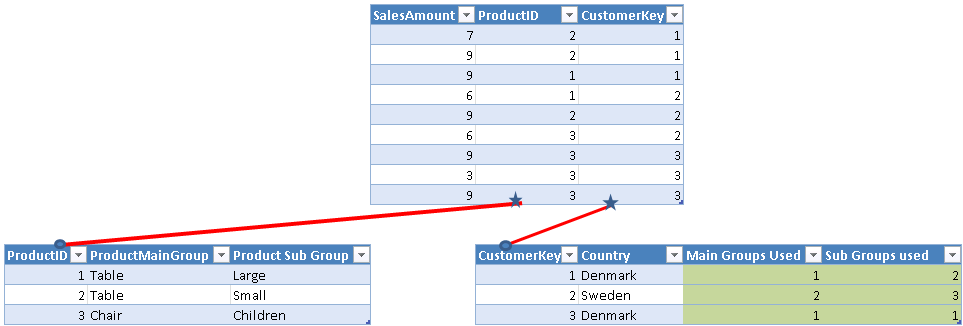
Solved! Go to Solution.


- Mark as New
- Bookmark
- Subscribe
- Mute
- Subscribe to RSS Feed
- Permalink
- Report Inappropriate Content
@Anonymous
Hi, you can use two measure like this:
Main Groups Used =
CALCULATE (
    DISTINCTCOUNT ( 'Product'[ProductMainGroup] );
    CROSSFILTER ( 'Fact'[ProductID]; 'Product'[ProductId]; BOTH )
)
Sub Groups Used =
CALCULATE (
    DISTINCTCOUNT ( 'Product'[Product Sub Group] );
    CROSSFILTER ( 'Fact'[ProductID]; 'Product'[ProductId]; BOTH )
)
Regards
Victor
Lima - Peru
Lima - Peru
- Mark as New
- Bookmark
- Subscribe
- Mute
- Subscribe to RSS Feed
- Permalink
- Report Inappropriate Content
Hi all,
I think SQLBI have got related article over here:
https://www.daxpatterns.com/related-distinct-count/
Thanks


- Mark as New
- Bookmark
- Subscribe
- Mute
- Subscribe to RSS Feed
- Permalink
- Report Inappropriate Content
@Anonymous
Here is another way to do this as a calculated column.
You might be better off with measures if you are running this over a large dataset. You can use the option suggested by @Vvelarde or simply create a bi-directional relationship between sales and products and use a simple DISTINCTCOUNT() measure.
MainGroup =
CALCULATE (
    CALCULATE (
        DISTINCTCOUNT ( Proucts[ProductMainGroup] ),
        SUMMARIZE ( Sales, Sales[CustomerKey], Proucts[ProductMainGroup] )
    )
)


SubGroup =
CALCULATE (
    CALCULATE (
        DISTINCTCOUNT ( Proucts[ProductSubGroup] ),
        SUMMARIZE ( Sales, Sales[CustomerKey], Proucts[ProductSubGroup] )
    )
)
- Mark as New
- Bookmark
- Subscribe
- Mute
- Subscribe to RSS Feed
- Permalink
- Report Inappropriate Content
I'm aware that a measure might be better for performance considerations, however currently I might use the calculated columns for filtering purposes and more importantly, I want to perform correlations on the results, which I have asked about in this thread:
Granularity in correlation plot where I'm uncertain how PBI handles granularity when feed directlt as the input for the correlation plot.
Anyone care to share the logic behind their approaches, and what should perform best?
I really want to understand the logic, and not just implement it, for future purposes.
Unfortunatly, I'm away from the model atm. so can't test it.

- Mark as New
- Bookmark
- Subscribe
- Mute
- Subscribe to RSS Feed
- Permalink
- Report Inappropriate Content
@Anonymous
Try this calculated column in Customer Table
Main Groups Used =
VAR mytable =
    ADDCOLUMNS (
        RELATEDTABLE ( Sales ),
        "MainGroup", CALCULATE ( VALUES ( 'Product'[ProductMainGroup] ) )
    )
RETURN
    CALCULATE ( DISTINCTCOUNT ( 'Product'[ProductMainGroup] ), mytable )
Regards
Zubair
Please try my custom visuals
- Mark as New
- Bookmark
- Subscribe
- Mute
- Subscribe to RSS Feed
- Permalink
- Report Inappropriate Content
First, I didn't know you can pass tables as variables ?
Second, I think I understand what you're trying to do, but after having entered your suggestion but model is just "stuck" on working on it, so I don't think the solution is ideal.
The dataset I'm working on has +120.000 Customers, around 1m sales rows distributed over 2000 products, if that has any relevance to performance.
- Mark as New
- Bookmark
- Subscribe
- Mute
- Subscribe to RSS Feed
- Permalink
- Report Inappropriate Content
@Anonymous
Hi, you can use two measure like this:
Main Groups Used =
CALCULATE (
    DISTINCTCOUNT ( 'Product'[ProductMainGroup] );
    CROSSFILTER ( 'Fact'[ProductID]; 'Product'[ProductId]; BOTH )
)
Sub Groups Used =
CALCULATE (
    DISTINCTCOUNT ( 'Product'[Product Sub Group] );
    CROSSFILTER ( 'Fact'[ProductID]; 'Product'[ProductId]; BOTH )
)
Regards
Victor
Lima - Peru
Lima - Peru
- Mark as New
- Bookmark
- Subscribe
- Mute
- Subscribe to RSS Feed
- Permalink
- Report Inappropriate Content
Try simplified version
Calculate (distinctcount(product[Maingroup]), relatedtable(sales))
Regards
Zubair
Please try my custom visuals
- Mark as New
- Bookmark
- Subscribe
- Mute
- Subscribe to RSS Feed
- Permalink
- Report Inappropriate Content
Hi @Anonymous
And this column one for Sub Groups used
Sub Groups Used =
VAR mytable =
    ADDCOLUMNS (
        RELATEDTABLE ( Sales ),
        "MainGroup", CALCULATE ( VALUES ( 'Product'[Product Sub Group] ) )
    )
RETURN
    CALCULATE ( DISTINCTCOUNT ( 'Product'[Product Sub Group] ), mytable )
Regards
Zubair
Please try my custom visuals
Helpful resources

FabCon & SQLCon – Barcelona 2026
Join us in Barcelona for FabCon and SQLCon, the Fabric, Power BI, SQL, and AI community event. Save €200 with code FABCMTY200.

Fabric Community Sticker Challenge - Barcelona 2026
If you love stickers, then you will definitely want to check out our community sticker challenge, Barcelona edition!

Power BI Monthly Update - July 2026
Check out the July 2026 Power BI update to learn about new features.

Power BI DataViz World Championships - June 2026
A new Power BI DataViz World Championship is coming this June! Don't miss out on submitting your entry.

| User | Count |
|---|---|
| 25 | |
| 23 | |
| 22 | |
| 17 | |
| 14 |


| User | Count |
|---|---|
| 25 | |
| 24 | |
| 20 | |
| 19 | |
| 19 |


