cancel
Showing results for 
Search instead for 
Did you mean: 

Learn from the best! Meet the four finalists headed to the FINALS of the Power BI Dataviz World Championships! Register now

Reply
Anonymous
Not applicable

Relate summarized tables with with many to many relationship

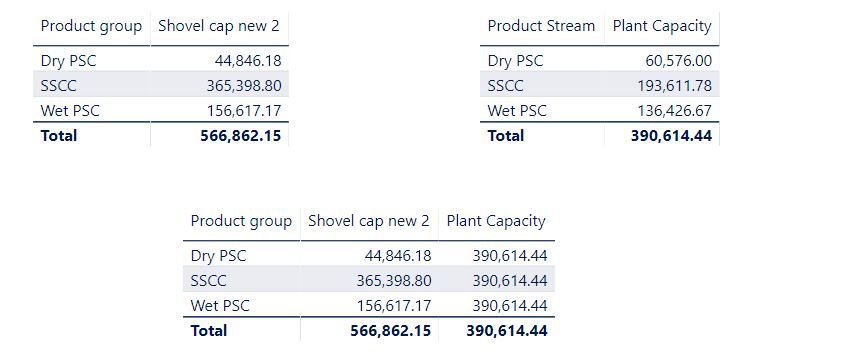
I created a bridge between two summarized tables. I want to  visualize columns from each of the tables into one visual, however it doesnt seem to work.


shovel and plant capacity per streamshovel and plant capacity per stream

As seen on the attached screenshot, the plant capacity on the bottom table just shows the total sum and not the sum per product group. Both shovel and plant capacity are calculated columns in two separate summarized tables and the capacity calculations use measures to create the columns.


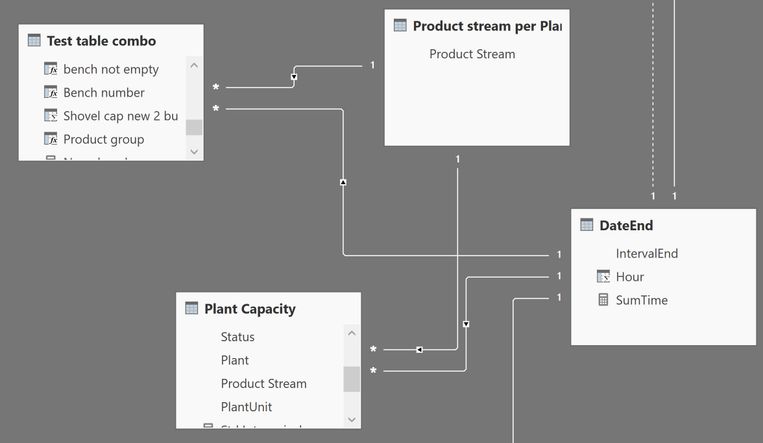
The Test table combo table has the shovel Cap and the Plant Capcity table has the plant capacity.


relationship.JPG


I am not sure what I have done wrong. Please assist.

3 REPLIES 3
Anonymous
Not applicable

Hi @Anonymous ,


If the last reply didn't solve your problem, can you share your pbix to us?


Best Regards,

Jay

Community Support Team _ Jay Wang

If this post helps, then please consider Accept it as the solution to help the other members find it more quickly.

Mariusz
Community Champion
Community Champion

Hi @Anonymous 


If you use in your visuals the column "product stream" from the table that is on the one side of the relationship it will be fine.


Best Regards,
Mariusz

If this post helps, then please consider Accepting it as the solution.

Please feel free to connect with me.
LinkedIn


Anonymous
Not applicable

Hi

Thanks for the response. It works when I use the "product stream" column from the bridge table "Product Stream per plant" . It does not work if I use the "product stream" column from the other two tables.

Helpful resources

Announcements
Join our Fabric User Panel

Join our Fabric User Panel

Share feedback directly with Fabric product managers, participate in targeted research studies and influence the Fabric roadmap.

February Power BI Update Carousel

Power BI Monthly Update - February 2026

Check out the February 2026 Power BI update to learn about new features.

FabCon Atlanta 2026 carousel

FabCon Atlanta 2026

Join us at FabCon Atlanta, March 16-20, for the ultimate Fabric, Power BI, AI and SQL community-led event. Save $200 with code FABCOMM.