FabCon is coming to Atlanta
Join us at FabCon Atlanta from March 16 - 20, 2026, for the ultimate Fabric, Power BI, AI and SQL community-led event. Save $200 with code FABCOMM.
Register now!- Power BI forums
- Get Help with Power BI
- Desktop
- Service
- Report Server
- Power Query
- Mobile Apps
- Developer
- DAX Commands and Tips
- Custom Visuals Development Discussion
- Health and Life Sciences
- Power BI Spanish forums
- Translated Spanish Desktop
- Training and Consulting
- Instructor Led Training
- Dashboard in a Day for Women, by Women
- Galleries
- Data Stories Gallery
- Themes Gallery
- Contests Gallery
- QuickViz Gallery
- Quick Measures Gallery
- Visual Calculations Gallery
- Notebook Gallery
- Translytical Task Flow Gallery
- TMDL Gallery
- R Script Showcase
- Webinars and Video Gallery
- Ideas
- Custom Visuals Ideas (read-only)
- Issues
- Issues
- Events
- Upcoming Events
The Power BI Data Visualization World Championships is back! Get ahead of the game and start preparing now! Learn more
- Power BI forums
- Forums
- Get Help with Power BI
- Desktop
- Re: Regroup Values to make less objects showed in ...
- Subscribe to RSS Feed
- Mark Topic as New
- Mark Topic as Read
- Float this Topic for Current User
- Bookmark
- Subscribe
- Printer Friendly Page

- Mark as New
- Bookmark
- Subscribe
- Mute
- Subscribe to RSS Feed
- Permalink
- Report Inappropriate Content
Regroup Values to make less objects showed in Column Legend?
Hello:
I have a dataset similar to below:
| cost | date | name |
| 100 | 2022/6/13 | main-name-1 |
| 101 | 2022/6/13 | main-name-2 |
| 102 | 2022/6/13 | main-name-3 |
| 103 | 2022/6/13 | subname-a-1 |
| 104 | 2022/6/13 | subname-a-2 |
| 105 | 2022/6/13 | subname-a-3 |
| 106 | 2022/6/13 | subname-b-1 |
| 107 | 2022/6/13 | subname-b-2 |
| 108 | 2022/6/13 | subname-b-3 |
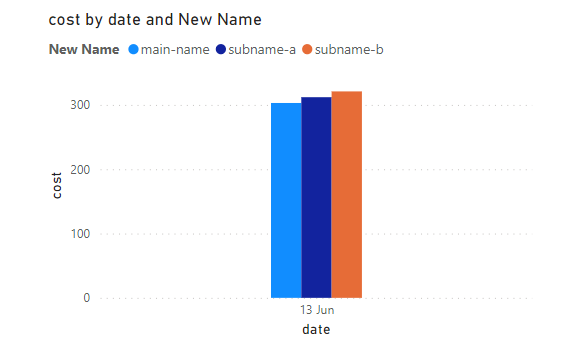
When I import the dataset in to a clustered column chart,
It will be showed as below.
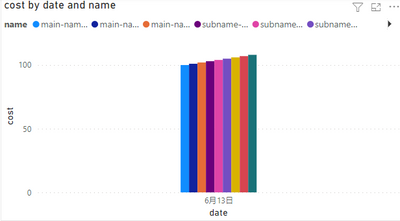
I want to regroup the values 'subname' in field name to reduce objects displayed in chart,
For example, down to 3 objects:main-name/subname-a/subname-b, just like below:
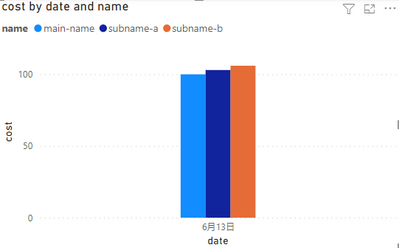
Please help me achieve this.
Thank you very much.
Solved! Go to Solution.


- Mark as New
- Bookmark
- Subscribe
- Mute
- Subscribe to RSS Feed
- Permalink
- Report Inappropriate Content
@kuma
I hope this is what you're looking for https://www.dropbox.com/t/hj5rU1wIXUuMrtCX
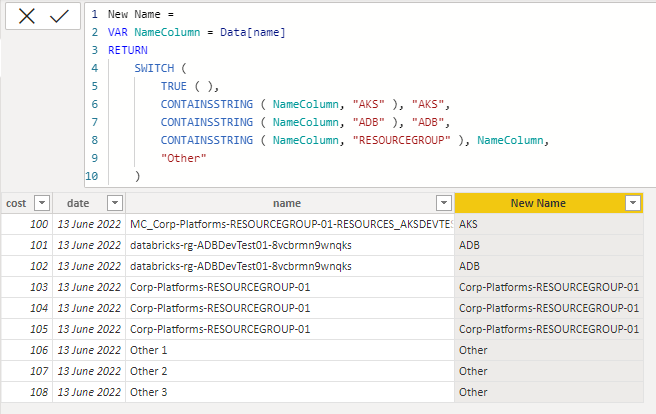
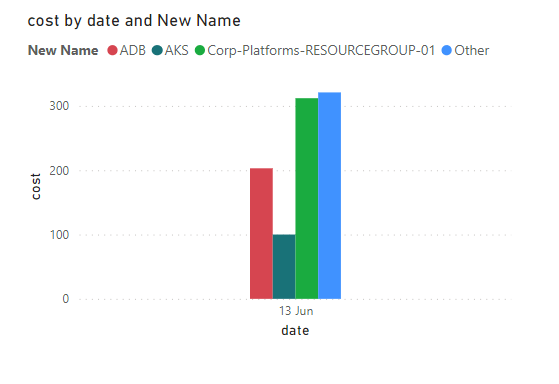
- Mark as New
- Bookmark
- Subscribe
- Mute
- Subscribe to RSS Feed
- Permalink
- Report Inappropriate Content
Hi @kuma
Here is a sample file with the solution https://www.dropbox.com/t/Ao5d3OS12zT88mDT
This is a general formula of a new column that removes the number (regardless of how many digits) from the end of the name
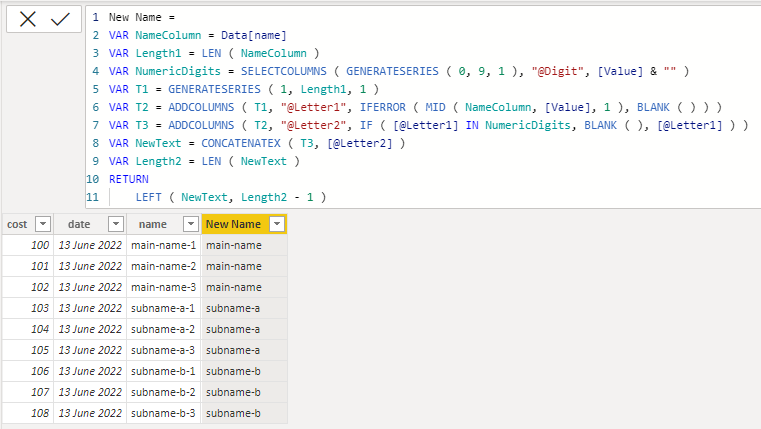
New Name =
VAR NameColumn = Data[name]
VAR Length1 = LEN ( NameColumn )
VAR NumericDigits = SELECTCOLUMNS ( GENERATESERIES ( 0, 9, 1 ), "@Digit", [Value] & "" )
VAR T1 = GENERATESERIES ( 1, Length1, 1 )
VAR T2 = ADDCOLUMNS ( T1, "@Letter1", IFERROR ( MID ( NameColumn, [Value], 1 ), BLANK ( ) ) )
VAR T3 = ADDCOLUMNS ( T2, "@Letter2", IF ( [@Letter1] IN NumericDigits, BLANK ( ), [@Letter1] ) )
VAR NewText = CONCATENATEX ( T3, [@Letter2] )
VAR Length2 = LEN ( NewText )
RETURN
    LEFT ( NewText, Length2 - 1 )
- Mark as New
- Bookmark
- Subscribe
- Mute
- Subscribe to RSS Feed
- Permalink
- Report Inappropriate Content
Hi @tamerj1
Thank you for the solution.
Actually in the name field there is a more complex pattern than I exampled.
There are four pattern below:
1.MC_[ResourceGroup name]-RESOURCES_[instanceID]_[Reigion]
be like: MC_Corp-Platforms-RESOURCEGROUP-01-RESOURCES_AKSDEVTEST01_USEAST2
2.databricks-rg-[instanceID]-[SubResourceGroupID]
be like: databricks-rg-ADBDevTest01-8vcbrmn9wnqks
3.[Main Resource Group name]
be like :Corp-Platforms-RESOURCEGROUP-01
4.Others
What I want is:
a.regroup all objects in No.1 and display a name by [AKS] in legend.
b.regroup all objects in No.2 and display a name by [ADB] in legend.
c.keep all [Main Resource Group name] which has [Corp-Platforms]prefix in No.3,and display the values in legend.
d.do not display [others] in No.4.
Could you tell me how to achieve this?
Thank you very much.
- Mark as New
- Bookmark
- Subscribe
- Mute
- Subscribe to RSS Feed
- Permalink
- Report Inappropriate Content
Hi @kuma
Little confused. Would you please have the four examples in a table showing nput in one column and output in the other column
| Input | Output |
| MC_Corp-Platforms-RESOURCEGROUP-01-RESOURCES_AKSDEVTEST01_USEAST2 | ? |
| databricks-rg-ADBDevTest01-8vcbrmn9wnqks | ? |
| Corp-Platforms-RESOURCEGROUP-01 | ? |
| "Others" | ? |
- Mark as New
- Bookmark
- Subscribe
- Mute
- Subscribe to RSS Feed
- Permalink
- Report Inappropriate Content
Hi @tamerj1
Here are the examples what I want to get values output in the new column.
Please tell me how to archieve this,
Thank you very much.
| Input | Output |
| MC_Corp-Platforms-RESOURCEGROUP-01-RESOURCES_AKSDEVTEST01_USEAST2 | AKS |
| databricks-rg-ADBDevTest01-8vcbrmn9wnqks | ADB |
| Corp-Platforms-RESOURCEGROUP-01 | Corp-Platforms-RESOURCEGROUP-01 |
| "Others" | Others |
- Mark as New
- Bookmark
- Subscribe
- Mute
- Subscribe to RSS Feed
- Permalink
- Report Inappropriate Content
@kuma
I hope this is what you're looking for https://www.dropbox.com/t/hj5rU1wIXUuMrtCX
- Mark as New
- Bookmark
- Subscribe
- Mute
- Subscribe to RSS Feed
- Permalink
- Report Inappropriate Content
Hi @tamerj1
Thank you very much.
This solution you provided can solve my issue.


- Mark as New
- Bookmark
- Subscribe
- Mute
- Subscribe to RSS Feed
- Permalink
- Report Inappropriate Content
Create a new calculated column by using the below formula
Subname= left(name,len(name)-2)add the new calculated column to the categories and it will be working. Reply if you have any doubts,
Mark as a solution if this works for you.
Thanks and regards,
Atma.
- Mark as New
- Bookmark
- Subscribe
- Mute
- Subscribe to RSS Feed
- Permalink
- Report Inappropriate Content
Hi Dhacd
Thank you for your reply.
I think this would help.
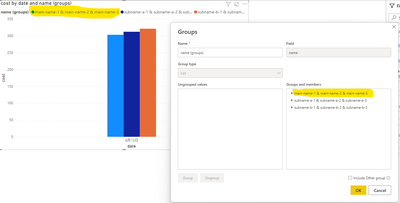
BTW, when I use 'create group' on this field, the value in new groups is settled automatically like below:
Is the any way I can manually edit the text displayed in legend?

Helpful resources

Power BI Monthly Update - November 2025
Check out the November 2025 Power BI update to learn about new features.

Fabric Data Days
Advance your Data & AI career with 50 days of live learning, contests, hands-on challenges, study groups & certifications and more!

FabCon Atlanta 2026
Join us at FabCon Atlanta, March 16-20, for the ultimate Fabric, Power BI, AI and SQL community-led event. Save $200 with code FABCOMM.

| User | Count |
|---|---|
| 58 | |
| 45 | |
| 42 | |
| 21 | |
| 18 |


