cancel
Showing results for 
Search instead for 
Did you mean: 

The Power BI Data Visualization World Championships is back! Get ahead of the game and start preparing now! Learn more

Reply
Anonymous
Not applicable

Regexp_replace function in DAX

Hi,

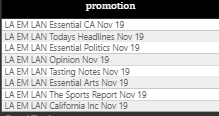
I have column where data is as shown below, for this column "REGEXP_REPLACE(Promotion,'LA EM LAN | Nov 19','')" function is used in google visual stuido to achive a new column with data like "Essesntial CA", "Today Headlines", "Opinion", "Tasting Notes"  so on please help me to create a DAX for this requirement in power BI 
pbi.PNG

1 ACCEPTED SOLUTION

Hi @Anonymous ,


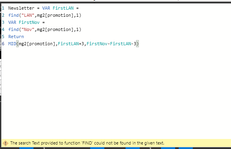
This is because your column mg2[promotion] has rows where LAN or Nov are not present.


Try this Calculated Column


Column = 
VAR FirstLAN =
    Find (
        "LAN",
        'Table'[Promotion],
        1,
        LEN('Table'[Promotion]))
    
VAR FirstNov =
    FIND (
        "Nov",
        'Table'[Promotion],
        1,
        LEN('Table'[Promotion]))
    
RETURN
//FirstLAN & " " & FirstNov
SWITCH(
    TRUE(),
    FirstLAN = FirstNov || FirstLAN > FirstNov, " ",
    FirstNov > FirstLAN , 
    MID (
        'Table'[Promotion],
        FirstLAN + 3 , -- to adjust LAN (3)
        FirstNov - FirstLAN - 3 -- to adjust LAN (3)
    )
)


Regards,

Harsh Nathani

Did I answer your question? Mark my post as a solution! Appreciate with a Kudos!! (Click the Thumbs Up Button)

View solution in original post

5 REPLIES 5
harshnathani
Community Champion
Community Champion

Hi @Anonymous ,


You should do this in Power Query.


But if you want to create a Calculated Column if your Values are between LAN and Nov.


Column = 
VAR FirstLAN =
    FIND (
        "LAN",
        'Table'[Promotion],
        1
    )
VAR FirstNov =
    FIND (
        "Nov",
        'Table'[Promotion],
        1
    )
RETURN

    MID (
        'Table'[Promotion],
        FirstLAN + 3 , -- to adjust LAN (3)
        FirstNov - FirstLAN - 3 -- to adjust LAN (3)
    )


1.jpg


Regards,
Harsh Nathani

Did I answer your question? Mark my post as a solution! Appreciate with a Kudos!! (Click the Thumbs Up Button)


Anonymous
Not applicable

Hi Harsh,


Thank you for the reply, I tried using your DAX but it is throwing me the below error.

pbi_1.PNG

I googled about this error and found that adding Iferror to find,mid will work, I tried that but it is throwing me another error 

"Expressions that yield variant data-type cannot be used to define calculated columns"

and this is because i am giving string "LAN"  and interger 1 in the same calculated column.

Please suggestme some other alternative

Hi @Anonymous ,


This is because your column mg2[promotion] has rows where LAN or Nov are not present.


Try this Calculated Column


Column = 
VAR FirstLAN =
    Find (
        "LAN",
        'Table'[Promotion],
        1,
        LEN('Table'[Promotion]))
    
VAR FirstNov =
    FIND (
        "Nov",
        'Table'[Promotion],
        1,
        LEN('Table'[Promotion]))
    
RETURN
//FirstLAN & " " & FirstNov
SWITCH(
    TRUE(),
    FirstLAN = FirstNov || FirstLAN > FirstNov, " ",
    FirstNov > FirstLAN , 
    MID (
        'Table'[Promotion],
        FirstLAN + 3 , -- to adjust LAN (3)
        FirstNov - FirstLAN - 3 -- to adjust LAN (3)
    )
)


Regards,

Harsh Nathani

Did I answer your question? Mark my post as a solution! Appreciate with a Kudos!! (Click the Thumbs Up Button)

Anonymous
Not applicable

This worked, thank you so much

amitchandak
Super User
Super User

@Anonymous , refer if this can help

https://radacad.com/power-bi-and-regular-expressions

Share with Power BI Enthusiasts: Full Power BI Video (20 Hours) YouTube
Microsoft Fabric Series 60+ Videos YouTube
Microsoft Fabric Hindi End to End YouTube

Helpful resources

Announcements
Power BI DataViz World Championships

Power BI Dataviz World Championships

The Power BI Data Visualization World Championships is back! Get ahead of the game and start preparing now!

December 2025 Power BI Update Carousel

Power BI Monthly Update - December 2025

Check out the December 2025 Power BI Holiday Recap!

FabCon Atlanta 2026 carousel

FabCon Atlanta 2026

Join us at FabCon Atlanta, March 16-20, for the ultimate Fabric, Power BI, AI and SQL community-led event. Save $200 with code FABCOMM.