Join us at FabCon Atlanta from March 16 - 20, 2026, for the ultimate Fabric, Power BI, AI and SQL community-led event. Save $200 with code FABCOMM.
Register now!Learn from the best! Meet the four finalists headed to the FINALS of the Power BI Dataviz World Championships! Register now
Hi,
Kindly help me to hide a value(1) which is highlighted i have created si.no using following dax(measure)
Solved! Go to Solution.
Check whether you use right field in HASONEVALUE function. It should work.
Hi @gladies123 ,
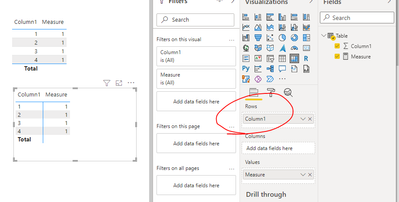
Let's take an example:
Measure = IF(ISINSCOPE('Table'[Column1]),1,BLANK())
So you measure may be:
Measure = IF(ISINSCOPE('Table'[the ROW field in matrix]),[your rank measure],BLANK())
Best Regards,
Eyelyn Qin
If this post helps, then please consider Accept it as the solution to help the other members find it more quickly.
@gladies123 Try this:
si.no= IF(HASONEVALUE(cxsurrender[your_crossed_out_field]),RANKX(ALLSELECTED(cxsurrender[V_RET_RESULT]),CALCULATE(SUM(cxsurrender[Index])),,DESC,Dense),BLANK())
Thanks but it returned blank
Right, for total it returns blank. What should it return?
it returns whole column as blank, 1(value) in the total section has to hide
Check whether you use right field in HASONEVALUE function. It should work.
Share feedback directly with Fabric product managers, participate in targeted research studies and influence the Fabric roadmap.
Check out the February 2026 Power BI update to learn about new features.
| User | Count |
|---|---|
| 68 | |
| 61 | |
| 45 | |
| 19 | |
| 15 |
| User | Count |
|---|---|
| 108 | |
| 108 | |
| 39 | |
| 30 | |
| 26 |