cancel
Showing results for 
Search instead for 
Did you mean: 

The Power BI Data Visualization World Championships is back! Get ahead of the game and start preparing now! Learn more

Reply
gladies123
Helper I
Helper I

Reg:Default selection of slicer value(MAX DATE)

Hi team,

I have created calendar table as calendar(min(date_refresh),max(date_refresh) date_refresh is a column which is located in my another table called business.Kindly provide solution to make default selection of max date in slicer , if my data is updated till 12-9-2021 so default selection has to be 12/9/2021 in slicer  then if my data is updated till 13-9-2021 so default selection has to be 13/9/2021 in slicer and it should be displayed all dates in slicer  but it should make a default selection max date


THANKS,

GLADIS

2 REPLIES 2
Anonymous
Not applicable

Hi  @gladies123 ,

This function power bi can’t be realized for the time being, you can try it: change the label of the maximum date to "Maxdate" and place it on the top of the slicer for better identification.

I created some data:

Table1: 2021.1.1 – 2021.3.1

vyangliumsft_0-1632807723942.png

Calendar table: CALENDAR(MIN('Table'[date]),MAX('Table'[date]))

vyangliumsft_1-1632807723946.png

Here are the steps you can follow:

1. Create calculated column.

Column =
var _max=MAXX(ALL('Calendar table'),'Calendar table'[Date])
return
IF(
    'Calendar table'[Date]=_max,"Maxdate",FORMAT('Calendar table'[Date],"yyyy/mm/dd"))

2. Place [Column] in the slicer and set Sort descending.

vyangliumsft_2-1632807723948.jpeg

3. Result:

Will change the maximum date to "Maxdate" and stay at the top of the slicer:
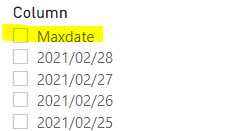
vyangliumsft_3-1632807723948.png

Add a row of dates in the Table: 2021.4.1

Then 2021.4.1 becomes "Maxdate" and stays at the top of the slicer
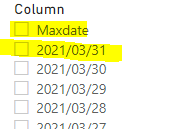
vyangliumsft_4-1632807723949.png


Best Regards,

Liu Yang

If this post helps, then please consider Accept it as the solution to help the other members find it more quickly

halfglassdarkly
Responsive Resident
Responsive Resident

It's a bit of a hack, but if you have a date dimension you could create a column that checks for the current/max data date and groups every other date under 'future' or 'previous' so eg


=switch(true(),

[Date] > Today(), "Future",

[Date] < Today(), "Past",

"Current")


Then add that to your slicer before the date column to form a hierarchy in the slicer. That way you could save the file with the 'Current' parent ticked, which would include only the current date which should update dynamically.


Helpful resources

Announcements
Power BI DataViz World Championships

Power BI Dataviz World Championships

The Power BI Data Visualization World Championships is back! Get ahead of the game and start preparing now!

November Power BI Update Carousel

Power BI Monthly Update - November 2025

Check out the November 2025 Power BI update to learn about new features.

FabCon Atlanta 2026 carousel

FabCon Atlanta 2026

Join us at FabCon Atlanta, March 16-20, for the ultimate Fabric, Power BI, AI and SQL community-led event. Save $200 with code FABCOMM.