cancel
Showing results for 
Search instead for 
Did you mean: 

Data Days is here! Join us now for 60+ days of learning, challenges, and connection. Learn more

Reply
Anonymous
Not applicable

Refresh timeout

Hi all, 


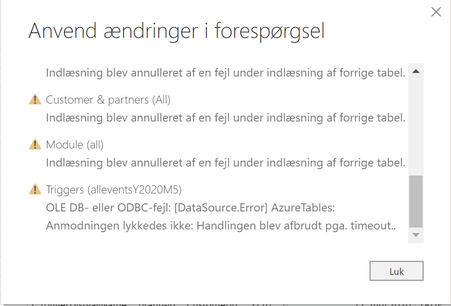
When i load new tables or refresh my current tables i get the following error message "Request did not succeed: The request was interrupted because of timeout" (See picture below in Danish). This often happens after about 1 hour, but a few times it works. 


I'm using Azure Table Storage databases and Azure SQL databases. The ones that are timing out are a Azure Table Storage databases. 


I have tried following this guide: https://stackoverflow.com/questions/51718344/how-to-set-a-max-run-time-timeout-for-power-query, but it did not work. 


And all other guides here seems to solve the problem for Power BI Service, but how do i fix this for Power BI Desktop? 


Udklip.PNG

Kind regards, 

Junior-BI-assi

2 REPLIES 2
v-xuding-msft
Community Support
Community Support

Hi @Anonymous ,


What did you do while transforming data in Query Editor? Please delete the steps firstly (with the condition that you add the CommandTimeout argument ) to check if it works fine . If it is caused by transforming, maybe you could implement it with DAX.


Best Regards,
Xue Ding
If this post helps, then please consider Accept it as the solution to help the other members find it more quickly.
Anonymous
Not applicable

The steps are as follows (Exanding data and changing the type of a single collumn) 


let
Kilde = AzureStorage.Tables("triggerevents"),
alleventsY2020M1 = Kilde{[Name="alleventsY2020M6"]}[Data],
#"Udvidet Content" = Table.ExpandRecordColumn(alleventsY2020M1, "Content", {"CustomerTriggerId", "Data", "EventDateUtc", "EventFound", "ResponseMessage", "Success", "TriggerName"}, {"Content.CustomerTriggerId", "Content.Data", "Content.EventDateUtc", "Content.EventFound", "Content.ResponseMessage", "Content.Success", "Content.TriggerName"}),
#"Ændret type" = Table.TransformColumnTypes(#"Udvidet Content",{{"Content.EventDateUtc", type date}})
in
#"Ændret type"


How do i add commandtimeout argument? 

Helpful resources

Announcements
Fabric Data Days is here Carousel

Fabric Data Days 2026

Don't miss out on Data Days, June 15 through August 7. Learn Fabric, Power BI, SQL, AI and more.

May Power BI Update Carousel

Power BI Monthly Update - May 2026

Check out the May 2026 Power BI update to learn about new features.

Power BI DataViz World Championships carousel

Power BI DataViz World Championships - June 2026

A new Power BI DataViz World Championship is coming this June! Don't miss out on submitting your entry.