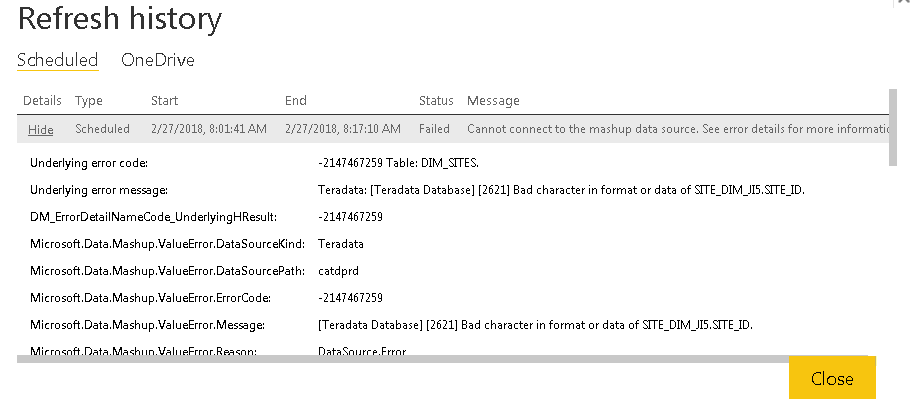
Hi @harrinho,
Here is a similar issue reported on Power BI Issues forum, in which a workaround is mentioned. Could you go to check if it helps in your scenario?
Hi all,
I've faced the exact same problem (GatewayPipelineErrorCode=DM_GWPipeline_Gateway_SpooledOperationMissing)
for 2 days now and have only just solved the issue.
I removed all tables and added them back in one by one. The error changed to an OleAut date error in a certain table.
From this reference I found any date on or before 30/12/1899 (e.g. 11/12/1089) would cause an error. Replacing/removing these would cause the whole original report to work. In query editor, order your date field to find the problem dates.
As values can be introduced to your Dataset over time, replacing each one isn't a good solution. I've come up with the following M code which you can add to your query editor (Query Editor, View, Advanced Editor) to remove any dates which will cause this error:
#"Remove inappropriate dates" = Table.TransformColumns(#PREVIOUS_STEP_OR_NO#TABLE_NAME, {"COLUMN_TO_AFFECT", each if _ < #date(1900, 1, 1) then #date(1900, 1, 1) else _}),
real-life-example:
e.g. #"Remove inappropriate dates" = Table.TransformColumns(dbo_tblAccounts, {"DOB", each if _ < #date(1900, 1, 1) then #date(1900, 1, 1) else _}),
Remember to take off any filters/sorting you introduced whilst diagnosing your issue!
Hope this helps someone.
In addition, if the issue persists, I would suggest you create a support ticket on Power BI Support page for better assistance. 
Regards