cancel
Showing results for 
Search instead for 
Did you mean: 

Data Days is here! Join us now for 60+ days of learning, challenges, and connection. Learn more

Reply
Anonymous
Not applicable

Refresh Problem

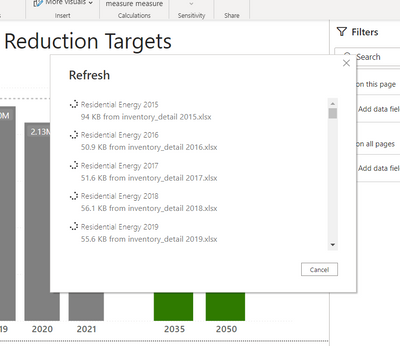
I have a Power BI dashboard that I cannot get to update. The source files are .xlsx files. Most source files are no larger than 38 KB and the entire project is 4,434 KB. The project used to refresh with the same amount of data, but I hadn't refreshed it in a few months. It gets stuck on the refresh page and I have to force quit the project from task manager because I can't even get it to cancel the update- it just freezes up completely. I've let it run for 6+ hours trying to update. Any advice?PBI Refresh Issue.png

1 ACCEPTED SOLUTION
amitchandak
Super User
Super User

@Anonymous , refresh tables one by one and save after each refresh. And check which table is causing that

Share with Power BI Enthusiasts: Full Power BI Video (20 Hours) YouTube
Microsoft Fabric Series 60+ Videos YouTube
Microsoft Fabric Hindi End to End YouTube

View solution in original post

1 REPLY 1
amitchandak
Super User
Super User

@Anonymous , refresh tables one by one and save after each refresh. And check which table is causing that

Share with Power BI Enthusiasts: Full Power BI Video (20 Hours) YouTube
Microsoft Fabric Series 60+ Videos YouTube
Microsoft Fabric Hindi End to End YouTube

Helpful resources

Announcements
Fabric Data Days is here Carousel

Fabric Data Days 2026

Don't miss out on Data Days, June 15 through August 7. Learn Fabric, Power BI, SQL, AI and more.

May Power BI Update Carousel

Power BI Monthly Update - May 2026

Check out the May 2026 Power BI update to learn about new features.

Power BI DataViz World Championships carousel

Power BI DataViz World Championships - June 2026

A new Power BI DataViz World Championship is coming this June! Don't miss out on submitting your entry.