Join us at FabCon Atlanta from March 16 - 20, 2026, for the ultimate Fabric, Power BI, AI and SQL community-led event. Save $200 with code FABCOMM.
Register now!Get Fabric certified for FREE! Don't miss your chance! Learn more
Hi everyone,
I have a dashboard on power BI desktop that I refresh manually twice a day.
I would like to display the refresh date on my dashboard.
Is it possible ?
Thanks.
Zakaria.
Solved! Go to Solution.
There are three options:
There are two ways to write a measure that returns the most recent date / processing date in your data model.
1. If you have a data(transaction) table
Most Recent Transaction = CALCULATE( MAX(Transactions[Date]), ALL(Transactions) )
2. If you have a calendar table - there's a two step process
A. Create a calculated column
Processing Date Flag = IF( Calendar[Date] = Now(), 1, 0 )
B. Create a measure
Processing Date = CALCULATE( MAX(Calendar[Date]), Calendar[Processing Date Flag] = 1 )
The third way is a lot easier. You can edit a tile on your dashboard to show the last refresh date. This is better in a way because each tile will show the right date for the underlying data set
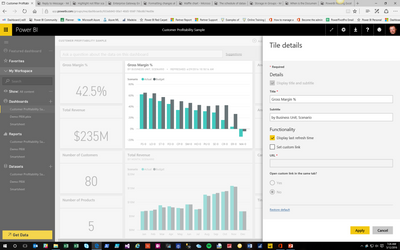
3. Click on the "..." on the top right of a dashboard tile. This opens up a menu click on the pencil icon which will bring up a properties menu. Check the box to turn on last refresh date. The only downside is you'll have to go and do this for every tile on your dashboard.
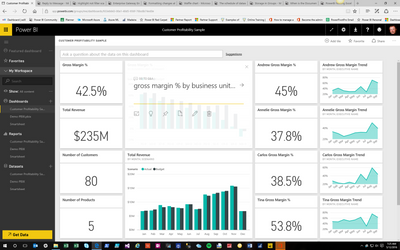
Editing a Tile
Turning on Last Refresh Date
You could create a query or add a calculated column to one of your queries that is essentially DateTime.LocalNow()
https://msdn.microsoft.com/en-us/library/mt253492.aspx
There are three options:
There are two ways to write a measure that returns the most recent date / processing date in your data model.
1. If you have a data(transaction) table
Most Recent Transaction = CALCULATE( MAX(Transactions[Date]), ALL(Transactions) )
2. If you have a calendar table - there's a two step process
A. Create a calculated column
Processing Date Flag = IF( Calendar[Date] = Now(), 1, 0 )
B. Create a measure
Processing Date = CALCULATE( MAX(Calendar[Date]), Calendar[Processing Date Flag] = 1 )
The third way is a lot easier. You can edit a tile on your dashboard to show the last refresh date. This is better in a way because each tile will show the right date for the underlying data set
3. Click on the "..." on the top right of a dashboard tile. This opens up a menu click on the pencil icon which will bring up a properties menu. Check the box to turn on last refresh date. The only downside is you'll have to go and do this for every tile on your dashboard.
Editing a Tile
Turning on Last Refresh Date
Thanks a lot !
Is it possible to dipslay it a little bit bigger and cutomize it inside my dashboard ?
Thanks in advance,
Zakaria.
Share feedback directly with Fabric product managers, participate in targeted research studies and influence the Fabric roadmap.
Check out the January 2026 Power BI update to learn about new features.
| User | Count |
|---|---|
| 68 | |
| 59 | |
| 44 | |
| 20 | |
| 15 |
| User | Count |
|---|---|
| 104 | |
| 103 | |
| 37 | |
| 27 | |
| 26 |