Join us at FabCon Atlanta from March 16 - 20, 2026, for the ultimate Fabric, Power BI, AI and SQL community-led event. Save $200 with code FABCOMM.
Register now!View all the Fabric Data Days sessions on demand. View schedule
Hi all,
I have a table which I use to collect data from our teams on areas of improvements. I currently produce a number of excels to suit the graphs I produce however I know theres a better way. I unpivoted the data and Im nearly there but not quite in terms of format.
The data is currently formatted as below:
| Project Name | GUID | Stage | Date | Product Score | Product Comments | Service Score | Service Comments | Defects Score | Defects Comments |
| Project 1 | 123 | Stage 1 | 1/1/21 | 9 | text | 8 | text | 7 | text |
| Project 2 | 124 | Precon | 1/2/21 | 10 | text | 7 | text | 5 | text |
| Project 3 | 125 | Stage 1 | 1/3/21 | 5 | text | 6 | text | 9 | text |
I would like to create a radar graph which shows all the different areas of improvement and sepertly report on their comments.
To do this I presume I need to show the report as:
| Project Name | GUID | Stage | Date | Area of Improvement | Score | Comments |
| Project 1 | 123 | Stage 1 | 1/1/21 | Product | 9 | text |
| Project 1 | 123 | Stage 1 | 1/1/21 | Service | 8 | text |
| Project 1 | 123 | Stage 1 | 1/1/21 | Defects | 7 | text |
| Project 2 | 124 | Precon | 1/2/21 | Product | 10 | text |
| Project 2 | 124 | Precon | 1/2/21 | Service | 7 | text |
| Project 2 | 124 | Precon | 1/2/21 | Defects | 5 | text |
Without having to create numerous rows for each project, how can I produce this within PowerBI?
As always, any help is greatly appreciated 🙂
Solved! Go to Solution.
Hi @eilidh3 ,
Try like following :
base data:

Unpivot three column:
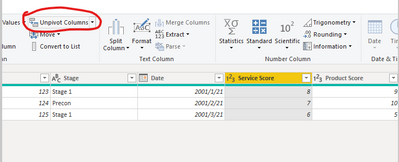
Then get the below:
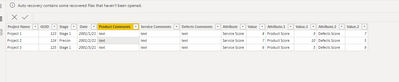
Then apply and use the following dax to create a new table:
Table2 =
VAR test1 =
SELECTCOLUMNS (
'Table',
"Project Name", 'Table'[Project Name],
"GUID", 'Table'[GUID],
"Stage", 'Table'[Stage],
"Date", 'Table'[Date],
"Area of Improvement", 'Table'[Attribute],
"Score", 'Table'[Value],
"Comments", "text"
)
VAR test2 =
SELECTCOLUMNS (
'Table',
"Project Name", 'Table'[Project Name],
"GUID", 'Table'[GUID],
"Stage", 'Table'[Stage],
"Date", 'Table'[Date],
"Area of Improvement", 'Table'[Attribute.1],
"Score", 'Table'[Value.1],
"Comments", "text"
)
VAR test3 =
SELECTCOLUMNS (
'Table',
"Project Name", 'Table'[Project Name],
"GUID", 'Table'[GUID],
"Stage", 'Table'[Stage],
"Date", 'Table'[Date],
"Area of Improvement", 'Table'[Attribute.2],
"Score", 'Table'[Value.2],
"Comments", "text"
)
RETURN
UNION ( test1, test2, test3 )
Final you will get the below:
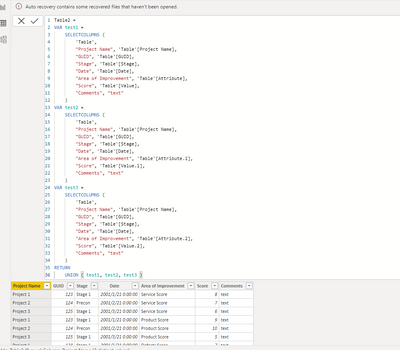
Wish it is helpful for you!
You could download my pbix file if you need!
Best Regards
Lucien
Hi @eilidh3 ,
Try like following :
base data:
Unpivot three column:
Then get the below:
Then apply and use the following dax to create a new table:
Table2 =
VAR test1 =
SELECTCOLUMNS (
'Table',
"Project Name", 'Table'[Project Name],
"GUID", 'Table'[GUID],
"Stage", 'Table'[Stage],
"Date", 'Table'[Date],
"Area of Improvement", 'Table'[Attribute],
"Score", 'Table'[Value],
"Comments", "text"
)
VAR test2 =
SELECTCOLUMNS (
'Table',
"Project Name", 'Table'[Project Name],
"GUID", 'Table'[GUID],
"Stage", 'Table'[Stage],
"Date", 'Table'[Date],
"Area of Improvement", 'Table'[Attribute.1],
"Score", 'Table'[Value.1],
"Comments", "text"
)
VAR test3 =
SELECTCOLUMNS (
'Table',
"Project Name", 'Table'[Project Name],
"GUID", 'Table'[GUID],
"Stage", 'Table'[Stage],
"Date", 'Table'[Date],
"Area of Improvement", 'Table'[Attribute.2],
"Score", 'Table'[Value.2],
"Comments", "text"
)
RETURN
UNION ( test1, test2, test3 )
Final you will get the below:
Wish it is helpful for you!
You could download my pbix file if you need!
Best Regards
Lucien
@eilidh3 , One option I can see that you can unpivot data in power Query and then use it , If you can use that
https://radacad.com/pivot-and-unpivot-with-power-bi
In matrix you have option to show measure on row. But not not suitable for other visuals
Check out the November 2025 Power BI update to learn about new features.
Advance your Data & AI career with 50 days of live learning, contests, hands-on challenges, study groups & certifications and more!