cancel
Showing results for 
Search instead for 
Did you mean: 

The Power BI Data Visualization World Championships is back! It's time to submit your entry. Live now!

Reply
ozlemv
Frequent Visitor

Reflecting ranking with filter function

Hi,


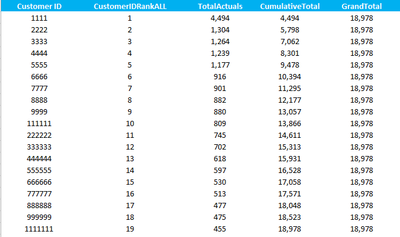
I am trying to work out the customer rank based on a condition. The below is the sample dataset, which reflects CustomerID, CustomerIDRank (measure-based on total amounts), Total Actuals(measure- Sum of Actuals by Customer), Cumulative Total(measure), GrandTotal(measure-Sum of Actuals for all Customers)


I would like to show the ranking of company where the cumulative total is equal or higher than the 20% of grand total. Below is the formulation I wrote, but it's not working. 


TopCustomers = calculate(value(vDetailSalesCompData[CompanyID Rank ALL]) ,filter(vDetailSalesCompData,vDetailSalesCompData[CumulativeTotal]>=vDetailSalesCompData[20%GrandTotal]))


Thanks in advance,


sample.PNG


1 REPLY 1
v-huizhn-msft
Microsoft Employee
Microsoft Employee

Hi @ozlemv,

You should create a new table to show the the ranking. Please click 'New Table' under Modeling on home Page. Type the formula below and check it it returns expected result.

Selected Rank=SELECTCOLUMNS(Filter(vDetailSalesCompData,vDetailSalesCompData[CumulativeTotal]>=vDetailSalesCompData[20%GrandTotal]),"Rank",vDetailSalesCompData[CompanyID Rank ALL])


Please let me know if you have any question.

Best Regards,
Angelia


Helpful resources

Announcements
Power BI DataViz World Championships

Power BI Dataviz World Championships

The Power BI Data Visualization World Championships is back! It's time to submit your entry.

January Power BI Update Carousel

Power BI Monthly Update - January 2026

Check out the January 2026 Power BI update to learn about new features.

FabCon Atlanta 2026 carousel

FabCon Atlanta 2026

Join us at FabCon Atlanta, March 16-20, for the ultimate Fabric, Power BI, AI and SQL community-led event. Save $200 with code FABCOMM.