Join us at FabCon Atlanta from March 16 - 20, 2026, for the ultimate Fabric, Power BI, AI and SQL community-led event. Save $200 with code FABCOMM.
Register now!The Power BI Data Visualization World Championships is back! It's time to submit your entry. Live now!
Hello,
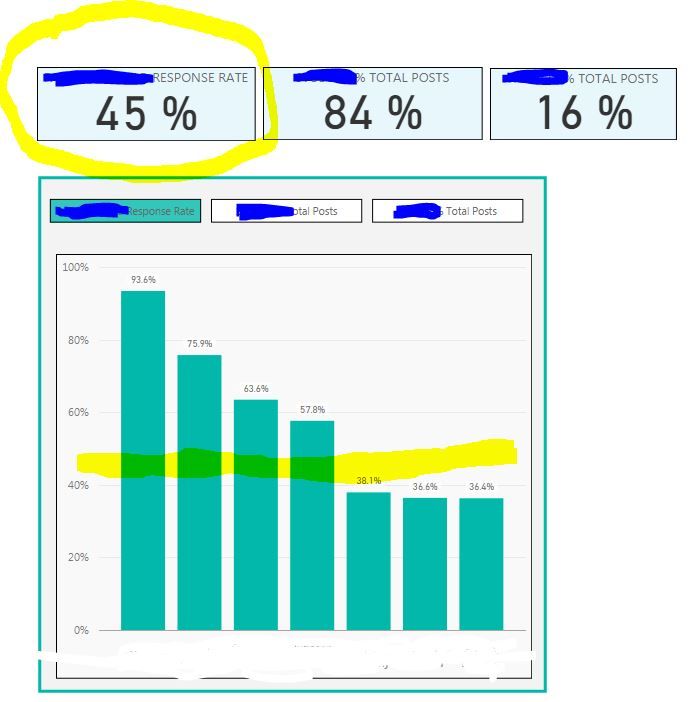
I am aware that the dynamic reference line feature is in development right now, but I am wondering if this is possible through a combo chart. I'm not able to figure out a way.
I have the following view that is rates across people with a stacked bar. I want to ideally have a reference line that shows the average percent. In this example, it's 45%. The trick is, I have person on this axis, so I am not able to figure out how to plot the overall 45%. Also, that 45% will change based on what the user selects in the slicers (not shown).
Any ideas? Please let me know if you need add'l info!
Solved! Go to Solution.
Response Rate = Calculate(sum(Table[Thread Responses]),All(Table)) / Calculate(sum(Table[Thread Count]),All(Table))
If you have Slicers to filter you can Change All to AllExcept(Table,ColumnSlicer)
thanks! I've never used that! it might work however my rate is a calculation:
Response Rate = Sum ( Thread Responses)/Sum(Thread Count)
I'm not sure how I would go about using an "all table" with that as it's not giving me that as an available field when I try All (table) or All(column).
Response Rate = Calculate(sum(Table[Thread Responses]),All(Table)) / Calculate(sum(Table[Thread Count]),All(Table))
If you have Slicers to filter you can Change All to AllExcept(Table,ColumnSlicer)
The Power BI Data Visualization World Championships is back! It's time to submit your entry.
Check out the January 2026 Power BI update to learn about new features.
| User | Count |
|---|---|
| 56 | |
| 42 | |
| 40 | |
| 21 | |
| 20 |
| User | Count |
|---|---|
| 142 | |
| 105 | |
| 63 | |
| 36 | |
| 35 |