Join us at FabCon Atlanta from March 16 - 20, 2026, for the ultimate Fabric, Power BI, AI and SQL community-led event. Save $200 with code FABCOMM.
Register now!The Power BI Data Visualization World Championships is back! Get ahead of the game and start preparing now! Learn more
Hi,
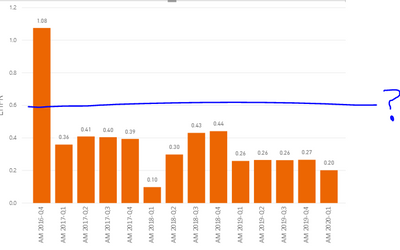
How to add reference line on bar chart. The Example below shows I need reference line on 0.6 value. How to achieve this?
Solved! Go to Solution.
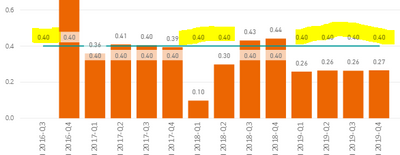
@Anonymous , Switch it on (Label), Scroll till Customize Series option. Switch on. Select the series name in the combo(Line series in this case) and make in off using the show button below
@Anonymous , Create a measure
Line = 0.1
and add a line (use clustered line visual) :https://docs.microsoft.com/en-us/power-bi/visuals/power-bi-visualization-combo-chart
Do not use secondary y-axis
Hi, How to turn off only the Reference line values?
Hi, It is hidding my bar values too. Only I wanted to hide Reference line values. thanks!
@Anonymous , Switch it on (Label), Scroll till Customize Series option. Switch on. Select the series name in the combo(Line series in this case) and make in off using the show button below
The Power BI Data Visualization World Championships is back! Get ahead of the game and start preparing now!
| User | Count |
|---|---|
| 38 | |
| 35 | |
| 33 | |
| 32 | |
| 29 |
| User | Count |
|---|---|
| 134 | |
| 96 | |
| 78 | |
| 67 | |
| 65 |