cancel
Showing results for 
Search instead for 
Did you mean: 

Data Days is here! Join us now for 60+ days of learning, challenges, and connection. Learn more

Reply
Anonymous
Not applicable

Refer to previous/next row in a calculated column

Hi All,


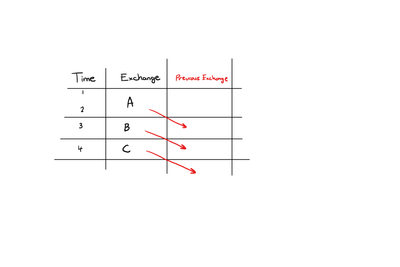
I am trying to create a calculated column which lists the value of the previous row of another column.


refer pbi.png


Any ideas on how to do this?


1 ACCEPTED SOLUTION
Tahreem24
Super User
Super User

@Anonymous ,


  1. Step 1: Go to Power Query Editor --> Add Column Option --> CLick on "Index Column" --> Apply and CLose.
  2. Create Measure = CALCULATE(VALUES('Table'[Exchange]),'Table'[Index]-1)

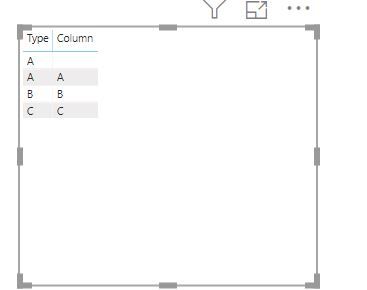
Capture.JPG

Don't forget to hit Thumbs up and accept this as a solution if you find it helpful! 

Don't forget to give thumbs up and accept this as a solution if it helped you!!!

Please take a quick glance at newly created dashboards : Restaurant Management Dashboard , HR Analytics Report , Hotel Management Report, Sales Analysis Report , Fortune 500 Companies Analysis , Revenue Tracking Dashboard

View solution in original post

4 REPLIES 4
Tahreem24
Super User
Super User

@Anonymous ,


  1. Step 1: Go to Power Query Editor --> Add Column Option --> CLick on "Index Column" --> Apply and CLose.
  2. Create Measure = CALCULATE(VALUES('Table'[Exchange]),'Table'[Index]-1)

Capture.JPG

Don't forget to hit Thumbs up and accept this as a solution if you find it helpful! 

Don't forget to give thumbs up and accept this as a solution if it helped you!!!

Please take a quick glance at newly created dashboards : Restaurant Management Dashboard , HR Analytics Report , Hotel Management Report, Sales Analysis Report , Fortune 500 Companies Analysis , Revenue Tracking Dashboard
Anonymous
Not applicable

 Thank you for this. I created the index column, but want a calculated instead of the measure you described. I tried using the same equation in calculated column but it did not work. Any tips?

@Anonymous ,


Create column like below:

Column = CALCULATE(MAX('Table'[Exchange]),ALL('Table'),'Table'[Date]<EARLIER('Table'[Date]))
 
Don't forget to hit Thumbs up and accept this as a solution if you find it helpful! 
Don't forget to give thumbs up and accept this as a solution if it helped you!!!

Please take a quick glance at newly created dashboards : Restaurant Management Dashboard , HR Analytics Report , Hotel Management Report, Sales Analysis Report , Fortune 500 Companies Analysis , Revenue Tracking Dashboard
Anonymous
Not applicable

Hi @Tahreem24 how do I do this if I want it the other way around? 

StartOutput End
22/03/202028/03/2020
29/03/202030/03/2020
31/03/202004/04/2020
05/04/202011/04/2020
12/04/202013/04/2020
14/04/2020 

Thank you

Helpful resources

Announcements
Fabric Data Days is here Carousel

Fabric Data Days 2026

Don't miss out on Data Days, June 15 through August 7. Learn Fabric, Power BI, SQL, AI and more.

May Power BI Update Carousel

Power BI Monthly Update - May 2026

Check out the May 2026 Power BI update to learn about new features.

Power BI DataViz World Championships carousel

Power BI DataViz World Championships - June 2026

A new Power BI DataViz World Championship is coming this June! Don't miss out on submitting your entry.