cancel
Showing results for 
Search instead for 
Did you mean: 

July 7 - July 17 | Round 2 of the Power BI Dataviz World Championships. Don't miss your chance! Learn more

Reply
ebecerra
Microsoft Employee
Microsoft Employee

Recursively split string into columns

I want to create some sort of "tree map visual" from some data stored in a DB, let me explain a little bit. I have the following sample data:


MainPage

MainPage/Page1

MainPage/Page1/SubPage

MainPage/Page2

MainPage/Page3/Subpage/OtherSubpage/AndSoOn/AndSoForth/Until/DozensOfTimes

MainPage/Page1/Subpage2


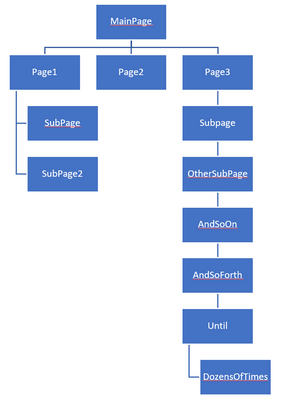
It is a list of "Paths" of dynamic length and I have no way of knowing the max levels that a path can have. All of them start with MainPage. I would like to visualize those paths in a way in PBI (ideally in hierarchical way) to kind of view a map of the paths to see where things are more clustered than others. I have split text in PBI before into columns, but this problem would require me to keep splitting an unknown number of times until the longest path has been completely processed. Ideally I would like to get something like this:


ebecerra_0-1671055109288.png


What would be the best way to parse those paths to create some useful visual for how those pages are organized? What would be a good visualization to aid with this? Or does this sounds like a problem that PBI can't solve and I should look into some other programatic way to get that visual?


Thanks in advance!

1 ACCEPTED SOLUTION
Greg_Deckler
Community Champion
Community Champion

@ebecerra You can do a split and then Unpivot other rows in Power Query or you can use SUBSTITUE(MAX('Table'[Column]), "/", "|"). That will turn it into a path and you can use the PATH functions like PATHLENGTH.


Follow on LinkedIn
@ me in replies or I'll lose your thread!!!
Instead of a Kudo, please vote for this idea
Become an expert!: Enterprise DNA
External Tools: MSHGQM
YouTube Channel!: Microsoft Hates Greg
Latest book!:
DAX For Humans

DAX is easy, CALCULATE makes DAX hard...

View solution in original post

3 REPLIES 3
ebecerra
Microsoft Employee
Microsoft Employee

Thanks @Greg_Deckler that seemed to do the trick to get me going. 

CNENFRNL
Community Champion
Community Champion

You can easily map the path this way,

let
    Source = Table.FromRows(Json.Document(Binary.Decompress(Binary.FromText("i45W8k3MzAtITE9VitVBcPRBhCEWIf3g0iTsqo0whYxBqgtAPP+SjNQiGMcxLyU43z8PQrvlF5Vk6IfmlWTm6LvkV6XmFfunhWTmphbjsLwAYlUsAA==", BinaryEncoding.Base64), Compression.Deflate)), let _t = ((type nullable text) meta [Serialized.Text = true]) in type table [Path = _t]),
    #"Split Path" = Table.TransformColumns(Source, {"Path", each let l1=Text.Split(_,"/"), l2={null} & List.RemoveLastN(l1) in Table.FromRows(List.Zip({l1,l2,{1..List.Count(l1)}}),{"Dir","Parent Dir","Depth"})}),
    #"Expanded Path" = Table.Distinct(Table.ExpandTableColumn(#"Split Path", "Path", {"Dir","Parent Dir","Depth"}))
in
    #"Expanded Path"
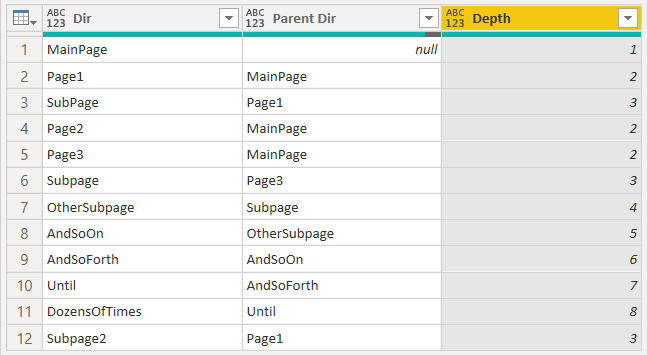
CNENFRNL_0-1671071320933.png


Thanks to the great efforts by MS engineers to simplify syntax of DAX! Most beginners are SUCCESSFULLY MISLED to think that they could easily master DAX; but it turns out that the intricacy of the most frequently used RANKX() is still way beyond their comprehension!

DAX is simple, but NOT EASY!

Greg_Deckler
Community Champion
Community Champion

@ebecerra You can do a split and then Unpivot other rows in Power Query or you can use SUBSTITUE(MAX('Table'[Column]), "/", "|"). That will turn it into a path and you can use the PATH functions like PATHLENGTH.


Follow on LinkedIn
@ me in replies or I'll lose your thread!!!
Instead of a Kudo, please vote for this idea
Become an expert!: Enterprise DNA
External Tools: MSHGQM
YouTube Channel!: Microsoft Hates Greg
Latest book!:
DAX For Humans

DAX is easy, CALCULATE makes DAX hard...

Helpful resources

Announcements
FabCon and SQLCon Barcelona 2026

FabCon & SQLCon – Barcelona 2026

Join us in Barcelona for FabCon and SQLCon, the Fabric, Power BI, SQL, and AI community event. Save €200 with code FABCMTY200.

60 days of Data Days Carousel

Data Days 2026

Join Fabric Data Days 2026: 60 days of free live/on-demand sessions, challenges, study groups, and certification opportunities.

Power BI DataViz World Championships carousel

Power BI DataViz World Championships - June 2026

A new Power BI DataViz World Championship is coming this June! Don't miss out on submitting your entry.