Get Fabric or SQL Certified for Free.
Get certified for free when you join Fabric Data Days 2026 and dive into Fabric, Power BI, SQL, AI, and other essential data skills.
Join now- Power BI forums
- Get Help with Power BI
- Desktop
- Service
- Report Server
- Power Query
- Mobile Apps
- Developer
- DAX Commands and Tips
- Custom Visuals Development Discussion
- Health and Life Sciences
- Power BI Spanish forums
- Translated Spanish Desktop
- Training and Consulting
- Instructor Led Training
- Dashboard in a Day for Women, by Women
- Galleries
- Data Stories Gallery
- Themes Gallery
- Contests Gallery
- QuickViz Gallery
- Quick Measures Gallery
- Visual Calculations Gallery
- Notebook Gallery
- Translytical Task Flow Gallery
- TMDL Gallery
- R Script Showcase
- Webinars and Video Gallery
- Ideas
- Custom Visuals Ideas (read-only)
- Issues
- Issues
- Events
- Upcoming Events
July 7 - July 17 | Round 2 of the Power BI Dataviz World Championships. Don't miss your chance! Learn more
- Power BI forums
- Forums
- Get Help with Power BI
- Desktop
- Re: Recursion in a calculated column
- Subscribe to RSS Feed
- Mark Topic as New
- Mark Topic as Read
- Float this Topic for Current User
- Bookmark
- Subscribe
- Printer Friendly Page


- Mark as New
- Bookmark
- Subscribe
- Mute
- Subscribe to RSS Feed
- Permalink
- Report Inappropriate Content
Recursive calculation
Hi,
How can I do the following ?
First day - Column A = 100
2nd day and every day that follows, column A=yesterday's value of column A X column B.
Thanks !
Solved! Go to Solution.


- Mark as New
- Bookmark
- Subscribe
- Mute
- Subscribe to RSS Feed
- Permalink
- Report Inappropriate Content
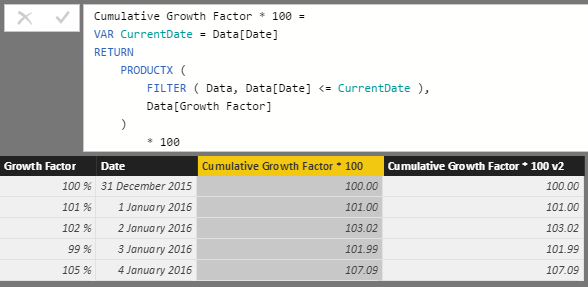
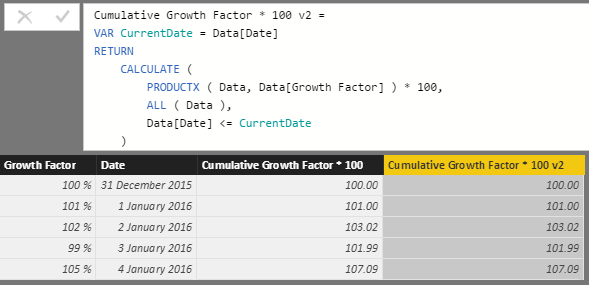
Following from other replies, you basically need to calculate the cumulative product of your 'growth factors'.
Gerhard Brueckl's blog (link above) had a method using summing logarithms, then mentioned that you can now use PRODUCTX.
Here are two examples using PRODUCTX in a calculated column. You could adapt this to a measure if that makes sense as well.


- Mark as New
- Bookmark
- Subscribe
- Mute
- Subscribe to RSS Feed
- Permalink
- Report Inappropriate Content
Hi @zivhimmel,
Would you please share some sample data and desired results so that we can try to test it?
Best Regards,
Qiuyun Yu
If this post helps, then please consider Accept it as the solution to help the other members find it more quickly.
- Mark as New
- Bookmark
- Subscribe
- Mute
- Subscribe to RSS Feed
- Permalink
- Report Inappropriate Content
Thanks @v-qiuyu-msft.
Basically what I am trying to do is like compund interest.
Imagine you have a 100 dollars. Each day you get 1% on your 100 so in day 2 you have 101, In day 3 you have 102.01, In day 4 you have 103.0301 etc.
Now, let's change it a bit - 1% a day is not fixed. It can change. On one day it's 1%, the next day it's zero, the next day it's 2%.
You need to be able to calculate your return over time. After 3 or 300 or 4562 days, for any given date range.
Example of dataset :
date,interest
11/1/2016, 0.01
11/2/2016, 0.01
11/3/2016, 0.005
11/4/2016, 0
11/5/2016, 0.02
So, based on the above dataset, if I want to calculate the return for the entire period, it would be like that :
100*(1+0.01)*(1+0.01)*(1+0.005)*(1+0)*(1+0.02)
If I want to calculate the return in the date ramge 2/11-4/11 :
100*(1+0.01)*(1+0.005)*(1+0)
I hope it makes sense.
Please let me know if you need additional information.
Any help is much appreciated. Thanks !
- Mark as New
- Bookmark
- Subscribe
- Mute
- Subscribe to RSS Feed
- Permalink
- Report Inappropriate Content
Following from other replies, you basically need to calculate the cumulative product of your 'growth factors'.
Gerhard Brueckl's blog (link above) had a method using summing logarithms, then mentioned that you can now use PRODUCTX.
Here are two examples using PRODUCTX in a calculated column. You could adapt this to a measure if that makes sense as well.

- Mark as New
- Bookmark
- Subscribe
- Mute
- Subscribe to RSS Feed
- Permalink
- Report Inappropriate Content
Sorry this is quite an old post, however I saw you were online and this applies to what I am working on now. I'm fairly new to PowerBI and you said this could be adapted to a measure if needed. Would you mind explaining how? When I try I get
"A single value for column 'Date' in table 'Data' cannot be determined. This can happen when a measure formula refers to a column that contains many values without specifying an aggregation such as min, max, count, or sum to get a single result."
This is my overall problem i'm working on.
- Mark as New
- Bookmark
- Subscribe
- Mute
- Subscribe to RSS Feed
- Permalink
- Report Inappropriate Content
Hi @OwenAuger, thanks allot for taking the time and answering.
I don't see however how it solves the compound interest problem.
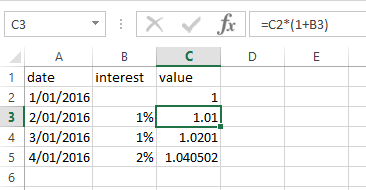
I'm missing the part where you multiply the day's Growth Factor with yesterday's.
If we had 1 dollar and the growth factor is 1%, then we now have 1.01.
The next day, if the growth factor is again 1%, then we now have 1.021.
I need a way to calculate it(column C below) :
Thanks !
- Mark as New
- Bookmark
- Subscribe
- Mute
- Subscribe to RSS Feed
- Permalink
- Report Inappropriate Content
I apologize, @OwenAuger, your solution is perfect. I read it too early before cofee probably.
Scratch that.
Thanks !

- Mark as New
- Bookmark
- Subscribe
- Mute
- Subscribe to RSS Feed
- Permalink
- Report Inappropriate Content
Hi @zivhimmel
The link
http://blog.gbrueckl.at/2015/04/recursive-calculations-powerpivot-dax/
may be helpful. Check it out. If it solves your issue please give KUDOS.
Cheers
CheenuSing
- Mark as New
- Bookmark
- Subscribe
- Mute
- Subscribe to RSS Feed
- Permalink
- Report Inappropriate Content
Thanks @Anonymous, I've actually seen it before posting but couldn't extract exactly what I need from it,
I'll give it another try.
Helpful resources

FabCon & SQLCon – Barcelona 2026
Join us in Barcelona for FabCon and SQLCon, the Fabric, Power BI, SQL, and AI community event. Save €200 with code FABCMTY200.

Data Days 2026
Join Fabric Data Days 2026: 60 days of free live/on-demand sessions, challenges, study groups, and certification opportunities.

Power BI DataViz World Championships - June 2026
A new Power BI DataViz World Championship is coming this June! Don't miss out on submitting your entry.

| User | Count |
|---|---|
| 22 | |
| 20 | |
| 14 | |
| 13 | |
| 13 |


| User | Count |
|---|---|
| 62 | |
| 40 | |
| 38 | |
| 38 | |
| 38 |


