This time we’re going bigger than ever. Fabric, Power BI, SQL, AI and more. We're covering it all. You won't want to miss it.
Learn moreDid you hear? There's a new SQL AI Developer certification (DP-800). Start preparing now and be one of the first to get certified. Register now
I am pulling my data from a SQL Database which contains records of devices being scanned for an asset management solution.
Everyday each device (device ID is unique), which can be reached via our network, sends data back to the database and upon doing so, updates a "Last Scan Date" column.
In a perfect world, all devices would check in everyday but, in an enterprise world, that is not plausible. This means I have devices (rows) which have a Last Scan Date of a previous date other than today. Since the devices which sent data on the previous day send data again on the current day, I do not have a rolling count of the total quantity of devices which scanned in each day.
I would like to create a way for recording the daily total count of devices which sent data on that day and storing these records in a table which I can then create a visualization for.
For example:
Day 1 (6/13/17) = 7 devices found; 0 devices not found; 0 new devices found
ID Last Scan Date
Computer 1 6/13/2017
Computer 2 6/13/2017
Computer 3 6/13/2017
Computer 4 6/13/2017
Laptop 1 6/13/2017
Laptop 2 6/13/2017
Laptop 3 6/13/2017
Day 2 (6/14/17) = 8 devices found; 2 devices not found; 3 new devices found
ID Last Scan Date
Computer 1 6/14/2017
Computer 2 6/14/2017
Computer 3 6/13/2017
Computer 4 6/14/2017
Computer 5 6/14/2017
Laptop 1 6/13/2017
Laptop 2 6/14/2017
Laptop 3 6/14/2017
Laptop 4 6/14/2017
Laptop 5 6/14/2017
....and so on
Does anyone have a solution for achieving this in Power BI?
Solved! Go to Solution.
Hi @seanrm42,
You can take a look at below steps to analysis the history data.
Steps:
1. Get the history current device list.
_history=CALCULATETABLE(VALUES(test[ID]),FILTER(ALL(test),[Last Scan Date]<EARLIER(test[Last Scan Date]))) _current=CALCULATETABLE(VALUES(test[ID]),FILTER(ALL(test),[Last Scan Date]=EARLIER(test[Last Scan Date])))
2. Calculate the different count.
Calculate columns:
Analysis Data = var _history=CALCULATETABLE(VALUES(test[ID]),FILTER(ALL(test),[Last Scan Date]<EARLIER(test[Last Scan Date]))) var _current=CALCULATETABLE(VALUES(test[ID]),FILTER(ALL(test),[Last Scan Date]=EARLIER(test[Last Scan Date]))) var devices_found=COUNTROWS(_current) //Found : current list var devices_not_found=COUNTROWS(EXCEPT(_history,_current))+0 //Not found: devices which exist in history but not in current var new_devices=COUNTROWS(EXCEPT(_current,_history))+0 //New device: devices which exist in current but not in history Return "found: "&devices_found&" , not found: "&devices_not_found&" , new: "&new_devices
Detail list:
Found Detail = var _history=CALCULATETABLE(VALUES(test[ID]),FILTER(ALL(test),[Last Scan Date]<EARLIER(test[Last Scan Date]))) var _current=CALCULATETABLE(VALUES(test[ID]),FILTER(ALL(test),[Last Scan Date]=EARLIER(test[Last Scan Date]))) var devices_found=COUNTROWS(_current) Return CONCATENATEX(_current,[ID],",") Not Found Detail = var _history=CALCULATETABLE(VALUES(test[ID]),FILTER(ALL(test),[Last Scan Date]<EARLIER(test[Last Scan Date]))) var _current=CALCULATETABLE(VALUES(test[ID]),FILTER(ALL(test),[Last Scan Date]=EARLIER(test[Last Scan Date]))) var devices_not_found=COUNTROWS(EXCEPT(_history,_current))+0 Return CONCATENATEX(EXCEPT(_history,_current),[ID],",") New Devices Detail = var _history=CALCULATETABLE(VALUES(test[ID]),FILTER(ALL(test),[Last Scan Date]<EARLIER(test[Last Scan Date]))) var _current=CALCULATETABLE(VALUES(test[ID]),FILTER(ALL(test),[Last Scan Date]=EARLIER(test[Last Scan Date]))) var new_devices=COUNTROWS(EXCEPT(_current,_history))+0 Return CONCATENATEX(EXCEPT(_current,_history),[ID],",")
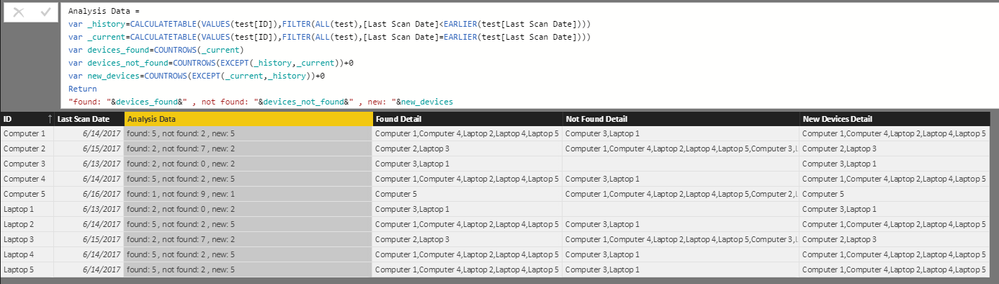
3. Create a table visual to show these result.
Regards,
Xiaoxin Sheng
Hi @seanrm42,
You can take a look at below steps to analysis the history data.
Steps:
1. Get the history current device list.
_history=CALCULATETABLE(VALUES(test[ID]),FILTER(ALL(test),[Last Scan Date]<EARLIER(test[Last Scan Date]))) _current=CALCULATETABLE(VALUES(test[ID]),FILTER(ALL(test),[Last Scan Date]=EARLIER(test[Last Scan Date])))
2. Calculate the different count.
Calculate columns:
Analysis Data = var _history=CALCULATETABLE(VALUES(test[ID]),FILTER(ALL(test),[Last Scan Date]<EARLIER(test[Last Scan Date]))) var _current=CALCULATETABLE(VALUES(test[ID]),FILTER(ALL(test),[Last Scan Date]=EARLIER(test[Last Scan Date]))) var devices_found=COUNTROWS(_current) //Found : current list var devices_not_found=COUNTROWS(EXCEPT(_history,_current))+0 //Not found: devices which exist in history but not in current var new_devices=COUNTROWS(EXCEPT(_current,_history))+0 //New device: devices which exist in current but not in history Return "found: "&devices_found&" , not found: "&devices_not_found&" , new: "&new_devices
Detail list:
Found Detail = var _history=CALCULATETABLE(VALUES(test[ID]),FILTER(ALL(test),[Last Scan Date]<EARLIER(test[Last Scan Date]))) var _current=CALCULATETABLE(VALUES(test[ID]),FILTER(ALL(test),[Last Scan Date]=EARLIER(test[Last Scan Date]))) var devices_found=COUNTROWS(_current) Return CONCATENATEX(_current,[ID],",") Not Found Detail = var _history=CALCULATETABLE(VALUES(test[ID]),FILTER(ALL(test),[Last Scan Date]<EARLIER(test[Last Scan Date]))) var _current=CALCULATETABLE(VALUES(test[ID]),FILTER(ALL(test),[Last Scan Date]=EARLIER(test[Last Scan Date]))) var devices_not_found=COUNTROWS(EXCEPT(_history,_current))+0 Return CONCATENATEX(EXCEPT(_history,_current),[ID],",") New Devices Detail = var _history=CALCULATETABLE(VALUES(test[ID]),FILTER(ALL(test),[Last Scan Date]<EARLIER(test[Last Scan Date]))) var _current=CALCULATETABLE(VALUES(test[ID]),FILTER(ALL(test),[Last Scan Date]=EARLIER(test[Last Scan Date]))) var new_devices=COUNTROWS(EXCEPT(_current,_history))+0 Return CONCATENATEX(EXCEPT(_current,_history),[ID],",")
3. Create a table visual to show these result.
Regards,
Xiaoxin Sheng
Check out the April 2026 Power BI update to learn about new features.
Sign up to receive a private message when registration opens and key events begin.
If you have recently started exploring Fabric, we'd love to hear how it's going. Your feedback can help with product improvements.
| User | Count |
|---|---|
| 36 | |
| 33 | |
| 31 | |
| 21 | |
| 16 |
| User | Count |
|---|---|
| 66 | |
| 55 | |
| 31 | |
| 24 | |
| 23 |