cancel
Showing results for 
Search instead for 
Did you mean: 

Join the FabCon + SQLCon recap series. Up next: Power BI, Real-Time Intelligence, IQ and AI, and Data Factory take center stage. All sessions are available on-demand after the live show. Register now

Reply
Anonymous
Not applicable

Recommended Workflow

Hi,

I'll be creating a dashboard to be embedded on our sharepoint site. Could you clarify a few things:

Our data is mostly sharepoint lists (also an access database and potentially a workbook on sharepoint)


1. I assume all the creation/design of reports/dashboard should take place in the Desktop app (as opposed to the Service). Am I correct?

2. If so, should I import/link the data from the Desktop app or should I create a workspace in the Service and import/link data to datasets and after that use "Power Bi dataset" to get data from the Desktop app?

3. I have noticed that in the online Service, I can create a new dataset => Files => Sharepoint TeamSites => Navigate and link to a workbook on a sharepoint. I can't seem to find such an option in the Desktop app (I know I could do it in the online Service and get the data via "Power Bi dataset")

4. I guess the most important question is what data source (Sharepoint list / online workbook?) should we use to ensure the least delay between a user updating the data source and it being synced to show in the final embedded dashboard on the sharepoint? Which option allows for automatic sync/update.

The idea is that by Friday 1pm, all managers report certain data via sharepoint lists (each of them has their own list) - based on that I'd like to display all the analysis in an dashboard embedded in the sharepoint.

Our users have Pro licence so they are able to see the embedded dashboard.


Hope that makes sense

Thank you


2 REPLIES 2
Mariusz
Community Champion
Community Champion

Hi @Anonymous 


1. Yes, you are correct, Power BI Desktop is still more powerfull then service in terms of functionality and it's a lot faster to mashup all different data sources there.

2. Normally I would use Desktop for design, please refer to above.

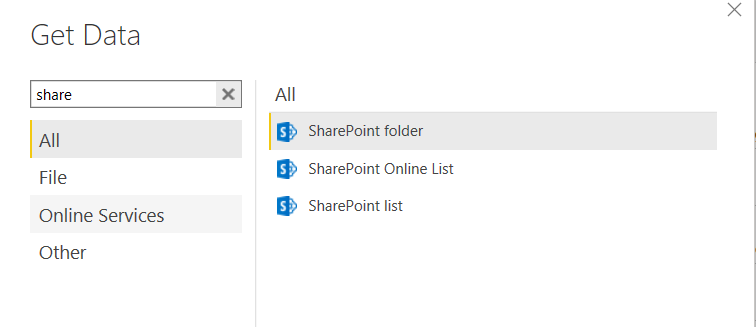
3. If you need to get data from SharePoint go to Get Data in Desktop or New Data source in the Query Editor and find SharePoint connectors as below.

image.png

4. Or else you using Direct Query or Streaming Datasets, you will need to set up a scheduled refresh, pro users can set up to 8 a day per dataset and premium up to 48, I imagine you just need to time it.
 
 
Best Regards,
Mariusz

If this post helps, then please consider Accepting it as the solution.

Please feel free to connect with me.
Mariusz Repczynski


Anonymous
Not applicable

Thanks a lot for your response. I'll be working on it over the next week and ask any questions if I stumble upon any problem.

Helpful resources

Announcements
April Power BI Update Carousel

Power BI Monthly Update - April 2026

Check out the April 2026 Power BI update to learn about new features.

New to Fabric survey Carousel

New to Fabric Survey

If you have recently started exploring Fabric, we'd love to hear how it's going. Your feedback can help with product improvements.

Power BI DataViz World Championships carousel

Power BI DataViz World Championships - June 2026

A new Power BI DataViz World Championship is coming this June! Don't miss out on submitting your entry.

FabCon and SQLCon Highlights Carousel

FabCon &SQLCon Highlights

Experience the highlights from FabCon & SQLCon, available live and on-demand starting April 14th.