cancel
Showing results for 
Search instead for 
Did you mean: 

The Power BI Data Visualization World Championships is back! Get ahead of the game and start preparing now! Learn more

Reply
supernk79
New Member

Real Time Report Build Using Oracle Database

Hi: I have historical data in my Enterprise Data Warehouse on Teradata and my Operational Data Store is on Oracle. My operational data store stores the data only for 5 days. The operational data gets updated almost every 5 minutes.


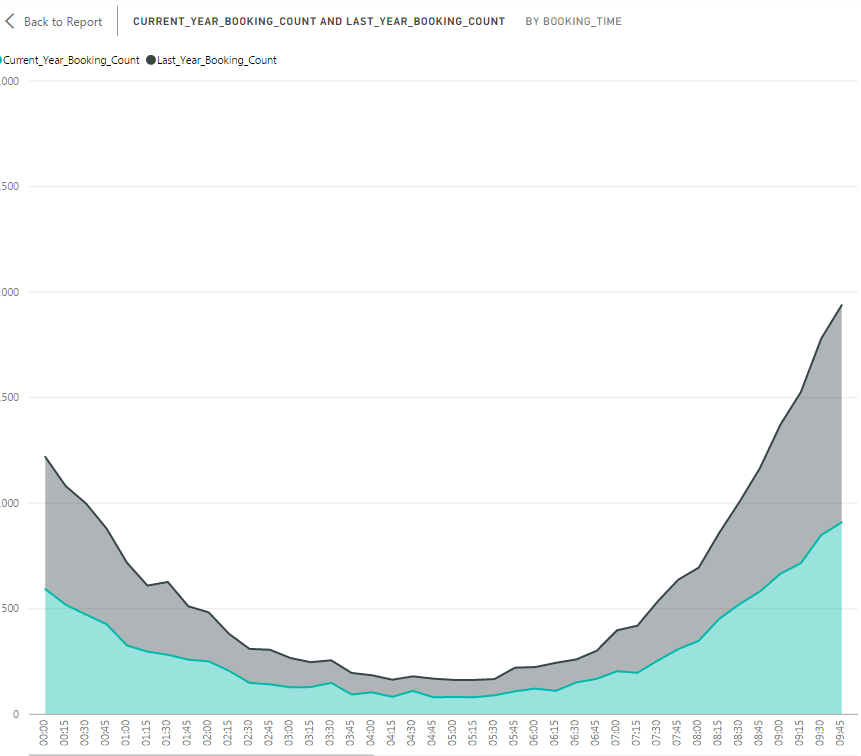
I need to develop a report that displays the data upto 15 minute lag from current system time and compare that to last week's same day i.e if I am displaying a Monday report, I need to compare that with last monday's report for the 24 hour window. and the report should keep refreshing automatically without any manual intervention. Is that possible in PowerBI ? I tried in Direct query mode but since there 2 different sources, it is not allowing to do in a direct query mode and i have to import which is not working as expected. 


Seee the sample below.


Any help is appreciated


.24-hr window real time report24-hr window real time report

2 ACCEPTED SOLUTIONS
Anonymous
Not applicable

Hi @supernk79

When using DirectQuery mode to connect to Oracle database from Power BI Desktop, all data must come from same data source and same Oracle database. In your scenario, you can move data from Enterprise Data Warehouse to Oracle database, then use DirectQuery mode. Or you can switch from DirectQuery mode to import mode in Power BI Desktop to connect to different data sources, then create reports in Power BI Desktop and publish reports to Power BI Service, this way, you are able to set schedule refresh for your dataset.

However, if you intend to display real-time report in Power BI Service, you would need to set up a real-time streaming dataset, which is introduced in this official article: https://powerbi.microsoft.com/en-us/documentation/powerbi-service-real-time-streaming/.


Thanks,
Lydia Zhang

View solution in original post

Anonymous
Not applicable

Hi @supernk79,

Firstly, schedule refresh is only allowed 8 times a day. The performance issue is related to multiple elements, you can following the guide in this blog to optimize your data model to avoid poor performance.

Secondly, to set up streaming dataset, you would need to firstly migrate your data from Oracle or Teradata to Pubnub or Azure Stream Analytics.

Thanks,
Lydia Zhang

View solution in original post

4 REPLIES 4
Anonymous
Not applicable

Hi @supernk79

When using DirectQuery mode to connect to Oracle database from Power BI Desktop, all data must come from same data source and same Oracle database. In your scenario, you can move data from Enterprise Data Warehouse to Oracle database, then use DirectQuery mode. Or you can switch from DirectQuery mode to import mode in Power BI Desktop to connect to different data sources, then create reports in Power BI Desktop and publish reports to Power BI Service, this way, you are able to set schedule refresh for your dataset.

However, if you intend to display real-time report in Power BI Service, you would need to set up a real-time streaming dataset, which is introduced in this official article: https://powerbi.microsoft.com/en-us/documentation/powerbi-service-real-time-streaming/.


Thanks,
Lydia Zhang

Thanks Zhang. A couple of more questions on your response


1. When I do the import mode in Power BI Desktop, how frequently can I refresh the data? I am looking for less < 15 minutes, also my data is about 2.5 M from Analytical Warehouse, will it cause any performance issues? Please clarify.


I went through the link related to display real-time report, i could not find any references to relational databases like Oracle & Teradata. If I want to do a data streaming from Oracle or Teradata, may I know what is required to do? 


Appreciate your immediate response. Thanks!

Anonymous
Not applicable

Hi @supernk79,

Firstly, schedule refresh is only allowed 8 times a day. The performance issue is related to multiple elements, you can following the guide in this blog to optimize your data model to avoid poor performance.

Secondly, to set up streaming dataset, you would need to firstly migrate your data from Oracle or Teradata to Pubnub or Azure Stream Analytics.

Thanks,
Lydia Zhang

supernk79
New Member

Hi All: I have to develop a dashboard that need to have live data from Operational data source ( Oralce ) on the left side and data from analytical warehouse ( Teradata ) on the right side. I am not able to have both live & import connection in a single dashboard, may I know what is work around for this?


Thanks!

Naveen.

Helpful resources

Announcements
Power BI DataViz World Championships

Power BI Dataviz World Championships

The Power BI Data Visualization World Championships is back! Get ahead of the game and start preparing now!

November Power BI Update Carousel

Power BI Monthly Update - November 2025

Check out the November 2025 Power BI update to learn about new features.

FabCon Atlanta 2026 carousel

FabCon Atlanta 2026

Join us at FabCon Atlanta, March 16-20, for the ultimate Fabric, Power BI, AI and SQL community-led event. Save $200 with code FABCOMM.