Join us at FabCon Atlanta from March 16 - 20, 2026, for the ultimate Fabric, Power BI, AI and SQL community-led event. Save $200 with code FABCOMM.
Register now!The Power BI Data Visualization World Championships is back! Get ahead of the game and start preparing now! Learn more
Hello everyone.
I would like to ask you for help in solving this problem that I have, since I am using directquery and some solutions that I found in the forum do not work.
I have values in a column that represent time (in minutes) that takes a process to complete.
I need to get the ratio of cases that have exceeded 15 minutes. so some how I need to first filter the cases that exceed 15min and then compare that number to the total cases.
the similar solutions I found here, when I tried to applied them, I get an Error msg that said that those DAX formulas are not allowedon DirectQuery models.
Hope I have been clear enought.
I will much appreciate your help on this.
Solved! Go to Solution.
Hi @CH-BsAs,
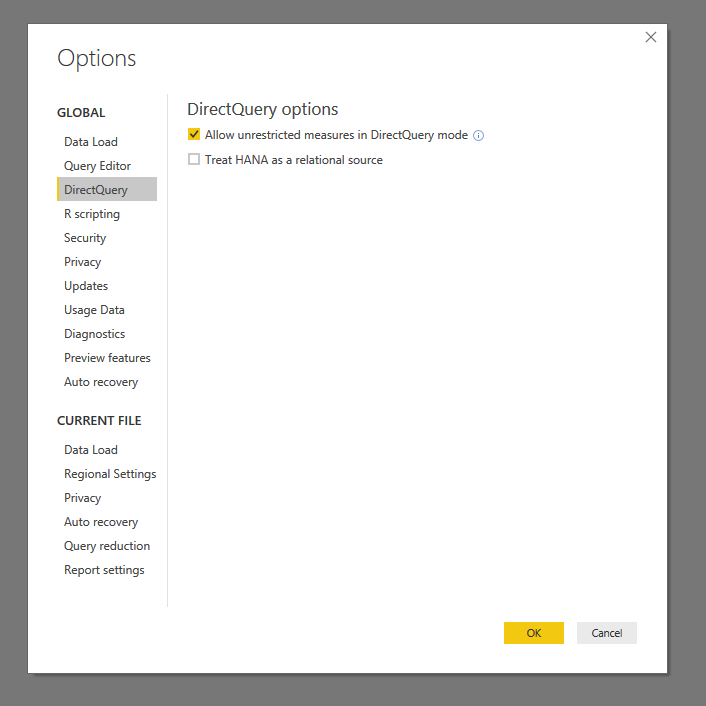
You can turn on below option to enable more dax functions in directquery mode.
Notice: in direct query mode, calculate column has more limitations than measure.
Regards,
Xiaoxin Sheng
Hi @CH-BsAs,
You can turn on below option to enable more dax functions in directquery mode.
Notice: in direct query mode, calculate column has more limitations than measure.
Regards,
Xiaoxin Sheng
The Power BI Data Visualization World Championships is back! Get ahead of the game and start preparing now!
| User | Count |
|---|---|
| 57 | |
| 48 | |
| 35 | |
| 34 | |
| 21 |
| User | Count |
|---|---|
| 143 | |
| 122 | |
| 100 | |
| 80 | |
| 57 |