cancel
Showing results for 
Search instead for 
Did you mean: 

The Power BI Data Visualization World Championships is back! Get ahead of the game and start preparing now! Learn more

Reply
alexbalazsalex
Helper IV
Helper IV

Rankx or Topn

Dear All ,


i would need you support to retrive my top customers


I have the following table


Year monthproduct detailsClientTons
18-Janaa115
18-Janv24
18-Jands113
18-Jandsg134
18-Jansdfs25
17-Decdf114
17-Deczf113
17-Decdz1134
17-Decz25
17-Decdf26
17-Deczf27
17-Decdfz13
17-Novzf114
17-Novzdf113
17-Novzdd24
17-Novfz25
17-Novzf23
17-Novfzd114
17-Novzf14


I have different month - clients products tons ect... a lot of info

I want to retrive my top 2 customers from the above for each month or accumultate month if i do the selection.


COuld you please help me with this can t get the foruma right ..


so let s say i select a business unit and a month to give me in a list top 2 customers with amount next to it  and maybe total under ?


Many Thanks,

Alex

1 ACCEPTED SOLUTION

Hi @alexbalazsalex,


Was my above suggestion helpful to you? If yes, would you please kindly mark it as an answer so that it can benefit more users?


Thanks,

Yuliana Gu

Community Support Team _ Yuliana Gu
If this post helps, then please consider Accept it as the solution to help the other members find it more quickly.

View solution in original post

4 REPLIES 4
v-yulgu-msft
Microsoft Employee
Microsoft Employee

Hi @alexbalazsalex,


Please try below measures:

Total tons =
CALCULATE (
    SUM ( Client_Tons[Tons] ),
    ALLEXCEPT ( Client_Tons, Client_Tons[Year month], Client_Tons[Client] )
)

Rankx =
RANKX (
    ALLEXCEPT ( Client_Tons, Client_Tons[Year month] ),
    Client_Tons[Total tons],
    ,
    DESC,
    DENSE
)

Insert a table visual and drag corresponding fields to it. If you want to show TopN records, please add [RANKX] into "visual level filters" and set its value to be equal to or less than N.

1.PNG


Best regards,

Yuliana Gu

Community Support Team _ Yuliana Gu
If this post helps, then please consider Accept it as the solution to help the other members find it more quickly.

Thanks @v-yulgu-msft


I will give ti a try and let you know..


meanwhile fi you get a chance could you please have a look at my other thread ? mabe you have an i deea what i could do to make it work ..


https://community.powerbi.com/t5/Desktop/Urgent-Support-for-matrix-table/m-p/369162#M167237


Many many thanks

Alex

Hi @alexbalazsalex,


Was my above suggestion helpful to you? If yes, would you please kindly mark it as an answer so that it can benefit more users?


Thanks,

Yuliana Gu

Community Support Team _ Yuliana Gu
If this post helps, then please consider Accept it as the solution to help the other members find it more quickly.
alexbalazsalex
Helper IV
Helper IV

exex

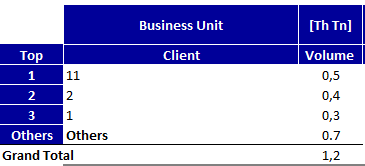
Maybe to look something like this :


Helpful resources

Announcements
Power BI DataViz World Championships

Power BI Dataviz World Championships

The Power BI Data Visualization World Championships is back! Get ahead of the game and start preparing now!

December 2025 Power BI Update Carousel

Power BI Monthly Update - December 2025

Check out the December 2025 Power BI Holiday Recap!

FabCon Atlanta 2026 carousel

FabCon Atlanta 2026

Join us at FabCon Atlanta, March 16-20, for the ultimate Fabric, Power BI, AI and SQL community-led event. Save $200 with code FABCOMM.