

Join us at FabCon Atlanta from March 16 - 20, 2026, for the ultimate Fabric, Power BI, AI and SQL community-led event. Save $200 with code FABCOMM.
Register now!The Power BI Data Visualization World Championships is back! It's time to submit your entry. Live now!
Hello,
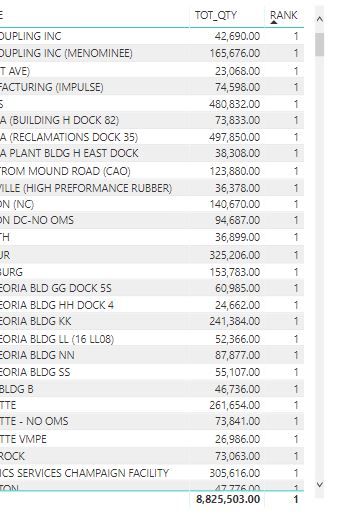
I am trying to rank locations using RankX function based on quantity for each location. I'm not sure why I'm getting the same rank for multiple locations although the quantity is different.
Can anyone help me on this?
Solved! Go to Solution.
Add the column you are Ranking I couldn't see the name in your picture above.
Rank Measure =
IF (
HASONEVALUE ( FINAL_TBL[Column you are Ranking] ),
RANKX ( ALL ( FINAL_TBL[Column you are Ranking] ), [TOT_QTY] )
)
Hello everyone,
I am trying to rank my table records in order to standard deviation of a column. The following SS shows how is my generic approach is wrtitten to achieve the rankings and I did the same for median values for the same column and it worked without any problem. So, here is how my function looks like:

This returns me 1 as the rank of each record. However when I change STDEV.P to MEDIAN it works pretty well

For more clearance, I am adding indices devided by a big number to prevent having the same rank for same values. That's why you see a sum there.
So, could anyone help me out and explain what is the problem here or how to create a stable ranking function for my tables please?
Thanks in advance,
Cheers!
Can you post the formulas for the RANK Measure and the TOT_QTY?
Add the column you are Ranking I couldn't see the name in your picture above.
Rank Measure =
IF (
HASONEVALUE ( FINAL_TBL[Column you are Ranking] ),
RANKX ( ALL ( FINAL_TBL[Column you are Ranking] ), [TOT_QTY] )
)
Hi Sean,
Thanks a lot..it worked ![]()
Great! ![]()
I added IF ( HASONEVALUE (...) to get rid of the 1 in the Total Row at the bottom of the Visual
The Power BI Data Visualization World Championships is back! It's time to submit your entry.
Check out the January 2026 Power BI update to learn about new features.
| User | Count |
|---|---|
| 60 | |
| 49 | |
| 30 | |
| 25 | |
| 23 |
| User | Count |
|---|---|
| 128 | |
| 102 | |
| 57 | |
| 39 | |
| 31 |